
Explore Our Latest Insights
Stay updated with our expert SEO and AI tips.
Featured blog posts
72% of all content cited by AI search engines has one thing in common.
It's not backlinks. It's not domain authority. It's a simple way to structure your content that takes about five minutes to implement.
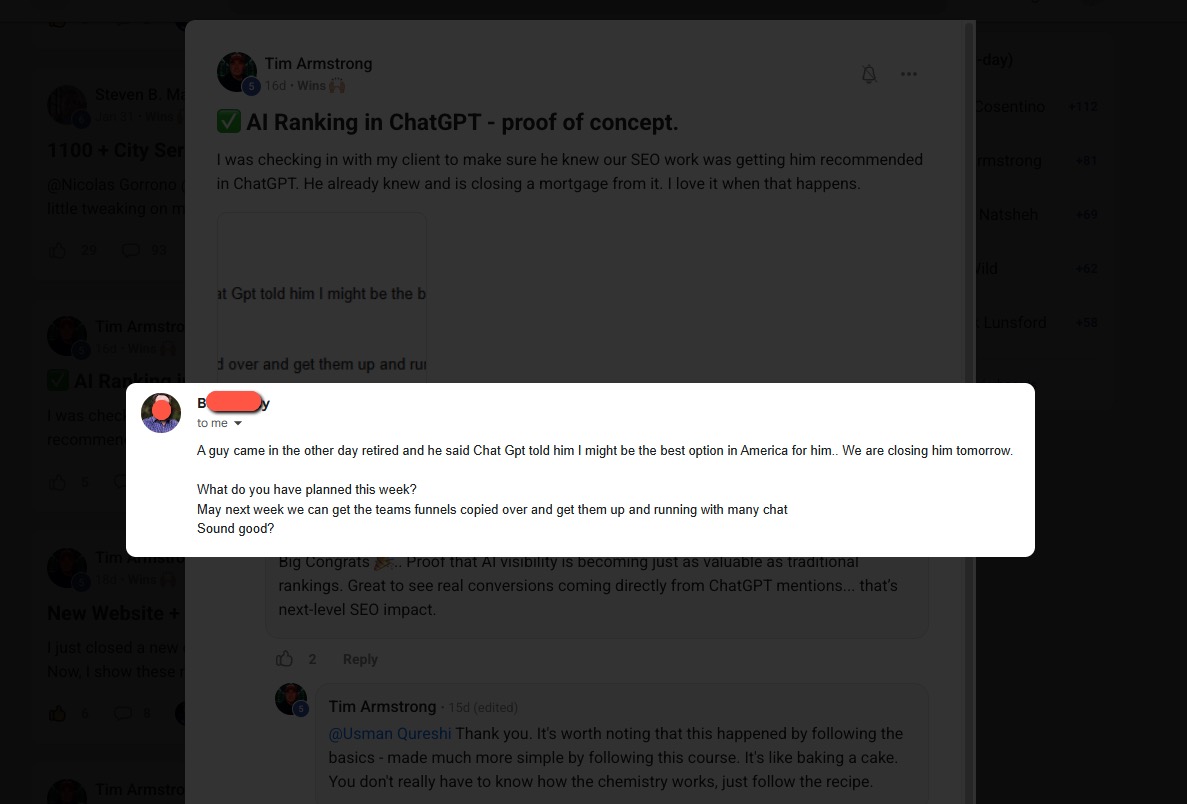
And this isn't just theory from some research paper. Our community members are getting real results with this. They're getting cited by Google AI Overviews in Ireland. They're seeing more impressions and clicks. One member even had ChatGPT recommend them as "the best option in America" for a mortgage - and they closed that client the next day.
So how the hell does this work?
Traffic Is Down. But That's Not Necessarily Bad News.
Let's be honest - traffic is down for everyone.
HubSpot was one of the most trafficked websites in the world. Their blog traffic dropped by 80% in 10 months. They went from 24.4 million organic visits in March 2023 to just 6.1 million by January 2025.
If that can happen to HubSpot, it can happen to anyone.
But here's the thing - this isn't necessarily a death sentence if you understand what's happening.
We've entered what I call the citation economy. Clicks aren't as valuable as they used to be, but citations are extremely valuable. If you're not cited by the AI search engines, you're essentially invisible.
And whilst overall traffic is down, the traffic you CAN get from AI search engines - if you understand this strategy - converts significantly better:
- Ahrefs found that AI search visitors convert 23 times better than traditional search visitors
- Semrush's research shows AI search visitors are 4.4x more valuable on average
- Seer Interactive's case study found ChatGPT traffic converted at 15.9% compared to Google organic at 1.76%
Less traffic, but way better quality. I can work with that.
Before We Go Further: You Still Need Valuable Content
I want to make one thing very clear before we get into the technique.
This strategy by itself isn't enough. You need good content along with it.
Google gives you very blase examples of what "good content" means. So let me give you some structured fundamentals:
What makes content valuable:
- Updated data - Original statistics, research, or synthesized information that's easier to understand
- Clear opinions backed by data - Don't just state facts, have a perspective
- Practical explanations - Show people how to actually do something
- Original workflows - Maybe you've built automations or found tools that help you work better
- Personal experience - Case studies, things you've learned throughout your career
That last one tends to work the best. Real experience is something AI can't easily replicate.
Once those fundamentals are done, we can move into the technique.
The Capsule Content Method
Fancy name, but very easy execution.
The technique can be encapsulated in three main things:
1. Write Short Answers (Around 150 Characters)
Under every heading that asks a question, write a brief answer - about 30-50 words or roughly 150 characters.
According to Search Engine Land's study of 8,000 AI citations, 72% of pages cited by ChatGPT had an answer capsule present. It's the single most consistent predictor of AI citation.
2. Zero Links in That First Answer
Keep that initial answer clean. No links, no references - just a direct, confident answer.
This makes it a lot easier for the AI to extract and cite that paragraph.
3. Answer First, Explain Later
Essentially, you want to answer the question right away, then provide more context and depth afterward.
Really, to make it simple, keep one question in mind when you're writing:
"Can someone understand this paragraph without reading anything else on the page?"
Is this paragraph encapsulated by itself? Can the AI just grab it and use it as a source?
Bad Example vs Good Example
Let's say you're writing a blog post about SEO and you have an H2 asking "What is Technical SEO?"
Bad Example (The Way Most People Write)
"In today's digital landscape, businesses are increasingly looking for ways to improve their online presence. SEO has evolved significantly over the years, and in this comprehensive guide we'll explore..."
Way too long. No direct answer. AI is going to skip right over this.
Good Example (The Capsule Method)
"Technical SEO is the process of optimizing your website's infrastructure so that search engines can crawl, index, and rank your pages effectively."
Done. That's the answer right there in the first sentence. Now you can elaborate with more detail below it.
Real-World Proof This Works
You've probably read content structured this way - you just didn't notice it.
When I Googled in AI mode "what is the best way to write content that will get cited by AI search engines?", the most cited source was this article from Semrush.
Looking at that content through the lens of the capsule content technique:
The first H2 asks: "What is AI search and why should I care?"
And right below that: "AI search engines use large language models to generate complex answers using trusted content from the web. Instead of showing a list of links like traditional search engines, AI search engines deliver a single synthesized response."
They answered that right away, then gave more information.
This makes it extremely easy for AI to cite that as a source.
The Statistics Back This Up
The research supports this approach:
- Content structure matters: Pages using 120-180 words between headings receive 70% more ChatGPT citations than pages with sections under 50 words
- Self-contained answers win: AI prioritizes passages that fully answer queries in 134-167 word self-contained units
- Question-based headings boost citations: Using question-format headings and FAQ sections significantly increases your chances of being cited
- Original insights matter: Content containing information not easily found elsewhere is the second-strongest differentiator for cited pages
- Fresh content gets more citations: Content updated in the past three months averages 6 citations versus 3.6 for outdated pages
How to Rewrite Your Existing Content (Without Taking Ages)
Here's the process I use:
Step 1: Use the Prompt
I've created a prompt that analyzes your content for "capsule readiness." You can use it with ChatGPT, Perplexity, or any LLM with internet access.
The prompt will:
- Give you a citation readiness score
- Analyze each section of your content
- Show you which headings should be reformatted as questions
- Provide suggested rewrites for your answer capsules
Step 2: Check the Criteria
The prompt will tell you things like:
- Does this content have answer capsules present?
- Are headings formatted as questions?
- Are there clear structured lists?
- Is there original data or insights?
Step 3: Rewrite Your H2s as Questions
This is where the magic happens.
Current H2: "Retirement Investment Vehicle Overview"
Suggested Rewrite: "What Are the Main Retirement Investment Vehicles?"
Simple change. Drastic positive consequences.
Step 4: Add the Answer Capsule
Current opening: "When it comes to stacking cash for those golden years, you've got solid options on the table."
Capsule rewrite: "IRAs, 401k plans, and annuities are the primary retirement investment vehicles that help you grow and protect your savings."
Gets right to the point. Now you can add the conversational tone and additional detail below it.
This isn't about changing your tone of voice or completely rewriting everything. Just keep that one question in mind: can this be understood and cited as a standalone answer?
Where to Start: Find Your Second-Page Content
If you've got a bunch of content on your website, you might be wondering where to begin.
Here's the strategy: find all the pages or blog posts ranking on the second page of Google.
How to Find These Pages:
- Go to Google Search Console
- Navigate to Performance
- Make sure Average Position is selected
- Filter to show pages ranking between positions 8-20
These are your golden opportunities. This content is already in Google's database - it's just not ranking well enough.
The reason I target second-page content:
- It's already indexed
- Google already sees it as relevant to the query
- A small improvement can push it to page one
- Page one content has a much higher chance of being cited by AI
According to research, 76.1% of URLs cited in AI Overviews also rank in the top 10 of Google search results. Get to page one first, then watch the AI citations follow.
Community Results
This stuff actually works. Our community members are seeing real results:
Tim Armstrong had a client closing a mortgage deal directly from a ChatGPT recommendation. The customer came in saying "ChatGPT told me you might be the best option in America for this." That wasn't even a click - it was GPT practically handing the client a lead because good on-site SEO was done.
Members in Ireland are getting cited in Google AI Overviews after implementing just a fraction of this strategy.
William Moon, a financial advisor in Arizona, went from nearly zero clicks despite ranking #1, to closing a $165,000 retirement planning client after optimizing his content structure. His CTR went from 0.3% to 2.3% - a 7x increase.
The Bottom Line
The citation economy is here. Traffic is down across the board, but the brands getting cited in AI Overviews are seeing 35% higher organic CTR and 91% higher paid CTR compared to non-cited brands.
The Capsule Content Method is straightforward:
- Format your H2s as questions
- Answer in the first 150 characters (30-50 words)
- Keep that answer clean - no links
- Then elaborate with more detail, examples, and context
It takes about five minutes to implement per section. The results can be dramatic.
Remember: This doesn't replace good SEO fundamentals. You still need valuable content, proper on-site optimization, and everything else that makes a website trustworthy.
GEO without SEO is like trying to swim butterfly without learning to swim first. Get the fundamentals right, then structure your content so AI can actually cite you.
Next Steps
Want to dive deeper into AI search optimization? Here are some resources:
- How to Do SEO for SearchGPT - A complete guide to optimizing for AI search engines
- SEO in the Age of AI: Why Your Clicks Are Disappearing - Understanding the shift to zero-click searches
- Turn Claude 4 Into Your Own Personal SEO Assistant - How to build AI-powered SEO workflows
And if you want more hands-on support with live Q&A calls where I can look at your website and give you specific advice, consider joining the AI Ranking Skool community.
.webp)
The Capsule Content Method: How to Get Cited by ChatGPT, Perplexity, and Google AI Overviews

AI Content Writing Checklist for SEO
Follow these 5 essential principles to create AI-assisted content that ranks and resonates
It's Okay to Use AI for Content
Google has been crystal clear: it's not about how you create content, but whether you're answering user search intent. The focus is on quality, helpfulness, and relevance (not the tools you use). AI can be a powerful ally in your content creation, as long as you follow these proven principles.
1. Inject Your Experience
AI can generate information, but it can't live your life. This is where you gain an unbeatable advantage. Your personal experience, client stories, real-world lessons, and unique insights add the "Experience" in E-E-A-T that AI simply cannot replicate.
"When I helped a SaaS client restructure their pricing page in 2023, we saw a 34% increase in conversions within 60 days. The key wasn't adding more features, it was simplifying the decision-making process by reducing options from five tiers to three."
"Pricing pages are an important part of any website. To optimize your pricing page, consider simplifying your options and making it easier for customers to make decisions. This can lead to increased conversions."
2. Be Precise, Cut the Fluff
Don't chase arbitrary word counts. More words don't equal better content (depth beats length every time). Structure your content to answer questions precisely, especially in your H2s and H3s.
H2: How Long Does It Take to Rank on Google?
Most new websites take 3-6 months to rank for competitive keywords, though low-competition terms can rank within weeks.
Factors include domain authority, content quality, and backlink profile.
H2: Google Ranking Timeline
When you're thinking about SEO, there are many factors to consider. First, we need to understand search engines.
Google is the most popular search engine in the world and has a complex algorithm...
3. Write at an 8th-Grade Reading Level
This isn't about dumbing down your content (it's about accessibility). The majority of online readers prefer clear, straightforward language. Avoid unnecessary jargon and complex phrasing that creates barriers.
"Email marketing helps you build relationships with customers by sending them valuable content directly to their inbox."
"Email marketing facilitates the cultivation of symbiotic customer relationships through the strategic dissemination of value-added digital correspondence to individual electronic mailboxes."
4. Back Up Statements with Data
Numbers and statistics aren't optional (they're essential for credibility). Every claim needs supporting data, and every stat needs a link to the high-quality source where you found it. This builds trust with both Google and your readers.
"According to a 2024 HubSpot study, companies that blog consistently generate 67% more leads per month than those that don't."
"Blogging is one of the most effective ways to generate leads for your business. Many successful companies use blogging as their primary marketing strategy."
5. Add Supporting Visuals
Remember, you're writing for humans, not just search engines. Break up text walls with images, screenshots, diagrams, charts, and illustrations. Visuals should add value and enhance your points (not just serve as decoration).

AI Content Writing Checklist
Background
Steven B. Marks, a member of our premium community, came to the group in November 2024 with a simple but powerful question: Should I create city pages for my client’s local SEO strategy? His client had four physical locations but wanted to target an entire state for one key service. The challenge was clear: without Google Business Profiles (GBPs) for every city, how could they capture that traffic?

The advice given was to build city-specific service pages: highly targeted pages optimized for transactional keywords like “plumbing services in Houston” or “24-hour emergency plumbing services in Houston.” This approach sparked a journey that completely transformed his client’s business.
Strategy Breakdown
1. Transactional Keyword Focus
Rather than chasing broad informational queries (which are increasingly answered by AI Overviews and GPT search), the strategy honed in on transactional intent keywords. These are the searches people make when they’re ready to buy or book, making them far more valuable.
2. Service + City Page Mapping
- Create a hub page for each city: e.g. “Plumbing Services in Houston.”
- Under that hub, build individual service pages: e.g. “24-hour emergency plumbing in Houston,” “pipe repair in Houston,” etc.
- Every service has its own page. No dumping everything onto one catch-all page.
3. Handling Duplicate Content Concerns
Many hesitate to create city/service combinations out of fear of duplication. Steven’s approach avoided issues by:
- Customizing title tags and HTML headers
- Using schema markup to signal exactly what each page covered
- Ensuring each page had unique value signals for Google
4. Indexing Best Practices
Don’t try to index everything at once. Roll pages out gradually, about 10 per week, so you don’t throw up red flags to Google. This slower pace also gives you time to check whether new pages are actually getting indexed. If you see the dreaded “crawled but not indexed” message (Google’s polite way of saying, “I read your page, I just don’t like it”), fix those issues before pushing hundreds more pages live.
5. Scaling with Automation
Creating thousands of service + city pages doesn’t have to mean thousands of hours of manual work. The process can (and should) be automated.
Why Segmenting Matters
When building at scale, resist the temptation to generate full pages in a single GPT or Claude prompt. Doing it in one shot leads to problems:
- Inconsistent word counts
- Variations in tone and style
- Higher risk of hallucinations
Instead, segment each page into structured sections and generate them individually. For example:
- context section
- Why hire us in {location}
- benefits of {service}
- FAQ section
- {on page schema}
- Meta Description
Each section is handled by a different automation node, ensuring consistent structure across all pages.
Example Build
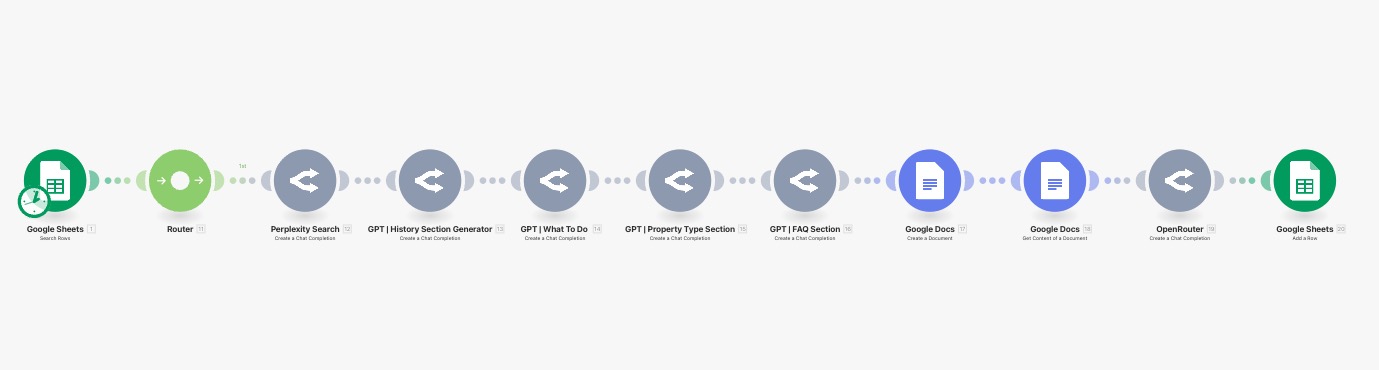
The screenshot provided shows a real automation flow:
- Google Sheets provides the data inputs.
- Router distributes the tasks.
- Each GPT node creates one section of the page.
- Google Docs assembles the final draft.
- The output is pushed back to Sheets for tracking.
Benefits of This Approach
- Scalability: You can generate 1,000+ pages with the same structure, adjusting only the local service and city.
- Consistency: Pages look uniform while still being tailored to each location.
- Efficiency: The process is fast and cost-effective—limited only by your API budget.
With this method, producing hundreds or even millions of pages is possible without sacrificing quality or spending endless hours writing.
Results
- November 2024: Started with just 127 indexed pages.
- April/May 2025: Over 1,122 pages indexed. Phones and calendars flooded with leads.
- January 2025: Client hit 99 booked appointments in one month (not counting phone bookings). Best month ever.
- August 2025: Google Search Console shows 1,200 clicks in 28 days, up from just 600 in April 2023.
- Business Impact: Client had to hire additional attorneys and paralegals to handle demand. Filing totals for 2025 are already surpassing previous years, with months left to go.
- Zero Ad Spend: All growth came from organic traffic.

Why This Worked
- Scalability: Hundreds of city + service combinations covered all the transactional keywords competitors ignored.
- High Intent: Focused traffic meant higher conversions, not just vanity metrics.
- Community Collaboration: The original idea came from sharing openly in the community, which gave Steven the confidence to execute.
Key Lessons
- Don’t lump all services into one generic “Our Services” page.
- Map out every service you want to rank for, then replicate it across every city you want visibility in.
- Transactional keywords are where the money is. Informational queries are often swallowed by AI Overviews.
- Organic traffic can outperform paid ads when structured correctly.
Final Word
What started as a question about whether to create city pages turned into a textbook example of local SEO domination. With no ad spend, Steven’s client now enjoys record-breaking growth, proving that the right content structure can scale a business faster than most people imagine.
If you want to learn how to do this and get support from an active community, consider joining us at AI Ranking Premium.

Local SEO at Scale: A Case Study in City Page Domination
With GPT‑5, OpenAI has basically simplified the whole “which model do I pick?” dilemma down to three core modes. Auto. Fast. Thinking. That’s it. But there’s nuance in how and when you should use each one. And trust me, if you get this right, you’ll save yourself time, frustration, and possibly a few grey hairs.
1. GPT5 Model Selection
Auto
Auto is like the GPS of GPT‑5. You tell it where you want to go, and it decides the best route. If your request is simple, it’ll quietly send it through Fast. If it senses complexity, it’ll switch to Thinking without you lifting a finger. It’s smart. But sometimes it’ll overthink a “what’s the capital of Chile?” type of question and route you to Thinking. Slightly annoying, but that’s just how OpenAI optimised GPT‑5 to balance compute efficiency.
OpenAI has been pretty upfront about this: one of the big pushes with GPT‑5 was to cut down on server strain while giving us better reasoning capacity at scale.
Fast
This is your go‑to for 99% of tasks. Quick answers, brainstorming, simple copy. If you’re drafting an email subject line or asking it to summarise a short text, Fast is perfect. It’s built to be responsive – you’ll actually feel the difference. In many ways, this is a little bit what GPT‑4o felt like: snappy, fast responses that made everyday tasks flow smoother... except now its smarter.
Thinking
Thinking mode is where GPT‑5 flexes. It’s slower, yes, but with a massive 196k token context window (about 4x GPT‑4o’s). Use it when you’re doing deep strategy work, coding problems, or anything with multiple moving parts. The trade‑off is speed, but the payoff is accuracy and depth.
Legacy Models
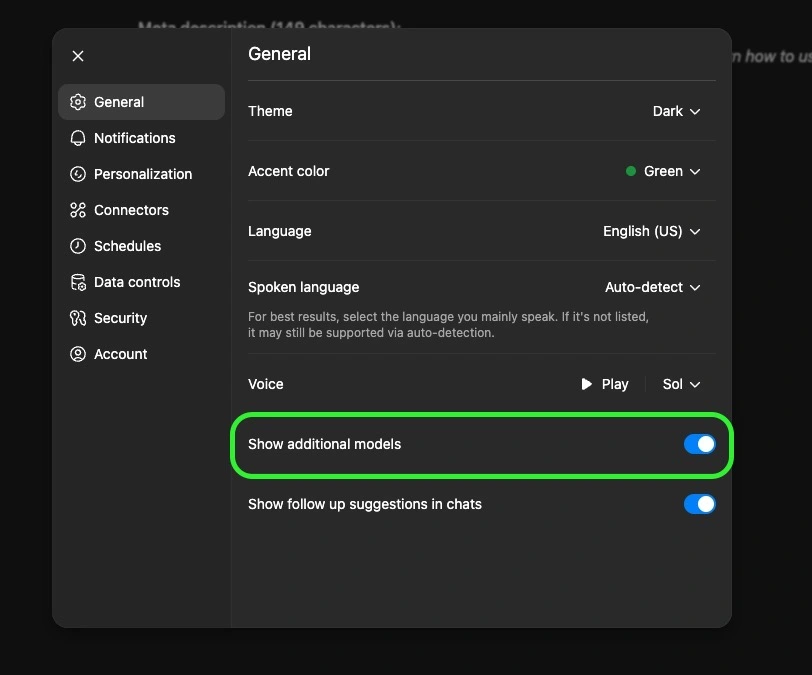
Missing your old friends GPT‑4o, 4.1, o3? They’re still tucked away. Go into Settings → General → Show additional models. Flip that toggle, and you’ll see them under the “Legacy Models” dropdown. Not essential for most people, but nice to have in case you want to compare outputs.
2. Tools You Actually Need to Know
Here’s where GPT‑5 goes from “chatbot” to “Swiss army knife.” These tools are what make the Plus plan worth it.
Add Photos & Files
Upload up to ~20 files at once. Docs, spreadsheets, PDFs, even images. This turns GPT into a multi‑modal assistant, it can read your PDFs, analyse your data, or even look at a photo and give insights. Super useful for research and SEO workflows (think uploading a CSV of keywords or a competitor’s brochure).
Search
Search gives GPT real‑time internet access. Officially, it’s powered by Bing. Unofficially, some SEOs testing the responses claim it’s pulling Google results more often than not. Either way, the point is: this is your way to cut hallucinations and get fresh data.
*Important side note* more and more sites are blocking AI crawlers (Cloudflare being the biggest culprit). So don’t assume GPT can access every corner of the internet. But when it works, it’s gold.
Deep Research
This is not just “search but slower.” It’s a Plus‑exclusive mode that basically turns GPT into your AI research assistant. Instead of a quick lookup, it actually performs multi‑step searches, not just scanning the top answers, but digging deeper into related areas, following interesting leads, and going further down the rabbit hole until it collects all the useful information. It’ll then spend 2–30 minutes combing sources, asking you clarifying questions, and producing a fully cited report.
Limits: ~25 deep research sessions/month on Plus. But that’s plenty if you save it for the big stuff – competitor analysis, market research, or building the foundation for a new content campaign.
Agent Mode
Think of Agent Mode as hiring an AI intern who also knows how to use a computer. It can:
- Browse sites like a human (click links, fill out forms).
- Run code in a terminal.
- Pull data into spreadsheets.
- Generate slide decks with charts.
- Even generate leads.
The key difference: unlike normal GPT where you guide every step, an Agent executes multi‑step workflows autonomously. You stay in control (it’ll ask permission before big actions), but this is the closest thing to an AI employee. And just to be clear, OpenAI isn’t the only one with this kind of autonomous agent tools like Manus or GenSpark offer similar functionality. Personally, I like having everything under one subscription, but it could be worth testing those out too since they bundle in other useful tools.
Canvas
Canvas is my personal favourite. It’s basically a Google Docs‑meets‑GPT editor where you and the AI can write side‑by‑side. Instead of GPT spitting out text in chat for you to copy, it edits inline, with suggestions, highlights, and even “track changes” style edits.
It’s a game‑changer for:
- Blog drafts
- SEO content refinement
- Code debugging
- Client deliverables
- Creating simple but useful HTML apps you can embed in your site
You can even throw a meeting transcript in there and have it convert it into a structured, sharable HTML report.
Create an Image
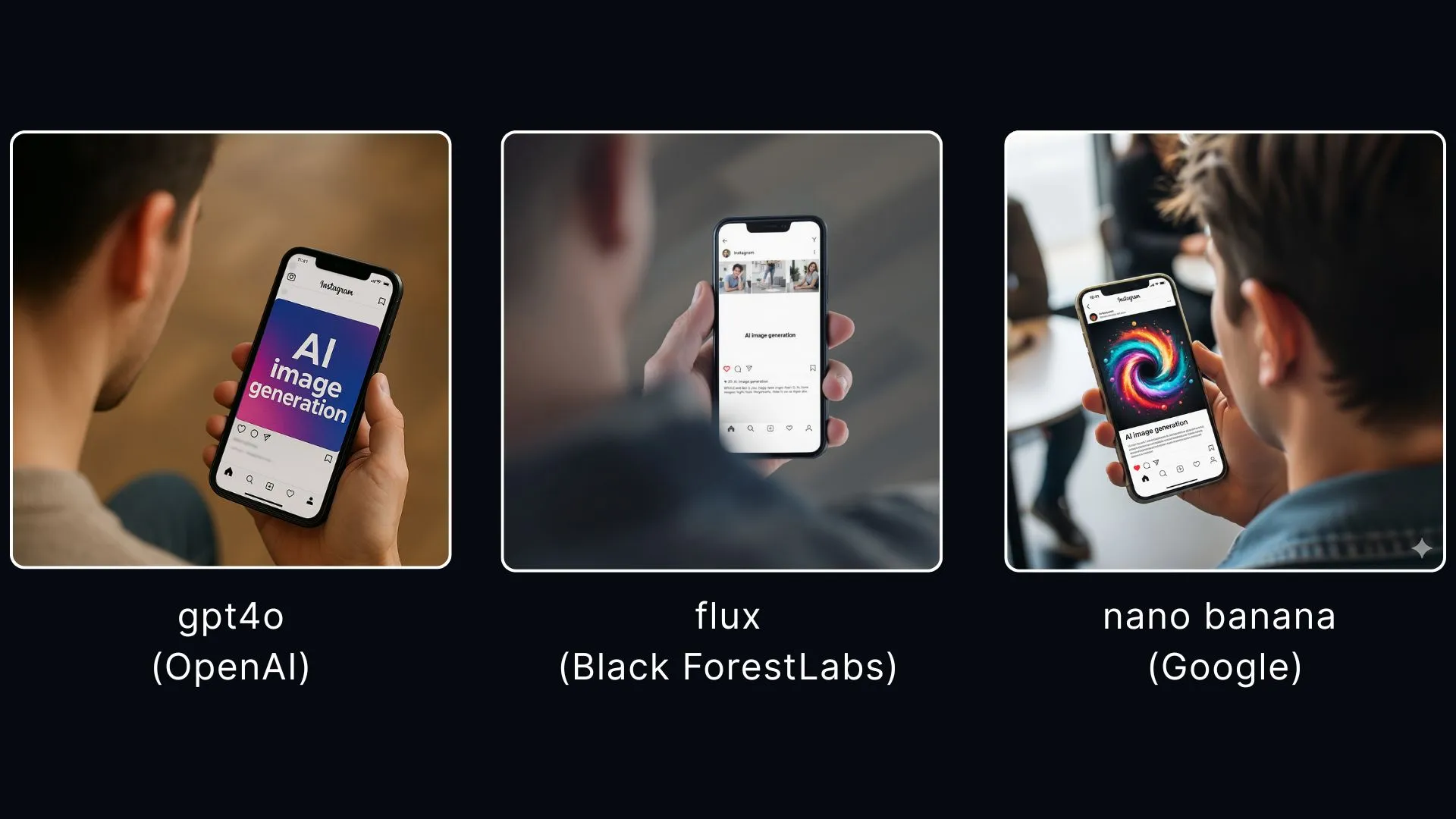
Built on OpenAI’s GPT‑4 image model (a huge upgrade from DALL·E). It handles text in images very well which used to be the Achilles heel of AI art tools. Great for social graphics, blog headers, or quick visuals when you don’t want to fire up Photoshop. That said, whilst this is an incredible AI image tool, in my opinion it’s by far not the best. If you want images that are almost indistinguishable from real photos, you should check out Flux from Black Forest Labs or Google’s new Nano Banana generator. At the end of this section, I’ll drop three images below from three different image generators with the same prompt: GPT‑4o, Flux, and Nano Banana. This way, you can make up your mind about which one you like better.
Prompt: High-angle over-the-shoulder photo of a person, showing the back of their head and shoulder. Their smartphone is in focus, displaying an Instagram post on the screen with the words "AI image generation." The background is softly blurred to emphasize the phone.
Study & Learn
This is more niche. Essentially GPT builds custom study programs. Perfect if you want to learn a new skill (SEO, coding, algebra homework for your kid). If your kid asks for help with algebra or quadratic equations, stuff you’ve totally forgotten, you can definitely use this tool to get you out of the pickle. Not something every business owner will use daily, but it’s there...
3. Customisation & Settings You Shouldn’t Skip
Here’s where you turn GPT from “a tool” into your tool.
- Custom GPT profile: Add your name, role, and tone. More importantly, use the “traits” field to set shortcuts. Example: prefix with
Cfor concise one‑liners,Lfor long‑form detailed answers. Total time‑saver. - Memory: Toggle this on. GPT will remember how you like things done, your writing style, even recurring workflows. You can edit or delete memories anytime. I think this is really the kind of unsung hero of all the GPT settings. The more memory and things that GPT remembers about you, the more personalised your ChatGPT experience will be. Yes, it can feel a little scary having an AI remember so much, but the deeper you go the better it gets. Think of it like Apple’s ecosystem effect: once your iPhone, AirPods and MacBook all work seamlessly together, it’s tough to leave. Same here, the more GPT remembers, the harder it is to imagine switching to another app.
- Connectors: Gmail, Google Drive, Calendar, Notion, Canva. Once hooked up, GPT can fetch info and act directly in those apps.
- Personality features: GPT‑5 also lets you set a personality style. You can make it more formal, friendly, cynical, or even playful depending on what suits you best. This goes beyond shortcuts – it actively changes how the model frames responses, almost like giving it a new voice. For example, a ‘cynic’ personality will give you blunt, witty replies, while a ‘coach’ might be more encouraging and structured. This is brand new in GPT‑5 and worth experimenting with. If you want to go deeper into this, we've created a detailed guide on GPT-5's new personality, which you can check out here.
- Data control: Disable “Improve the model for everyone.” Otherwise, you’re giving OpenAI consent to train on your data. Especially critical if you’re in law, healthcare, or finance.
- Voices & Themes: More cosmetic, but advanced voice mode is actually fun if you like talking to your assistant instead of typing.
4. Best Practices (a.k.a. Don’t Do Dumb Stuff)
- Use Fast by default. Only switch to Thinking when you’re tackling strategy or complex analysis.
- Don’t waste Deep Research. Save it for competitive research or market deep dives, not “what’s the best pizza topping.”
- Lean on Canvas. If you’re drafting or editing, don’t settle for chat bubbles – put it in Canvas and collaborate properly.
- Treat Agent Mode like a junior hire. Give it clear tasks, review the outputs, and never let it run wild with sensitive stuff.
- Stay organised with Projects. For ongoing campaigns, group your chats, files, and settings in one place. Keeps you sane.
FAQ
1. What’s the difference between Fast and Thinking modes in GPT-5?
Fast gives you quick, snappy answers (like GPT-4o), while Thinking takes its time with deeper reasoning and a much larger context window.
2. Can I still use older GPT models like GPT-4?
Yes. Toggle Show additional models in Settings and you’ll see legacy models like GPT-4o, 4.1, and mini versions in the dropdown.
3. How is Deep Research different from normal Search?
Search pulls quick results from the web. Deep Research runs multi-step queries, follows leads, and produces a fully cited report — perfect for competitor or market analysis.
4. What can Agent Mode actually do for my business?
It can browse websites, fill out forms, run code, generate reports, or even schedule meetings — essentially acting like a junior AI employee under your supervision.
5. Is Canvas just for writing?
Not at all. It’s for writing and coding. You can refine SEO drafts, debug scripts, or even build simple HTML apps you can embed on your site.

Unlocking GPT‑5 for Business: Models, Tools & Settings You Should Actually Care About
All Blog Posts
Discover insights and strategies for AI-powered SEO.
Understanding GEO
What is GEO?
Generative Engine Optimization (GEO) is all about getting your stuff noticed in AI-powered search answers. When folks pop questions into chatbots or AI-driven searches, GEO makes sure your content comes out in the answer. It's like making your page the teacher's pet in the digital classroom. For small businesses, nailing GEO means you'll stand out more online, being the go-to answer when folks have questions.
Here's the playbook: craft clear, straightforward bits of writing; use nerdy stuff like structured data; toss in some Q&A sections; make your pages easy-peasy to skim through; focus on specific, deep-dive questions; play with diverse content types; keep your material fresh, sync your brand voice across the board, and always keep an eye on your results.
Difference from Traditional SEO
Now, GEO isn't here to flip the table on traditional SEO. Think of it like adding a new flavor to your SEO cocktail. Traditional SEO is about getting your page to the top of the hit list on search engine results pages (SERPs), pulling folks in both organically and through ads. This means using keywords, building links, and tweaking your site's nitty-gritty details.
AspectGEOTraditional SEOGoalBe AI's pick for answering queriesScore a top spot on SERPsFocusAI can easily understand your contentKeywords, backlinks, site performanceTechniquesStructured data, clear Q&A bitsKeyword magic, linking pathways, speed tuning
GEO makes sure your content catches the AI's eyes, thanks to tweaks that speak "AI-friendly." Small business folks can ride this wave by crafting content that AI's just can't ignore—while still playing the traditional SEO game like pros.
Curious about how GEO's shaking things up in search marketing? Check out is geo replacing seo? and how to optimize for generative ai?.
Amping Up Your Game with Generative AI
So, you've got this thing called Generative Engine Optimization (GEO) to wrap your head around. Basically, it means making sure your stuff shows up when folks toss questions at AI search engines. Let's get straight into how you can make your content stand out like a shiny new penny.
Crafting Content That Clicks
If you're diving into GEO, think clear and snappy with your writing. Small biz owners like you should nail that easy-to-grasp, cut-to-the-chase style. It'll make AI pick up the right bits and help boost how often you pop up online—just like magic.
Here's the lowdown on keeping your words clear:
Wanna get more tricks? Check out how to optimize for GEO.
Making Sense with Structured Data
Structured data is like giving your content a crispy roadmap so AI can "get" what you're yakking about. By using this neat trick, your website turns into a well-oiled machine ready for both people and algorithms.
Here's Why You Want Structured Data:
Sprinkle some structured data over your site and you'll see everything line up like ducks in a row. More nitty-gritty details? Swing by our how to rank in generative engine optimization section.
Popping in Q&A Sections
Adding Q&A bits in your content is a clever trick to cozy up to generative AI. This style mimics how AI spits out answers, making it easier for machines to snag the right info.
Q&A Tips to Rock Your Content:
This Q&A stuff not only makes life easier for visitors but also cranks up your shot at being the AI's next darling. For a deeper dive, hop over to how to optimize for generative AI.
Nail these three moves—killer content writing, structured data jazz, and nifty Q&A sections—and you'll be on your way to GEO success. You'll not only score more eyeballs online but also welcome the right kind of peeps to your doorstep. Curious if SEO kicked the bucket with AI? Let these new plays show you the ropes of the modern marketing jungle.
Leveraging Long-Tail Queries
Targeting Niche Audience
In the game of standing out online, using long-tail queries is a smart move. These are the specific questions or phrases folks use when they're chatting with those smart AI search engines. They're like secret passwords to find smaller, less crowded corners of the internet, making them perfect for zooming in on a niche crowd. (AI Rankingskool).
When small business peeps get cozy with these specific queries, they connect with folks hunting for exactly what they're selling. It's like winning the jackpot for engagement because you're speaking directly to their needs.
Think about a little setup selling handmade candles. If they go after the big fish like "buy candles," they're lost in the sea of sellers. But switch to "buy handmade soy candles with lavender scent," and suddenly they're the big fish in a small pond. That's some serious "find-me" magic for anyone on the lookout for those particular candles.
Attracting Quality Visitors
Who wants random clicks when you can have visitors who are really into what you're all about? That's the beauty of long-tail queries—they're magnets for folks truly interested. When people type in these detailed searches, they're waving a flag saying, "I know what I want!"
When you tweak your content for these queries, you meet potential customers exactly where they want to be found. Not only does this boost the number of eyeballs on your site, but it gets the right eyeballs—those ready to make a move.
Even with its higher search volume, "buy candles" doesn't hold a candle to the juicy conversion potential of "buy handmade soy candles with lavender scent." It's all about the specificity and realness of buyer intent.
Wanna get more tips on mastering long-tail queries? Check out our guide how to rank in generative engine optimization.
Embracing long-tail queries is a sweet strategy for small business champs aiming to turn up the volume online with generative engine optimization. By zoning in on a specific audience and reeling in quality guests, businesses can ramp up both engagement and sales conversions. For more handy tips, dive into how to optimize for GEO on our site.
Automation in GEO
Mixing Data with AI Models
Throwing raw data and AI models into the mix is like giving small biz folks a secret weapon for juicing up their Generative Engine Optimization (GEO) plans. By letting automation handle stuff that used to eat up time or lead to slip-ups, you can glide through like butter on toast.
Peep this: data from all over the place—think search waves, user quirks, and what the other guys are up to—gets fed to AI models. They dish out the good stuff, those insights that pack a punch. That means laser-sharp focus on what actually counts, letting you target like a sniper and make your resources count. A shout-out to AI Rankingskool: their models dive into domain authority and resource limits, pointing out the sweet spots in keywords and tactics.
Zeroing In on Keywords
One cool thing about teaming up AI with GEO is the served-up keyword intel. The old-school way of digging for keywords? That's passe when AI's got your back, making it a slick and breezy ride.
AI models come up with keywords that fit like a glove with your marketing groove, weighing in domain authority and what's doable given your resources. Thanks again, AI Rankingskool. Small operations can then bank on buzzwords that hit the sweet spot: "doable" meets "relevant."
Keyword TypeRelevanceDifficultySuggestion FrequencyLong-Tail KeywordsHighLowLoadsHigh-Volume KeywordsMediumHighSometimesNiche KeywordsHighMediumFrequent
Picture this: If your site's a bit of an underdog, AI steers you towards long-tail keywords. They don't have the fierce fight and are super specific, upping your shot of nabbing top spots in search lists. But, as you step up your domain game, maybe dive into livelier keywords to reel in a bigger crowd.
For more jam-packed GEO goodies, swing by our articles on how to get your GEO on point and cracking the GEO code. They're crammed with smart moves and tips you can roll with to master GEO.
With AI and data rigged up right, small biz champs can tap into GEO's whiz-bang, pulling in more eyeballs and giving their online game a good boost.
9 Actionable GEO Tactics You Can Implement Today
Here are specific, practical steps to optimize your content for AI-powered search engines:
- Write Clear and Direct Content: Use descriptive headings, keep paragraphs short, and include direct answers to questions right at the start of each section.
- Use Structured Data: Add schema markup (FAQPage, Article, LocalBusiness) to help AI systems understand your content. Use Google's Rich Results Test to verify.
- Include Q&A Sections: Add dedicated FAQ sections that answer common questions in a clear, conversational tone.
- Make Your Content Easy to Scan: Use bullet points, numbered lists, and short paragraphs so AI can quickly extract key points.
- Focus on Long-Tail Questions: Target specific, detailed queries like "how to use Claude Code for local SEO" rather than broad terms like "SEO tips."
- Diversify Your Content Formats: Combine text with videos, infographics, and podcasts. Include transcripts for multimedia content so AI can process it.
- Keep Your Content Updated: AI systems favor fresh content. Review and update your pages regularly with the latest information and stats.
- Build a Consistent Brand Voice: Write conversationally and authentically. Avoid overly technical jargon unless necessary.
- Monitor Your Results: Track where your traffic comes from and how often your content appears in AI-generated answers. Use this data to refine your approach.
Real-World GEO Case Studies
Case Study 1: DA 9 vs DA 39 (The Small Fish Wins)
Here's a real example that shows the power of GEO. When searching ChatGPT for "how to use DeepSeek R1 to write SEO content that ranks," one of our articles appeared as a top result, beating out a competitor with a domain authority of 39 while our site was sitting at just DA 9.
Three key lessons from this:
- Diversifying content works: By offering a mix of videos, blog posts, and detailed guides, AI has multiple pieces to choose from.
- Quality and clarity win: The content performed well because it answered the question directly and broke the topic into easy-to-understand sections.
- Small can outperform big: A well-optimized, focused piece of content can outrank sites with much higher domain authority in AI search results.
Case Study 2: Will's Financial Advisor Success
Will, a financial advisor in Arizona, came to us struggling to get any organic visibility. His pages were stuck on page 3 of Google.
We focused on the fundamentals:
- Built hyper-local service pages for each Arizona location he served
- Added comprehensive schema markup to every page
- Ensured every claim was backed by credible sources
- Optimized his Google Business Profile completely
- Created in-depth content that genuinely answered client questions
Within weeks, Will was ranking #1 on Google for his target keywords. But he also started showing up in Perplexity and ChatGPT when people searched for financial advisors in Arizona. The key insight: if you do the basics of traditional SEO correctly, you're automatically doing GEO.
Case Study 3: Tim Armstrong's ChatGPT Referral
Tim Armstrong, a mortgage professional in our community, recently shared that a client came to him saying: "ChatGPT told me you might be the best option in America for him." Tim closed that deal the next day.
Tim didn't do anything special for "ChatGPT optimization." He built a solid website, created helpful content, and established himself as an authority. The AI systems figured out the rest.
The Answer Capsule Methodology
To consistently rank in AI-generated search results, structure your content using what we call the "Answer Capsule" approach:
1. Schema Markup Is Non-Negotiable
AI systems rely heavily on structured data to understand what your content is about. Every page should have relevant schema: Organization, LocalBusiness, Service, FAQ, and Person schema for author bios.
2. Source Everything
AI systems are trained to value content that cites credible sources. When you make a claim, link to a reputable source backing it up. This signals to both Google and AI systems that your content is research-based, not just opinion.
3. Answer Questions Directly
Structure your content with clear headings that match how people ask questions. Use bullet points and numbered lists for easy extraction by AI systems.
4. Build Transactional Pages
Maximize the number of transactional-type pages your website has. For a local business, this means creating dedicated pages for each service in each location: "Retirement Planning in Scottsdale," "401k Rollover in Mesa," etc. Each page should have proper schema and cite relevant sources.
5. YouTube Amplifies Everything
When you create YouTube videos about the same topics as your blog posts, AI systems see content about the topic from multiple authoritative sources (your website AND YouTube), reinforcing your expertise. Plus, YouTube videos build trust that written content alone can't match.

Small Business Boost: Mastering the Art of Generative Engine Optimization

Intro to Generative Engine Optimization (GEO)
Differentiating GEO from Traditional SEO
Generative Engine Optimization (GEO) is shaking things up in digital marketing. While older sibling SEO aims to boost your website on search pages like Google, GEO is all about making sure AI-powered engines spotlight your content as the go-to answer.
Ranking Objectives
With Traditional SEO, you're trying to climb the ranks on big search pages by using keywords and linking strategies. Think Google or Bing.
But GEO? It's about getting AI to pick your stuff as the perfect response to a question. So, you need to make your content clear and answer-focused. Fewer clicks, maybe, but way more trust and recognition.
Want to know if GEO is taking over SEO? Check our article on is geo replacing seo?.
Structuring Content
Traditional SEO loves those hefty pieces packed with details and sections. They help search engines figure out what’s important.
GEO's not about length, though. It's all about structured and snappy content. Bullet points, headings, and tables are your friends here; they help AI quickly get what you're saying.
For the best tips on nailing GEO, peek at our guide on how to optimize for geo?.
Clicks and Recognitions
Traditional SEO's game is to get clicks: jazzy meta descriptions and headlines pull users in.
Switch over to GEO, and it’s more about trust and kudos. Even if fewer folks click, being picked by AI as the right answer can supercharge your brand’s reputation.
Check out more about how GEO changes clicks in our other piece, is seo dead with ai?.
Jumping on board with GEO might mean a different game plan, but it opens exciting new doors for small businesses online. Check out key areas of generative AI to see how they can boost your game.
Key Strategies for GEO Success
Looking to shine in the Generative Engine Optimization (GEO) arena? Here’s the lowdown on some smart moves to make the most of Generative AI. We’ve got three top strategies that’ll help you hit the ground running.
Crafting Clear & Direct Content
Kicking off with keeping it simple—it's like AI 101. Clear, straight-to-the-point stuff is gold for Generative AI, as it’s great at gobbling up content that's chopped up into easy bites and that answers questions head-on.
Tips for Making it Clear as Day:
Implementing Structured Data
Next up, it’s all about giving content a little structure. Structured data is like giving AI a map—helps it pin down and file away your info neatly.
Structured data spruces up your spot on the search page, like catnip for clicks. Hungry for more on GEO? Mosey on over to our optimization guide.
Utilizing Q&A Sections
Now for the crowd-pleaser—Q&A setups mimic how folks talk with AI. When you lay out answers this way, Generative AI picks it up like an eagle scout—that's a win-win for you and your audience.
Why Q&A is Your New BFF:
Imagine someone asks, "How do you make GEO work for you?"
Here’s what you’d say: "Stick to clear content, organize with structured data, and pack in some killer Q&A."
For a meatier read on this, check out our piece on ranking well with GEO.
Rock these tricks, and small businesses can shoot up in online searches and keep pace in the spirited world of Generative AI. Hang out for more on the basics with this starter guide.
Giving Your Content A Boost with GEO
Sprucing up your content for Generative Engine Optimization (GEO) is a game-changer for small businesses looking to shine online. Here’s how you can make your content pop and snag those web visits you’re after.
Keep It Easy On The Eyes
Both AI brainiacs and humans love content they can zoom through. Make your ideas pop with easy-to-read spins on your content.
More tricks on mastering this art can be found in our article on making the most of generative AI.
Zero in on Those Quirky Queries
Nabbing those niche crowds with long-tail queries is a well-kept secret in GEO. These gems might not be rockstars in search volume, but they bring the right crowd who know what they want.
Find more tricks for long-tail magic in our piece on ranking higher with GEO.
Dream Up Those One-of-a-Kind Content Ideas
Jumping into unique ideas is where you hit GEO gold. Don’t just play copycat; cook up something fresh and juicy.
| Source | Ideas Machine |
|---|---|
| RedditInsighs.ai | Unveils user curiosities |
| Competitor Blogs | Spotlights what's missing |
| Industry Reports | Maps out buzzing topics |
Explore more ways to keep it fresh with our guide on mastering GEO.
Play it smart by making your content easy-peasy to browse, honing in on niche questions, and serving up those killer original ideas. Your small biz will rocket up the GEO charts. For more on the magic of GEO, drop by our article on generative engine optimization explained.
Tools for GEO Optimization
So, optimizing for Generative Engine Optimization (GEO) isn't just a 9-to-5 thing—it's more like a marathon with sprints. You gotta have the right tools in your toolbox to gather insights and keep yourself in front of the crowd. Below are a couple of essential tools that'll help you step up your GEO game.
AI Search Tools for Insights
When it comes to understanding what's hot and poppin', AI search tools are like your secret agents, scouring the web for trending topics and queries. They make it easy to craft content that hits your audience right in their curiosity bone.
Take RedditInsights.ai, for instance. It's like a detective on social platforms like Reddit, finding what people are buzzing about with those long-tail keywords and fresh ideas.
| Tool Name | What It Does | Platform Picks |
|---|---|---|
| RedditInsights.ai | Spots trending questions | |
| AnswerThePublic | Brings your search questions to life |
Small business owners can dig into these tools to get the scoop on what the folks they want to reach are chatting about, letting them whip up content that makes some serious waves in GEO. For more tips and tricks, dip into how to optimize for generative AI.
Competitor Analysis Automation
Keeping the top spot in GEO means you gotta know your opponents. Automated tools for competitor analysis give you a sneak peek into the competition's world of backlink strategies and SERP data, showing you all their crafty moves.
DataForSEO is a heavyweight in sifting through such competitive data. It puts the pedal to the metal, delivering real-time insights on what your rivals are cooking up.
These tools take the grunt work out of analyzing your competition and build smarter GEO strategies. Want some advice? Check out how to optimize for geo.
By using AI search tools alongside automated competitor sleuths, small biz folks can get a leg up in their GEO strategies, jazz up their online presence and leave the digital competition in their dust. For the full scoop, look up what is generative engine optimization?.
Improving Visibility with GEO
Boosting Trust and Recognition
Generative Engine Optimization (GEO) is like getting the nod from AI to become the star answer to a question. It's not just about climbing to the top of search engine results like traditional SEO; it's more about building trust and making your brand a household name, even if it means getting fewer clicks.
For small business owners, GEO can be a game-changer in establishing authority in their field. When AI repeatedly picks their content as the top answer, people begin to associate that brand with reliability. Keeping your content clear and using structured data can really crank up your chances of being the chosen one by AI systems.
Adding Q&A sections is another slick move. They fit like a glove with how people naturally ask stuff, which means AI is more likely to take notice. For more ideas on ramping up your GEO status, check out our tips to optimize for GEO and ride the waves of trust and street cred.
Niche Audience Targeting Benefits
Honing in on long-tail queries is a big win for GEO and packs a powerful punch. These are usually less crowded and more specific, making it easier to zero in on niche folks who actually care. You'll see more engagement and better conversion rates with this crowd.
AI search helpers like RedditInsights.ai are great for spying on what's buzzing in online chatter, steering your content toward unique subjects that click with niche groups. Like, business owners can dig out what's hot in their sector and tweak their stuff to hit the mark with these topics.
Using automated tools like DataForSEO for a peek at the competition serves up a good look at the lay of the land, helping businesses fine-tune their GEO playbook. This automation can reveal juicy details like backlink trails and SERP insights, which are useful for an in-depth competitor analysis.
Diving into niche targeting and using smart tools put small businesses on the map to outshine with GEO. For more how-to's on snagging top spots in GEO, don't miss our guide on how to rank in generative engine optimization.

Unleashing Creativity: Key Areas of Generative AI Explored
Unlocking the Power of OpenAI’s Deep Research: A Comprehensive Guide
If you’re a small business owner or marketer looking to supercharge your SEO strategy, you might have heard about OpenAI’s new Deep Research feature. It promises to transform the way we perform online research, making it possible to generate in-depth, citation-rich reports that once took hours – or even days – to compile. In this post, we’ll break down exactly what Deep Research is, how it works, and address all the FAQs so you know how to leverage this innovative tool to elevate your content game.
What Is Deep Research?
In a nutshell, OpenAI’s Deep Research is a powerful extension of ChatGPT designed for autonomous, multi-step research tasks. Unlike standard queries where you get a quick answer, Deep Research dives deep into the public web, gathering, analyzing, and synthesizing information from hundreds of sources. It then delivers a detailed report complete with citations, effectively serving as your digital research assistant.
You can think of it as moving from a simple Google search to having a personal research analyst at your fingertips. Whether you’re looking to understand a niche topic or compile market data, Deep Research can handle the heavy lifting so you can focus on strategy and execution.
How Does Deep Research Work?
The Process
- Getting Started
Using Deep Research is straightforward. In the ChatGPT interface, you simply select the “Deep Research” option when composing your query. For instance, you might ask: “Give me a comprehensive analysis of the top marketing strategies for a new online boutique.”
Learn more about how to start your query.

- Setting the Parameters
Once your query is submitted, Deep Research may prompt you for some follow-up details to better focus the research. This ensures that the AI knows exactly what information you’re after. - Autonomous Research
After the initial setup, the AI embarks on its research journey. Over the course of 5 to 30 minutes, it sifts through numerous webpages, studies documents (including PDFs and images), and compiles a comprehensive report complete with hyperlinks to the original sources.
Discover more about the research process. - Presentation of Results
When the research is complete, you receive a detailed report with all the necessary information, including relevant citations. This report is ideal for content creation, competitive analysis, or even refreshing existing articles with the latest data.
Frequently Asked Questions About Deep Research
Let’s dive into the most commonly asked questions about Deep Research, addressing the concerns and curiosities that small business owners and marketers typically have.What Exactly Is Deep Research?Deep Research is a specialized tool within ChatGPT that performs in-depth, autonomous research by combing through publicly available information online. It’s designed to generate a comprehensive, well-cited report on any given topic. Whether you need detailed market analysis or a deep dive into a trending topic, this tool is built to handle complex research tasks that would otherwise require extensive manual effort.
Read about the tool’s capabilities on OpenAI’s site.
Who Can Use Deep Research, and Are There Any Limits?
As of now, Deep Research is available exclusively to ChatGPT Pro subscribers in eligible regions. Users in the UK, Switzerland, and the EEA might experience a delayed rollout, but the feature is expected to become more widely available over time. Pro users enjoy up to 100 Deep Research tasks per month, making it a scalable solution for businesses that need regular, in-depth research without the overhead of a dedicated research team.
Check out the latest subscription details.
How Do I Use Deep Research in ChatGPT?
Using Deep Research is as simple as choosing the option in the ChatGPT interface and entering your research query. You can provide extra context by attaching files or images, which the AI will then consider as part of its research. For example, if you need insights on “DIY marketing for small businesses in 2025,” you simply enter the query, set any parameters, and let Deep Research do its work.
Get started with Deep Research here.
How Is Deep Research Different from a Normal ChatGPT Query or Standard Search?
There’s a significant difference between Deep Research and the typical quick responses you get from a standard ChatGPT query. The normal mode is designed for immediate answers or simple fact-checking, drawing from a limited set of sources. In contrast, Deep Research is built for thoroughness. It searches through a vast number of sources to compile a detailed, multi-layered report with citations, making it invaluable for content that requires deep insights and extensive data validation.
Compare standard search vs. Deep Research.
How Long Does a Deep Research Task Take?
A Deep Research task can take anywhere from 5 to 30 minutes, depending on the complexity of the query. This delay is by design – the AI is working methodically, reading, and analyzing the content across multiple sources to ensure a comprehensive result. During this time, you can continue to work on other tasks, as the research process runs in the background. Once the task is complete, you’re notified, and your detailed report is ready for review. As an example, we used Deep Research to help us write this blog and it took around 4 minutes to provide us with in-depth research on this. Keep in mind this is a relatviely easy topic to search, more complex tasks might take 30 min.

Learn more about task timing.
Does Deep Research Provide Sources, and How Accurate Is It?
Yes, every Deep Research report comes with clearly cited sources. This is a game changer for verifying facts and building content that’s not only informative but also credible. However, while the AI strives for accuracy, it’s not infallible. There are instances where the tool might misinterpret data or combine information in unexpected ways. The citations allow you to verify the information directly from the source, ensuring that you can trust and cross-check the findings.
What Are the Limitations or Concerns?
Despite its many benefits, Deep Research does have some limitations:
- Public Data Only: The tool only accesses public information. It can’t retrieve data from private databases or subscription-based services unless you provide the data yourself.
- Time Factor: The research process is intentionally slower than a standard query because it’s gathering information from a wide array of sources.
- Potential for Inaccuracies: Like any AI, it might occasionally present incorrect or outdated information, which is why it’s important to review the citations and verify critical facts.
- Use Case Specificity: While fantastic for comprehensive reports and content research, it’s not designed for quick, on-the-spot queries during live discussions or meetings.
Explore known limitations here.
Practical Use Cases: Maximizing SEO and Content Creation With Deep Research
For small business owners and marketers, the practical applications of Deep Research are as exciting as they are numerous. Here’s how you can put this tool to work for your SEO and content strategy (It's also how I did research for this blog post .
Comprehensive Topic Research & Content Ideation
The Challenge: Crafting unique, authoritative content often requires extensive background research on a topic.
The Deep Research Solution: Instead of spending countless hours browsing multiple sites and pulling together data, use Deep Research to compile a detailed report on your topic. For example, if you’re creating content about “sustainable packaging for e-commerce,” you can instruct the tool to gather statistics, industry trends, expert opinions, and more. This comprehensive background will help you:
- Identify unique angles or insights that set your content apart.
- Ensure that your blog post or video script is well-supported by data.
- Enhance the overall quality and depth of your content, which is crucial for SEO.
See how deep research boosts content ideation.
SEO Content Planning and Keyword Research
The Challenge: Understanding what your target audience is searching for can be overwhelming without the right tools.
The Deep Research Solution: Use Deep Research to conduct advanced keyword and question research. Ask the tool to find common queries and topics that small business owners are interested in, such as “DIY marketing strategies for 2025” or “how to improve local SEO on a budget.” This approach not only gives you a list of high-potential keywords but also the context behind them – the actual questions and pain points your audience is expressing online. The result is a content plan built around real-world search queries, ensuring that your articles, videos, and FAQs address exactly what your audience wants to know. One thing to keep in mind is that OpenAI's Deep Research does not have direct access to keyword data like, monthly search volume, keyword difficulty etc, so you might want to combine the research provided with SEO Keyword Research tools like our own free tool or others from ahrefs, semrush etc.

Writing Data-Backed, Authoritative Content
The Challenge: Writing long-form content, like ultimate guides or whitepapers, can be daunting without thorough, reliable research.
The Deep Research Solution: Leverage Deep Research as your content research assistant. Suppose you’re working on “The Complete Guide to Email Marketing for Nonprofits.” Instead of manually scouring the internet for studies, expert quotes, and case studies, let Deep Research compile a report for you. This report will include:
- Data-backed insights.
- Relevant statistics and trends.
- Expert opinions with links to the original sources.
With this detailed research in hand, you can craft a more authoritative and persuasive piece that not only resonates with readers but also meets Google’s E-E-A-T (Experience, Expertise, Authoritativeness, and Trustworthiness) standards for SEO.
Competitor Analysis and Market Research
The Challenge: Keeping tabs on your competitors and market trends is essential but time-consuming.
The Deep Research Solution: Ask Deep Research to analyze your competitor’s content strategy or gather market insights. For example, you could query: “Analyze the online content strategy of [Competitor X] and compile customer feedback on their product.” The AI will gather information from news articles, reviews, and their published content, giving you a comprehensive overview of:
- What topics your competitor is focusing on.
- Their strengths and weaknesses.
- Opportunities for you to fill gaps in the market with your own content.
This kind of analysis can guide your strategy, helping you to craft content that addresses unmet needs and differentiates your brand in the competitive landscape.
Learn more about market research with AI.
Content Refresh & Fact-Checking
The Challenge: Keeping content up-to-date is critical for maintaining high search rankings and audience trust.
The Deep Research Solution: Use Deep Research as a periodic check-up tool for your existing content. If you have an older blog post, ask the AI to “Check the latest data on [your topic] since 2022.” It will compile recent findings and statistics, enabling you to refresh your content with new, accurate information. This approach not only helps maintain the authority of your site but also signals to search engines that your content is continually updated and relevant.
Understand how to refresh your content effectively.
Integrating Deep Research into Your Workflow
So, you might be wondering how to fit Deep Research into your daily routine without it becoming a time sink. Here are a few tips for seamless integration:
Prioritize High-Impact Projects
Focus on using Deep Research for projects where the depth of insight can make the biggest difference – such as cornerstone content, detailed market analysis, or comprehensive competitor studies. For day-to-day queries or quick facts, the regular ChatGPT mode or a standard search might be more efficient.
Combine AI with Human Oversight
While Deep Research provides an excellent starting point, it’s important to review and verify the information it provides. Use the citations to cross-check critical details, and add your own expertise and insights to polish the final output. Think of it as a collaborative process between AI and human creativity.
Experiment and Iterate
Like any new tool, there might be a learning curve with Deep Research. Experiment with different types of queries and parameters to see what yields the best results for your content needs. Over time, you’ll develop a sense of when to use Deep Research versus other tools in your content creation arsenal.
Looking Ahead: The Future of Deep Research in Content Creation
As AI continues to evolve, tools like Deep Research are poised to revolutionize how we approach content creation and SEO. For small business owners and marketers, this means:
- More Efficient Research: Spending less time gathering data and more time crafting compelling, value-driven content.
- Enhanced Content Quality: With comprehensive, data-backed research, your content will naturally become more authoritative and engaging.
- Competitive Advantage: Leveraging advanced AI research can give you insights that are hard for competitors to match, setting your brand apart in a crowded digital landscape.
There is no doubt that Deep Research is not a silver bullet. Its current limitations – such as only accessing public data and requiring a bit more time for results – mean that it works best as a supplement to your overall strategy. However, as it continues to improve and become more widely available, its role in transforming content marketing will only grow.
Let's Wrap this up
OpenAI’s Deep Research is a groundbreaking tool that offers an exciting glimpse into the future of AI-driven content creation. For those who need detailed, well-cited research in a fraction of the time it would take manually, it’s a game changer. By understanding how it works, knowing its limitations, and learning how to integrate it effectively into your workflow, you can unlock a new level of efficiency and creativity in your marketing efforts.Whether you’re using it to brainstorm fresh content ideas, conduct competitive analysis, or simply verify that your data is up-to-date, Deep Research is designed to be a trusted partner in your content strategy. Remember, while the AI does the heavy lifting, your expertise in interpreting and refining the results is what ultimately makes your content shine.
P.S For a look into how to use Deep Research to write very high quality seo blog posts, take a look at our video below

OpenAI's Deep Research: A Comprehensive Guide
SEO (Search Engine Optimization) can be tedious and time-consuming, but it doesn’t have to be. With the right strategy, you can automate a large portion of your SEO processes and harness the power of AI to lighten the load. In this post, we’ll explore which parts of SEO can (and should) be automated, what tools you’ll need, and how to strategically incorporate AI for data-driven decisions. We’ll also discuss how to keep your content high-quality so Google doesn’t penalize you and—most importantly—how to supercharge your content output without losing your unique voice and expertise.
Whether you’re new to automation or a seasoned marketer looking to refine your workflow, this guide will walk you through the essentials, step by step. Let’s dive in.
Why Automate Your SEO (and What Not to Automate)
We all know SEO can sometimes feel overwhelming. From keyword research and competitor analysis to backlink building and content creation, it’s easy to get bogged down in repetitive tasks. That’s why automation is so powerful: it frees you up from mundane “busy work” and lets you focus on creativity, strategy, and big-picture thinking.
However, not all SEO tasks should be automated. Some areas, like refining your brand voice or adding your personal expertise to the content, are best done by a human hand. Google continues to value content that reflects real-life experience, in-depth knowledge, and genuine insight—attributes that automated systems alone can’t fully replicate.
So the guiding principle here is: Automate the time-consuming parts, and keep the human element where it truly matters.
Key Tools and Platforms For SEO Automations
Before we get into the specifics of automations, it’s important to get your toolkit in order. Below are the key platforms and tools you’ll likely need.
Automation Platforms

Make
Make (formerly Integromat) is a no-code automation platform with a drag-and-drop interface that simplifies the creation of complex workflows. You can connect it to various services—like your SEO data provider or Google Sheets—and build sequences that take data from one place to another, trigger actions, and manipulate the data as needed.
n8n
This is a newer automation tool that is open-source and can be more cost-effective. Although it’s powerful, we haven’t used it extensively, so we’ll mostly focus on Make in our examples. However, if you’re comfortable experimenting with new platforms, n8n might be worth exploring.
High-Quality SEO Data
A lot of folks gravitate toward big-name tools like Ahrefs and SEMrush. While these services are great, they can be extremely expensive once you try to use their APIs. In many cases, you have to be on their highest-tier or enterprise-level plan to get API access.
Enter DataForSEO. This is a budget-friendly yet robust data provider that offers:
• Backlink data
• Keyword research data
• Google My Business data
• SERP data, and more
For a fraction of the cost of the better-known platforms, you get high-quality SEO data you can integrate directly into your automations. As a bonus, if you sign up through certain referral links (*hint* the one we have for you here), you might get a free credit (like $5) to get started. That’s enough to test the service without committing big money up front.
Storage and Collaboration (Google Sheets)
When it comes to storing and analyzing data, Google Sheets is your friend. It’s free, widely accessible, and easy to integrate with Make (and many other automation tools). You can create multiple Sheets:
• One for raw keyword data
• One for competitor insights
• One for backlink tracking
• And so on
By keeping your data in Sheets, you ensure that it’s neatly organized and readily available for your next steps, whether that’s feeding it to an AI model or conducting manual reviews.
#1: Automating Keyword Research
Generating Keyword Suggestions
Keyword research is often the first major step in any SEO campaign. You need to figure out what people are searching for and how competitive those terms are.
Using DataForSEO, you can automate the process of discovering:
• Keyword suggestions related to a root keyword (e.g., “learn SEO”).
• Search volume for each suggested keyword.
• Competition metrics (to gauge difficulty).
• Cost per click (CPC) if you’re also running ads.
• Search intent (where available).
A typical workflow might look like this:
1. Input your main keyword in a Google Sheet (e.g., “learn SEO”).
2. Use Make to send this keyword to Data for SEO’s Keyword Research API.
3. Retrieve a list of related keywords, along with monthly search volumes, competition, and CPC.
4. Populate a new tab in your Sheet with these findings.
This sets you up with a powerful data set you can then analyse or feed into AI models. If you want to detailed step-by-step guide on an automation that covers most of this, check out the video below, just remember to take it slowly at first, it can be overwhelming at first but the benefits are well worth it... (that's what she said)
Scraping SERP Data
Once you have your list of potential keywords, it’s time to look at the SERPs (Search Engine Results Pages). With Data for SEO, you can also pull in the top organic search results for each keyword. This tells you:
• Which domains are ranking in the top 10 results
• How many backlinks these domains have
• An estimate of their monthly organic traffic
• Other relevant metrics that help you gauge the difficulty of ranking
Automated SERP scraping gives you a data-driven snapshot of the competition. You’ll know exactly who you’re going up against and can spot patterns (e.g., smaller sites ranking for certain terms that you might be able to outrank).
Leveraging AI to Discover Keyword Opportunities
One of the best ways to take your keyword research to the next level is to feed your data to an AI model, such as GPT 4o or a smarter reasoning model like o1 and even DeepSeek R1, which is a free model that is *nearly* as smart as o1.
Why is this helpful? Because:
• You’re not just asking an AI to “come up with random keywords.”
• You’re giving it actual, context-rich data (like search volumes, competitor difficulty, and more).
For instance:
1. Collect your newly scraped data (keywords, volumes, competitor info) in a Google Sheet.
2. Send this data to an AI model through an automation in Make.
3. Instruct the AI model to propose additional keyword opportunities that align with your overall strategy, factoring in your domain’s current authority and resource constraints.
This approach produces more targeted keyword suggestions that match your real-world data, rather than a generic list that may or may not align with your site’s strengths.
Finding Frequently Asked Questions and Reddit Q&A
Adding a FAQ section to your content or creating blog posts answering specific questions can set you up as an authority. Tools like Answer the Public or Also Ask can help you find questions people type into search engines. But there’s another hidden gem: Reddit. You might be thinking that Reddit is absolutely terrible to navigate for FAQs, and you would be right, but there a solution to help you filter through the internets hay to find the golden needle... (strange metaphor, I know)
• RedditInsights.ai is a tool that lets you input a specific subreddit and pulls all the frequently asked questions or topics people are discussing there.
• Because Reddit content isn’t always fully indexed by Google, you can spot questions that might not appear in standard keyword tools.
• Writing a blog post that addresses these Reddit-specific questions can position you as the first to answer a query that might later gain traction in search results.
This can be an absolute goldmine for long-tail keywords and “fresh” content ideas. By the time others catch on, you’ll already have a well-established page on that topic.
You can take RedditInsights a step further an join it with Machined.ai for quick and effective strategy that will help you write unique content in minutes. You can learn how to do the entire flow with the video below.
#2: SEO Competitor Analysis Automation
Why Competitor Analysis Is Essential
You’ve probably heard someone say, “I’m doing the exact same thing as that competitor, but they rank, and I don’t. Why does Google hate me?”
Often, it’s not that Google hates you—there are under-the-hood factors at play:
• Your competitor might have a larger backlink profile.
• They may be ranking for more total keywords.
• They could have a better site structure or more user engagement signals.
In short, appearances can be deceiving. You need to dive deep to understand what’s really going on.
How to Automate Competitor Backlink and Ranking Checks
Here’s how automation can help:
1. List Your Competitors: Start with a spreadsheet that includes the URLs of your top competitors.
2. Create a Workflow in Make:
• Connect to Data for SEO’s backlinks API.
• For each competitor, pull data on:
• Number of domains linking to them
• Number of total backlinks
• Anchor text distribution (optional)
• Also pull data on how many keywords each competitor ranks for, and in which positions (1, 2–3, 4–10, etc.).
3. Populate the Data in Google Sheets:
• Each competitor gets its own row or tab, which updates automatically whenever you trigger the workflow or set it to run on a schedule.
By the end, you’ll have a rich data set showing exactly how your competitors stack up in terms of links, domain authority, and organic rankings.
Combining Competitor Data with AI Insights
As with keyword research, you can feed competitor data to an AI model to get a second opinion on what it all means. For instance:
• Ask the AI to compare your backlink profile with your competitor’s and see if there are any glaring gaps.
• Let it suggest new link-building opportunities or content angles based on competitor strategies.
When you combine raw data with AI’s pattern-recognition capabilities, you get a more comprehensive picture than data alone could provide. It's a great way for those who are allergic to numbers (like me), to digest and understand the why, what, and how of the raw data.
Once again, like all the other sections in this blog, if you want a complete tutorial on how to create a powerful competitor analysis automation, check out the video below.
#3: SEO Content Generation Automation (and the Role of AI)
Why You Shouldn’t Automate Everything
Now we get to the most popular form of SEO automation: content generation. Tools like GPT4o, Claude, Jasper.ai and Machined.ai can produce articles in seconds. It’s tempting to let the machine run wild and churn out hundreds of blog posts. However, you risk:
• Publishing low-quality or repetitive content
• Missing your own unique expertise or “human touch”
• Getting penalized by Google if the content reads like spam or fails to provide real value
We firmly believe AI should assist in content creation, not replace you entirely.
(Don't write content for the sake of just writing content, this will just feed the 'dead internet theory'...If you don't want to be pessimistic about where the future of the internet is going, maybe don't look into that one)
Staying on Google’s Good Side: Quality Control
Google doesn’t have a specific policy that says, “We ban all AI-written content.” Their actual stance is that they value high-quality content, regardless of how it’s produced. If you use AI in a way that leads to:
• Comprehensive coverage of a topic
• Accurate, well-researched information
• Clear value-add for your audience
…then you shouldn’t worry about penalties. If, however, you’re just generating fluff for the sake of publishing more articles, expect trouble.
Using AI Tools to Speed Up Content Creation
A practical approach looks like this:
1. Outline Your Post: Decide what the main headings (H2, H3) are going to be, and the key points you want to cover.
2. Generate the First Draft with AI: Use a tool like Machined.AI (or OpenAI’s GPT models) to flesh out the sections. You can write 20, 30, or even 40 articles in the time it used to take to do just one.
3. Human Review: This is crucial. Read through the AI-generated text thoroughly:
• Add anecdotes and examples from your own experience.
• Insert brand-specific info or personal stories that make the content unique.
• Fact-check any data that might be out-of-date or incorrect.
4. Final Edit: Add images, tables, supporting illustrations (Napkin.ai is awesome for that).
This method ensures you’re combining AI’s speed with your expertise, maintaining a high level of quality and uniqueness. We have tried this many times with Machined.AI and get great results, you can check out how to do the whole process below.
Repurposing Content Across Platforms
Automation doesn’t stop once you hit “Publish” on your blog. You can also repurpose content for:
• LinkedIn updates
• Facebook posts
• Pinterest pins
• Twitter threads
• Email newsletters
However, keep in mind that every platform is different. LinkedIn, for example, often penalizes posts that drive users away with external links. It’s better to share the gist of your post directly on LinkedIn, providing real value so your audience doesn’t have to click away just to learn something. If they see the full value in your LinkedIn post, they might be more inclined to visit your site out of genuine interest, rather than an obligatory click.
Automation tip: You can set up a workflow where once a blog post is published (tracked by your RSS feed or a webhook), Make grabs the text, modifies it to fit another platform’s character limit or style, and then posts it automatically. Just ensure that the repurposed content is truly adapted—don’t just copy-paste a few lines and a “Read more” link.
Three Fundamental Skills for Successful SEO Automation
If you want to excel at automating your SEO processes, focus on these three core competencies:
Deep Understanding of SEO
You need to know what you’re doing when it comes to keyword research, competitor analysis, and content strategy. Automation can’t fix fundamental misunderstandings about SEO best practices.
Solid Knowledge of AI Models
Know how to work with large language models and specialized AI tools. Even just understanding how to get an API key from OpenAI’s playground can open a world of opportunities. It won't hurt to learn how to craft a decent prompt, this can go a long way.
Basic Understanding of Automation Software
Platforms like Make let you build complex workflows without coding knowledge. Still, you need to grasp the basics—like triggers, data mapping, and error handling—to ensure your automations run smoothly.

Bringing It All Together: Step-by-Step SEO Automation Workflow
Let’s outline a sample workflow that integrates all these automations into a cohesive process:
1. Keyword Brainstorm
• You add a “seed” keyword to Google Sheets (e.g., “learn SEO”).
• Make triggers an automation:
1. Calls Data for SEO to gather related keywords.
2. Pulls SERP data for each of these keywords.
3. Stores all the results in your Sheets.
2. AI-Enhanced Keyword Recommendations
• Make sends the new data to an AI model along with a prompt asking for further keyword suggestions (especially long-tail queries) based on search volume and difficulty.
• AI returns a refined list, possibly with suggestions you hadn’t considered.
3. Competitor Snapshot
• You maintain a list of competitor domains in another Sheet.
• On a weekly or monthly schedule, Make retrieves:
• Their backlink counts, ranking keywords, domain authority, etc., from Data for SEO.
• Each competitor’s top 10 performing keywords.
• This data updates in the same Sheet, creating a dynamic “competitor analysis” dashboard.
4. Content Creation
• You identify high-potential keywords from Steps 1 and 2.
• Use an AI writing tool to draft articles for each keyword.
• Human edit: Add your expertise, insights, and unique angles.
• Finalize the post and publish on your site.
5. Repurposing and Distribution
• When new articles go live, Make picks it up from your RSS feed or a WordPress webhook.
• The workflow automatically creates platform-specific drafts:
• One version for LinkedIn with a more discussion-oriented or story-telling angle.
• A short snippet for Facebook that highlights a key insight.
• You quickly review these drafts (to ensure the formatting and voice are right) and then schedule or post them.
6. Performance Tracking and Feedback Loop
• Another workflow runs weekly or monthly to check your newly published content’s ranking progress.
• If certain articles underperform, you feed that performance data back into your AI model, asking it to suggest improvements or identify missing subtopics.
.webp)
Final Thoughts and Next Steps
SEO is part art, part science. Automation and AI let you handle the “science” side—collecting data, analyzing trends, and producing initial drafts—while you bring the “art” by adding personal insights, creativity, and human nuance.
If you’re serious about leveling up your SEO with automation and AI, keep the following in mind:
• Start Small: Pick one process (like keyword research), automate that, and then gradually expand.
• Stay Human: Even as you scale up content production, always review and refine. Don’t let your brand voice get lost in machine-generated text.
• Join a Community: If you need a place to learn the ins and outs of SEO automation—complete with how-to guides, real-time support, and like-minded people—check out our AI Ranking Skool community. It’s a space where you can ask questions, get support, share workflows, and get feedback on your automation setups.
Automation is a marathon, not a sprint. But once you get the hang of it, you’ll find that your SEO processes become both more efficient and more effective. By leveraging AI in tandem with automation platforms, you can spend less time on tedious tasks and more time on high-value strategic decisions—like figuring out what your audience really wants and how you can deliver it better than anyone else.
Ready to take the next step? Open up Google Sheets, sign up for DataForSEO, and start tinkering with Make. As you build these workflows and see the results, you’ll realize that SEO automation isn’t just a trend—it’s the future of online marketing. And best of all, you’ll be freeing yourself from repetitive work so you can focus on what you do best: growing your business and delivering real value to your audience.
Good luck, and happy automating!

Automate SEO Tasks with AI: Tools & Workflows That Save Hours
Let’s get straight to it: you want organic traffic. You want your content to rank. And you want to do it without spending a dime. The good news? With DeepSeek-R1, a powerful AI model that rivals OpenAI’s o1 (and sometimes outperforms it), you can create high-quality, SEO-optimized content for free. But here’s the catch (isn’t there always..)—you need to use it strategically.
In this guide, I’ll walk you through my exact process for writing content that ranks, drives traffic, and sounds human—all while leaning on DeepSeek-R1’s brilliance. No fluff. No paid tools. Just actionable steps.
First, Let’s Address the Elephant in the Room: “Does Google Penalize AI Content?”
Short answer: No.
Long answer: Google doesn’t care if your content is written by a human, a robot, or a caffeinated squirrel. What they do care about is whether your content is helpful, original, and adds value. Spammy, repetitive, or “shitty” content gets penalized—whether it’s AI-generated or not.
DeepSeek-R1, developed by the China-based company DeepSeek, is a game-changer here. It’s not just “good for an AI.” It’s smart. Think of it as a hyper-efficient copywriting assistant that understands context, nuance, and even subtle humor. But like any tool, its effectiveness depends on how you use it.
Let’s get into the strategy.
Step 1: Preparation Is Everything (Don’t Skip This!)
You can’t just type “write me a blog post about SEO” into DeepSeek-R1 and expect magic. The key to success? Preparation. Here’s how to set yourself up:
1. Start With a Solid Idea
Your blog post needs a purpose. Ask yourself:
- What problem am I solving?
- What questions do my customers keep asking?
- What’s a topic I’m genuinely curious about?
Example: If you run a gardening website, maybe your readers keep asking, “How do I keep aphids off my roses without pesticides?” That’s your blog post idea.
If you just can’t think of any ideas, try using tools like ‘PeopleAlsoAsked’. Put in the keyword you want to focus on, ensure you select the right country and language and you will have around 40-50 FAQs that you can pick and choose from. I have made an *idiot proof* step-by-step guide on how to do this below.
2. Keep Keyword Research Simple (Seriously)
Forget complicated tools. Use free options like:
- Our FREE Keyword Research Tool: Type your word into the search bar, select the country and language and you are set.
- AnswerThePublic: Shows questions people ask about your topic.
- Ubersuggest: Free version gives decent keyword ideas.
Look for long-tail keywords (phrases with 3+ words). Example: Instead of “SEO tips,” target “how to write SEO content for beginners.”
3. Research Like a Pro
DeepSeek-R1 needs context to write well. Spend 10–15 minutes gathering:
- Stats (e.g., “87% of marketers use AI for content creation”).
- Expert quotes or case studies.
- Links to authoritative sources (like Google’s SEO guidelines).
Whilst DeepSeek has a search function, I find that sometimes it’s not the best. I prefer to search my topic in PERPLEXITY and save that research for later.
Pro tip: Feed DeepSeek-R1 specific data. The more precise your input, the better the output.
Step 2: Crafting the Perfect Prompt
This is where most people fail. They ask AI to “write a blog post,” get generic drivel, and blame the tool. Let’s fix that.
DeepSeek-R1 thrives on one-shot prompting—giving it a single, detailed instruction. Here’s how to structure your prompt:
- Tone of Voice: “Write in a friendly, conversational style. Avoid jargon.”
- Objective: “Explain how to write SEO content using DeepSeek-R1 for beginners.”
- Keywords: Naturally include “free SEO tools,” “AI content writing,” and “organic traffic.”
- Research Input: Paste your gathered stats, quotes, and links.
- Format: “Use subheadings, bullet points, and a FAQ section.”
Example prompt:
“You are an expert SEO content writer. Write a 1,500-word blog post targeting beginners who want to use DeepSeek-R1 for free SEO content. Use a casual, upbeat tone. Include the keywords ‘AI content writing’ and ‘organic traffic strategies’ naturally. Incorporate this research: [insert stats/links]. Structure the post with subheadings, step-by-step instructions, and a conclusion.”
Step 3: Polish Like a Human (Because You Are One)
DeepSeek-R1’s first draft will be good—but not great. Here’s how to elevate it:
- Add Personality: Sprinkle in anecdotes or humor.
Example: “Think of keyword research like dating—focus on quality, not quantity.” - Insert Visuals: Use Napkin.ai (free tier available) to create simple illustrations.
- Internal Linking: Link to 2–3 relevant posts on your site.
Example: If you mention “on-page SEO,” link to your guide on meta tags. - Readability: Break up walls of text with short paragraphs, em dashes, and bold key points.
Step 4: Submit to Google Search Console
Don’t let your masterpiece gather dust. Submit the URL to Google Search Console (free) to speed up indexing. This is like knocking on Google’s door and saying, “Hey, check this out!”
Why This Works (And Why Most People Fail)
I’ve ranked AI content in 48 hours with this method. But most bloggers fail because they:
- Skip research (leading to generic content).
- Ignore internal linking (missing SEO equity).
- Expect overnight results (SEO is a marathon).
The Rubik’s Cube Reality: I hate to brake it to you —writing great content is just one piece of the SEO puzzle (and it’s a Rubik’s Cube-sized one at that). Even if your blog post is a masterpiece, you’ll still need:
- High-quality backlinks (other sites linking to you).
- Technical SEO (site speed, mobile-friendliness, etc.).
- Domain authority (older domains often rank easier).
- User experience (low bounce rates, high dwell time).
This guide nails the content part, but don’t ignore the rest. A Rubik’s Cube isn’t solved by fixing one side—you need all colors aligned. If you want to explore and master the rest of the SEO puzzle, I recommend checking out out online community, AI Ranking Premium, where we simplify SEO and we teach you how to maximise it with AI tools (like this one) and Automations (shameless community plug over).
The Harsh Truth: If your site is new, it might take 3-6 months to see traction. But with consistent, high-quality posts (1-2/week), you will build momentum.
Final Thoughts: Be Patient, Stay Curious
DeepSeek-R1 is a rocket booster for content creation, but you’re the pilot. Use it to explore ideas, streamline research, and draft faster—but always add your unique voice.
Remember, the goal isn’t to “trick” Google. It’s to create content so good that readers want to share it. Do that, and the rankings will follow.
Now go write something amazing.
P.S. Want my exact DeepSeek-R1 prompt template? [Get It HERE]—and start ranking.

DeepSeek R1 for SEO Content: Write Articles That Rank (Free)
The 500Billion vs .5.5 Million AI Showdown: What China’s Open-Source Surge Means for the Future
Let’s talk about the most lopsided tech rivalry you’ve probably never heard of. The U.S. is pouring 500 billion into a moonshot AI project called Stargate, while China’s DeepSeek trains models that rival OpenAI’s GPT-4 for just 5.6 million. Yes, you read that right: one country is spending 89,000 times more than the other to chase the same goal.
This isn’t just a story about money—it’s a wake-up call. As the AI race heats up, China’s open-source, budget-friendly approach is rewriting the rules of the game. Let’s unpack what this means for innovation, geopolitics, and whether bigger budgets actually mean better bots.
The David vs. Goliath AI Battle
First, the numbers:
- The U.S. “Stargate” Initiative: A $500 billion plan to build a network of data centers powering next-gen AI, backed by tech giants like Microsoft and OpenAI (Forbes).
- China’s DeepSeek R1: A state-of-the-art AI model trained for $5.6 million, matching OpenAI’s performance at 0.001% of the cost (NYTimes).
Here’s the kicker: While the U.S. bets on sheer financial firepower, China is proving that constraints breed creativity. Thanks to U.S. chip export restrictions, Chinese firms like DeepSeek are forced to innovate with limited resources—and they’re winning.
How Does DeepSeek R1 Work? (And Why Should You Care?)
Let’s demystify the magic behind China’s budget AI darling. DeepSeek R1 isn’t just cheaper—it’s smarter about how it uses data and computing power.
Most AI models (like OpenAI’s GPT-4) rely on brute-force training: throw endless data and billions of dollars at the problem until the model “gets it.” DeepSeek flips the script:
- Hyper-Efficient Data Curation: Instead of scraping the entire internet, DeepSeek’s team focuses on high-quality, domain-specific data (think academic papers, technical manuals).
- Open-Source Collaboration: By sharing tools and frameworks publicly, developers worldwide can troubleshoot and improve the model—no $500 billion required.
- Chip Restrictions as a Feature, Not a Bug: With limited access to advanced NVIDIA chips, DeepSeek optimized its code to run on older, cheaper hardware (Global Times).
The result? A model that’s faster to train, cheaper to run, and good enough to compete with the big players.

Is DeepSeek Open Source?
Yes—and that’s a game-changer. Unlike OpenAI’s closed ecosystem, DeepSeek’s code and model weights are publicly available. This transparency lets researchers globally tinker with, improve, and adapt the AI for niche uses (e.g., diagnosing crop diseases in Kenya or optimizing solar farms in Chile). But it’s not all sunshine: open-source models can also be exploited by bad actors, a risk even OpenAI’s leadership warns about (Yahoo News).
The Positives: Why Cheap, Open AI Changes Everything
1. Democratizing AI Development
When training costs drop from billions to millions, startups in Nairobi, São Paulo, or Jakarta can play in the AI sandbox. DeepSeek’s approach could spark a global “AI Spring,” where solutions are tailored to local problems—not just Silicon Valley’s priorities.
2. Innovation Under Pressure
China’s chip shortages have inadvertently fostered a culture of efficiency. As UC Berkeley’s Ion Stoica notes, “The center of gravity in the open-source community is shifting toward China” (NYTimes). Translation: Scarcity breeds ingenuity.
3. Accelerating Global Progress
Open-source models act as a rising tide. When DeepSeek releases a breakthrough, engineers in Berlin or Bangalore can build on it overnight—no corporate NDAs required.
The Negatives: When Frugal AI Meets Geopolitics
1. The New Cold War (Tech Edition)
The U.S. and China aren’t just racing for AI dominance—they’re fighting to set the rules. If China’s open-source ecosystem becomes the global standard, Western tech could lose its pole position. Imagine a world where TikTok’s algorithm rules social media and every startup runs on Chinese-built AI.
2. Security Risks on Steroids
Open-source AI is a double-edged sword. Sure, it’s great for collaboration, but it also lets rogue states or hackers customize models for cyberattacks or disinformation campaigns. As OpenAI warns, “If the U.S. doesn’t lead, someone else will” (Yahoo News).
3. The Talent Drain
Why work for a U.S. tech giant when you can join a nimble Chinese startup (or contribute to open-source projects remotely)? China’s cost-effective models could lure top AI talent away from traditional hubs.
DeepSeek R1 vs. OpenAI O1: A Side-by-Side Showdown
Let’s break down how these two models stack up:
| Metric | DeepSeek R1 | OpenAI O1 |
|---|---|---|
| Training Cost | $5.6 million | Estimated $500 million+ |
| Open Source? | Yes | No (Proprietary) |
| Hardware Used | Older GPUs, custom optimizations | State-of-the-art NVIDIA chips |
| Key Innovation | Data efficiency, community collaboration | Scale-driven performance |
| Accessibility | Free for researchers/developers | API access (paid) |
The table tells the story: One model is a Lamborghini; the other is a souped-up Toyota. Both get you there—but only one lets you peek under the hood.
The Next 5 Years: 3 Predictions
- The Rise of the “Mini-Giants”
Forget competing with OpenAI’s budget. Startups will leverage open-source tools like DeepSeek to build niche AI for healthcare, agriculture, or climate modeling—no billion-dollar war chest needed. - AI Nationalism Goes Mainstream
Countries will push for “sovereign AI” models to reduce reliance on U.S. or Chinese tech. France’s Mistral AI is already a blueprint. - The Efficiency Arms Race
Training costs will plummet as U.S. and Chinese labs adopt hybrid strategies. Think “Stargate’s” compute power meets DeepSeek’s data-sipping habits.
The Bottom Line: It’s Not About the Money
The U.S. vs. China AI showdown isn’t a spending contest—it’s a clash of philosophies. One side bets on scale; the other on scarcity. But here’s the twist: The real winner might be neither.
Open-source models like DeepSeek R1 are erasing barriers to entry, turning AI from a superpower trophy into a global toolkit. Sure, risks remain (cyberweapons, job disruption), but the genie’s out of the bottle.
As we hurtle toward 2030, the question isn’t “Who will win the AI race?” It’s “What happens when everyone can afford to run?”

The 500 Billion vs .5.5 Million AI Showdown
The Rise of AI Agents: How NVIDIA, Meta, and OpenAI Are Reshaping the 2025 Workforce
(And What It Means for You)
Imagine a world where your coworker isn’t human—but a hyper-efficient AI agent that schedules meetings, predicts supply chain hiccups, and even cracks jokes during coffee breaks. This isn’t sci-fi; it’s 2025. Companies like NVIDIA, Meta, and OpenAI are racing to deploy AI agents that promise to revolutionize industries. But with great power comes great debate: Will these agents uplift workers or replace them? Let’s unpack the hype, the hope, and the hard truths.
Meet the Players: NVIDIA, Meta, and OpenAI
1. NVIDIA: The Brains Behind the Brawn
NVIDIA isn’t just about gaming GPUs anymore. Their AI agents, built on quantum-AI hybrids and advanced computing frameworks, are designed to optimize everything from drug discovery to urban planning. Think of them as the Swiss Army knives of enterprise AI, streamlining supply chains and powering real-time decision-making.
2. Meta: Social AI with a Human Touch
Meta’s agents focus on social integration—think AI assistants that mimic human empathy in customer service or mental health support. Their Llama models are evolving to handle nuanced conversations, though critics argue Meta’s hardware limitations might slow progress toward artificial general intelligence (AGI).
3. OpenAI: The AGI Trailblazers
Sam Altman’s OpenAI is betting big on autonomous AI agents entering the workforce by 2025. Their “Strawberry” model uses multi-step reasoning to solve complex tasks, like drafting code or diagnosing medical conditions. Altman claims these agents could boost company output by 30%—but warns of ethical pitfalls.
The Good, the Bad, and the Automated
Let’s break down the potential impacts of AI agents with a quick comparison:
| Aspect | Positive Impact | Negative Impact |
|---|---|---|
| Productivity | Automate 40% of repetitive tasks (e.g., data entry) | Risk of over-reliance on AI for critical decisions |
| Job Creation | 97M new roles in AI oversight and ethics | 300M jobs at risk in finance and retail |
| Healthcare | 90% of hospitals use AI for faster diagnostics (NVIDIA's vision) | Privacy concerns over patient data usage |
| Creativity | Generative AI aids designers and marketers | Potential homogenization of creative outputs |
The Bright Side: Why AI Agents Could Be a Win
- Supercharged Efficiency
AI agents excel at tasks humans find tedious. For example, NVIDIA’s AI orchestrators can optimize factory workflows in real time, cutting downtime by 40%. Meanwhile, OpenAI’s agents automate 89% of clinical documentation in healthcare, freeing doctors to focus on patients. - Democratizing Expertise
Small businesses can now access AI tools once reserved for tech giants. Meta’s AI assistants help startups automate customer service, while OpenAI’s GPT-4 enables solo entrepreneurs to draft legal contracts in seconds. - Solving Global Challenges
From climate modeling to pandemic prediction, AI agents analyze data at unprecedented scales. NVIDIA’s quantum-AI systems are accelerating carbon capture research by simulating molecular interactions in minutes.
The Flip Side: Risks We Can’t Ignore
- Job Polarization
While AI creates high-skilled roles, low- and mid-level jobs face displacement. Wall Street could lose 200,000 back-office jobs by 2025, and customer service roles are increasingly automated. - Ethical Quandaries
Bias in training data could skew hiring or lending decisions. A healthcare AI might misdiagnose marginalized groups if trained on non-diverse datasets. OpenAI’s Altman stresses the need for “explainable AI” to ensure transparency. - The AGI Uncertainty
What happens when AI outsmarts us? Meta’s Yan Lecun doubts AGI is near due to hardware limitations, but OpenAI’s 87.5% score on human-like reasoning benchmarks hints otherwise.
The Verdict: Collaboration Over Replacement
The future isn’t humans vs. machines—it’s humans with machines. For instance, Salesforce’s Einstein GPT doesn’t replace sales teams; it handles grunt work so they can strategize. Similarly, NVIDIA’s AI factories need engineers to oversee ethical AI deployment.
Key Takeaways for 2025:
- Upskill or Fall Behind: Learning to work alongside AI will be non-negotiable.
- Demand Transparency: Support regulations like the EU’s AI Act to curb misuse.
- Embrace Hybrid Workflows: Use AI for heavy lifting, but keep humans in the loop for creativity and judgment.
Final Thoughts
AI agents from NVIDIA, Meta, and OpenAI are neither saviors nor villains—they’re tools. Their impact depends on how we wield them. Will 2025 be a dystopia of job losses? Unlikely. But it will be a year of transition, where adaptability and ethical foresight determine who thrives.

The Rise of AI Agents: How NVIDIA, Meta, and OpenAI Are Reshaping the 2025 Workforce
DeepSeek R1 vs. OpenAI O1: The Open-Source Underdog Takes on the AI Giant
(And Why This Battle Matters for the Future of AI)
The AI world is buzzing with the release of DeepSeek R1, a new open-source language model that’s challenging OpenAI’s flagship O1 in performance—but at a fraction of the cost. Think of it as a David vs. Goliath story, but with neural networks and math benchmarks instead of slingshots. Let’s unpack why this rivalry is reshaping the AI landscape.
The Contenders: Meet the Models
DeepSeek R1 (GitHub) is the brainchild of Chinese AI startup DeepSeek, built on their earlier DeepSeek-V3 architecture. Unlike traditional models that rely heavily on supervised fine-tuning (SFT), R1 was trained using large-scale reinforcement learning (RL) with minimal human-labeled data. This approach allowed it to “self-evolve” reasoning capabilities, like solving complex math problems through trial and error28.
OpenAI O1, on the other hand, is a proprietary model optimized for reasoning tasks. It uses a hybrid approach combining SFT and RL, backed by OpenAI’s massive resources. While exact details are scarce (it is closed-source, after all), O1 has set high benchmarks in coding, math, and general knowledge tasks16.
Head-to-Head: Performance & Cost
Let’s cut to the chase: How do they stack up? Here’s a snapshot of their benchmark scores and costs:
| Benchmark | DeepSeek R1 | OpenAI O1 | Winner |
|---|---|---|---|
| AIME 2024 (Math) | 79.8% | 79.2% | DeepSeek R1 |
| MATH-500 (Reasoning) | 97.3% | 96.4% | DeepSeek R1 |
| Codeforces (Coding) | 96.3%ile | 96.6%ile | OpenAI O1 |
| MMLU (General Knowledge) | 90.8% | 91.8% | OpenAI O1 |
| Cost per 1M tokens | $0.55 (input) | $15 (input) | DeepSeek R1 (95% cheaper) |
R1 shines in math and software engineering, while O1 edges ahead in coding competitions and general knowledge. But the real kicker? R1’s API costs just 5% of O1’s—a game-changer for startups and researchers8.
Why Open-Source Matters
DeepSeek R1 isn’t just a model—it’s a statement. By open-sourcing R1 under an MIT license, DeepSeek invites developers to tweak, refine, and build upon its architecture. Need a smaller, faster version? They’ve already distilled R1 into six variants (like Qwen-32B and Llama-70B) that outperform even GPT-4o in niche tasks28.
Compare this to OpenAI’s “walled garden” approach. While O1 offers polished performance, its closed nature limits customization and transparency. For example, DeepSeek R1’s training pipeline—revealed in its technical report—shows how RL can replace costly SFT data, a breakthrough for resource-strapped teams68.
The Bigger Picture: What This Means for AI
- Democratizing AI Innovation:
R1’s affordability and accessibility lower the barrier to entry. A solo developer can now experiment with a model rivaling O1’s capabilities—something unheard of in the billion-dollar AI race810. - Ethical Trade-Offs:
Open-source models like R1 raise concerns about misuse (e.g., generating harmful content), but they also enable scrutiny. Proprietary models, while “safer,” operate in opacity510. - The Efficiency Revolution:
DeepSeek trained R1 on a $6 million budget—a fraction of what OpenAI likely spent. This proves that smart resource allocation (like RL-driven training) can rival Big Tech’s brute-force spending16.
Should You Switch to DeepSeek R1?
- For math/logic-heavy tasks: Yes. R1’s Chain-of-Thought reasoning excels here.
- For general-purpose chatbots: OpenAI O1 still leads, but R1’s distilled models are catching up.
- For budget-conscious projects: R1 is a no-brainer. At 95% lower costs, it’s ideal for prototyping18.
Try R1 yourself on DeepSeek’s chat platform (look for the “DeepThink” mode) or via its Hugging Face integration.

Personal Experience With R1: A Human Touch in AI Writing?
(Spoiler: I’m stealing this paragraph for my productivity newsletter)
I’ve been stress-testing DeepSeek R1 for the past few hours – coding Python scripts, drafting research summaries, and yes, even writing this blog section. What surprised me most wasn’t its math chops (though those are stellar), but how human its SEO copywriting felt.
When generating article drafts, most AI models make me feel like an editor battling robotic phrasing (“In conclusion, this revolutionary technology synergizes paradigm shifts!”). With R1, I simply added:
“Ensure the content is concise, flows naturally, and feels like an easy, relatable read.”
The result? Paragraphs that sounded like a colleague wrote them, not ChatGPT’s overly enthusiastic cousin. For coding tasks, it aced Python error debugging with clearer explanations than I’d get from Stack Overflow.
Why this matters: R1’s ability to grasp nuanced writing styles with minimal prompting (see their style guide tips) suggests open-source models are closing the “personality gap” that kept many businesses wary of AI content.
Final Thoughts
The DeepSeek R1 vs. OpenAI O1 rivalry isn’t just about benchmarks—it’s a clash of philosophies. Will open-source, community-driven AI overtake proprietary giants? Early signs suggest yes. As one researcher put it: “R1 proves innovation thrives when knowledge is shared, not siloed.”
.webp)
DeepSeek R1 vs. OpenAI O1: The Open-Source Underdog Takes on the AI Giant
SEO keeps changing, and if you want to stay ahead in 2025, it’s important to focus on strategies that worked in 2024 and look at what’s going to matter this year. I’ve broken it down into three key areas that can really make a difference for your SEO strategy.
1. Diversification of Platforms
Let me be honest—relying only on Google just doesn’t cut it anymore. To have a solid SEO strategy, you need to be on as many platforms as possible. I’m talking YouTube, TikTok, Pinterest, and anything else you can handle. This isn’t just about getting seen more (although that’s a big part of it); it also shows Google that your brand is active and trusted across the web.
Here’s why diversification matters:
- More Places, More Eyes: The more platforms you’re on, the better your chances of getting noticed.
- Build Brand Authority: When you’re mentioned all over the place, Google sees you as a serious, trustworthy player.
- Protect Yourself from Surprises: Remember when TikTok was almost banned in the U.S.? Imagine if all your efforts were tied to just one platform … I nearly did, but thankfully around July last year we started taking YouTube seriously, and I am eternally grateful I did. Diversification keeps you safe.
How to make this work:
- Repurpose the Right Way: Take your blog posts and reshape them to fit the vibe of each platform. Don’t just drop a “Read More” link—actually share useful tips or insights directly in your posts. The idea is to provide ALL the value from the blog post in the chosen platform’s post, then, should they want to read even further, they can do so with the link you provide.
- Use Automation Tools: Tools can save you a ton of time. I’ve shown how to set up systems for TikTok, YouTube, and LinkedIn that make repurposing easier. I predominantly use MAKE to repurpose my content, as it allows for greater customization. I can get very granular by sending the content to a pre-trained assistant GPT that understands my tone of voice and how I write.
- Focus on Value: Each platform has its own style. Tailor your content to fit the audience and format.

If you want to get a jump start into learning how to repurpose your content correctly, I have created an entire FREE mini course called the Content Automation Kickstarter that will help hit the ground running with your content repurposing journey.
Diversifying isn’t just about SEO—it’s about being smart with your overall online presence. Spread out your efforts, and you’ll see the payoff.
Proof of Payoff:
We recently launched a new website with a brand-new domain name (..this one), and thanks to our diversification on different channels (mostly YouTube and TikTok), in the first 7 days of the site being publsihed we’ve already started seeing a steady flow of traffic to this squeaky new domain. Not too shabby!

2. Become a Topical Authority in Your Niche
If you want to dominate your niche, Google needs to know that you’re an expert in it. This means covering every possible angle of your topic and doing it well.
Here’s how to establish yourself as the go-to resource:
- Leave No Stone Unturned: Let’s say you’re in dog training. Write about everything—potty training, leash etiquette, aggressive behaviors—you name it.
- Find and Answer FAQs: A great way to start becoming a topical authority is to figure out all the frequently asked questions people have about your keyword. You can use tools like PeopleAlsoAsked or out own Free Keyword Research tool to easily find all these questions. Then, answer each of those questions in its own detailed blog post. Not only does this help you cover every aspect of your niche, but it also makes your content incredibly helpful to readers.
- Work with AI (Smartly): AI tools like MachinedAI can help you draft content fast, but don’t let the AI tool write everything and upload it blindly. Make sure you give it a good read and add your experience throughout the blog post, as experience is one of the only things AI still can’t quite replicate (yet). In testing this strategy, AI-generated content versus AI-assisted content, the content that was written by AI but polished by an expert nearly ALWAYS performed better. Add your own insights and experiences to make it stand out.
- Focus on Real Value: Go deeper than the surface-level stuff. People (and Google) can tell when your content actually helps solve a problem.
When you’re the authority on a topic, people will trust you, and so will Google. It’s a long game, but it’s worth it.
3. Develop a Strong Backlinking Strategy
Backlinks still matter a lot, but the game isn’t about quantity anymore—it’s about quality.
Why backlinks are key:
- Boost Your Brand’s Visibility: Links from trusted sites make your brand more credible to Google.
- Climb the Rankings: When your links come from contextually relevant places, your rankings for target keywords improve.
How to get it right:
- Start with Branded Links: Studies show that branded mentions are incredibly powerful for SEO. If people are talking about your brand, Google notices.
- Go for Relevance: If you’re a dog trainer, aim to get links from vets, pet stores, or dog groomers—not random tech blogs.
- Consider Outsourcing: If backlinking feels overwhelming, there are experts out there who can help. We’ve worked with GetMeLinks, and they’ve been fantastic at securing high-quality, relevant backlinks.
Not all backlinks are equal, so focus on quality and relevance. It’ll pay off big time.
4. Bonus: Build a Simple Web App to Add Value
One of the most overlooked ways to drive traffic and provide value is by creating a simple web app or tool that your audience will find useful. These tools don’t just engage your visitors—they also give them a reason to keep coming back to your site. Plus, AI-generated content can’t replace the unique functionality of custom-built tools, so you’ll stand out.
Examples of Simple Tools You Can Build:
- Jewelry Business: Create a ring size calculator or a gemstone matching guide.
- Real Estate: Build a mortgage calculator or a home valuation tool.
- Fitness Coaching: Offer a BMI calculator or a workout planner.
- Car Dealership or Junk Car Buyer: Develop a cost calculator for junk cars or trade-in estimations.
These tools don’t need to be overly complicated—simple functionality can go a long way. When people visit your site to use your tool, they’re more likely to engage with your other content, boosting your brand’s authority and SEO. Over time, you’ll see great results from these efforts, as they differentiate you from competitors and make your site indispensable for users.
We built out Free Keyword Research Tool for this very reason and it has already brought substantial traffic to this website.

Wrapping It Up
SEO in 2025 is about playing smarter, not harder. You’ve got to show up on multiple platforms, prove you’re the expert in your niche, and build strong, meaningful backlinks. Stick to these three strategies, and you’ll not only rank higher but also build a stronger, more resilient online presence.

SEO in 2025 | Three Key Things To Focus On
Introduction to SEO
Getting the Basics of SEO
Search Engine Optimization, or SEO, is kind of the magic sauce for making websites more noticeable on search engines like Google. It's all about tweaking your site so it pops up when folks search for stuff connected to what you offer. Done right, SEO can shoot a small biz to the top of the search list, helping it get discovered by potential customers. And if you’re wondering, yes, SEO is still very much relevant in 2025, and it’s worth a business putting some serious effort into it. If you're a small business owner itching to dig into this world, check out our learn SEO resources.
SEO's like a toolbox filled with neat tricks—keyword picking, crafting cool content, and building links. By sharpening these tools, you can boost your site's ranking and reel in that sweet organic traffic. New to this? Our seo tutorial for beginners is a great place to start.
To wrap your brain around SEO, you need to get friendly with its three main areas:
Why SEO is a Big Deal for Small Businesses
For small businesses, SEO isn't just some buzzword—it's a lifeline in the online marketing game. When cash is tight, SEO is a saviour, letting little guys play ball with big brands without blowing their ad budget.
SEO blasts a business's online profile, upping the odds of getting spotted by folks hunting for your products or services. Better search rankings mean more hits on your website, which can mean more folks buying what you're selling. If you're keen on diving into this world, our learn SEO online guide is your buddy.
Let's break it down with some numbers:
MetricNo SEOWith SEOMonthly Website Visits5002,500Conversion Rate1%2.5%Monthly Sales562.5
See the difference? By weaving SEO into the mix, both your site visits and sales can skyrocket. Curious about the nitty-gritty? Our how to do seo for website step-by-step guide walks you through it all.
By tapping into SEO, small businesses can beef up their online presence, drag in more customers, and watch profits climb. For those ready to up their game, give seo courses a look-see, or explore a google seo course made just for small biz folks.
Defining SEO
What is SEO Exactly?
SEO, which stands for Search Engine Optimization, is all about getting your website noticed by search engines like Google. You do this by fine-tuning different parts of your site so it pops up higher in search results. In simple terms, SEO is your way to pull in more folks without shelling out cash for ads.
For this blog post we are concentrating on traditional seo, but remember that SEO is not just Google—particularly now in 2025, SEO expands into all other platforms like TikTok, YouTube, Pinterest, and more. It should be looked at from a holistic perspective because we all search in different ways.
The heart of SEO beats with the pulse of the right keywords, top-notch content, and making sure the technical side doesn't scare away search engines. The aim? Make life easy for Google and friends so they know exactly what your site is about and give you a thumbs-up in rankings. If you're scratching your head about where to begin, check out an SEO beginner's guide for some solid pointers.
The Importance of SEO for Online Visibility
For mom-and-pop shops and budding entrepreneurs, SEO is like a neon sign in the digital world. Get a higher rank, and suddenly more eyeballs are on your business – that's new faces and potential new customers knocking at your door.
A well-thought-out SEO game plan can skyrocket a biz's online profile, pulling in not just visitors but actual buyers.
Benefits of SEODescriptionIncreased TrafficHigh ranks bring in the non-paying crowd.Cost-EffectiveCheaper in the long run compared to burning through cash on ads.Brand CredibilityBeing on top makes you look legit and trustworthy.Better User ExperienceFollowing SEO rules often means a smoother ride for visitors too.
Getting why SEO matters is like finding the key to the front door of the digital marketplace. For those ready to beef up their SEO knowledge, consider jumping into SEO courses. The info you’ll snag, whether from a Google SEO course or other online SEO learning spots, is like giving your business a major boost.
Want some real-world steps? Dive into step-by-step SEO for websites to snag practical tips suited for small biz owners looking to navigate the digital highway.
Components of SEO
SEO, short for search engine optimization, is all about making your website more noticeable in search engine results. Think of it as sprucing up a store window to catch the eye of passersby. There's a lot to it, but it breaks down into three main parts: On-Page SEO, Off-Page SEO, and Technical SEO.
On-Page SEO
On-Page SEO is all the stuff you do directly on your website to make it more appealing to search engines. This part's about making your content the star of the show.
Here's what to pay attention to:
For small business owners wanting to learn SEO, these bits are your bread and butter for better visibility.
Off-Page SEO
Off-Page SEO is all about the things that happen outside your website that still affect how search engines see you. It’s like getting word-of-mouth buzz going.
The biggies are:
With some savvy SEO strategies, small business folks can give their online visibility a good bump through Off-Page SEO.
Technical SEO
Technical SEO is the behind-the-scenes stuff that keeps your website running like a well-oiled machine. It’s the grease that keeps things smooth for search engines crawling around your site.
Keep an eye on:
Technical SEO FactorsImportanceSite SpeedHighMobile-FriendlinessHighXML SitemapsMediumURL StructureMedium
Getting the hang of these backend tricks can give small business owners a solid start on their SEO journey.
Grasping these three pieces is a big deal for anybody wanting to learn SEO online. Whether you're digging into free SEO courses or checking out a full-blown Google SEO course, understanding On-Page, Off-Page, and Technical SEO is where it's at for scoring high in search.
The Role of Keywords
When it comes to SEO, think of keywords as your trusty guide. They help connect the dots between your website's content and what folks are typing into search bars. For a small business owner aiming to boost online presence, nailing down the importance of keywords ain't just a good idea—it's the bedrock of better visibility.
Keyword Research
Keyword research is all about getting inside your audience's head. What’s the lingo they use when they're hunting for products or services like yours? The process includes figuring out trending terms, checkin' out how many people search for 'em, sizing up competition, and seeing if they vibe with your business goals. If you want to start your keyword research journey, don't start with expensive tools, instead try our free keyword research tool that will give nearly all the data you need to find the right keyword.
Key Metrics for Keyword Research:
Grab tools like Google's Keyword Planner, and you're set for some serious insights into which keywords will kick traffic into high gear on your site. For those just starting, check out our handy seo tutorial for beginners.
Implementing Keywords in Your SEO Game Plan
Picked your golden keywords? Great! Now it's time to weave them into your grand SEO scheme. Pop those gems into your website's content, meta tags, headers, and URLs. This helps search engines get the memo that your site means business.
Effective Keyword Implementation:
Remember, don’t skimp on quality. Search engines are all about content that's useful and answers what folks wanna know. For more tips on sliding keywords seamlessly into your content, have a read of our guide on how to do seo for website step-by-step.
By getting savvy with keyword research and stringin' them into your content, small business owners can really pump up their site's visibility and draw a bigger crowd. If you wanna dive deeper into SEO, check out our collection of seo courses and learn seo online resources.
SEO Best Practices
Business owners wanting to spice up their online mojo should get cozy with these standout SEO tips. Stick with these and not only will your site shine bright, but you'll also make life a whole lot nicer for your visitors.
Quality Content Creation
Busting out quality content is, no joke, the lifeblood of winning at SEO. Great stuff hooks folks in, keeps ‘em around longer, and leads them to act, bringing in the bucks. Good content has got to:
Content TypeUser Engagement MetricsBlog PostsHighHow-to GuidesVery HighInfographicsMediumVideosVery High
Dig deeper on amping up your content and properly using keywords by checking out our article on how to learn seo.
Mobile-Friendliness and Site Speed
With everyone and their dog surfing the net on mobiles, your site better play nice with small screens. A mobile-friendly site = happy users and search engines give you a high-five for it. Also, lightning-fast load times keep folks and rankings happy.
MetricOptimal ValuePage Load TimeUnder 3 secondsMobile Friendliness ScoreAbove 90%Server Response TimeUnder 200 ms
Want a thorough guide to tailoring your site for mobile and cranking up the speed? Swing by our guide on how to do seo for website step-by-step.
Link Building and Social Media
Link building isn’t just about collecting internet breadcrumbs; it’s about boosting your site’s street cred. Quality links and a solid social media presence are golden for upping your rank game and getting eyeballs on your brand.
Link SourceQuality IndicatorIndustry BlogsHighEducational SitesVery HighNews WebsitesHighSocial Media PostsMedium
Want to become a pro in link building and rock social media? Dive into our seo tutorial for beginners.
By weaving these SEO know-hows into your plan, your site’s reach will stretch farther while keeping your guests grinning. If diving deeper into SEO mastery sounds like a plan, hit up our range of seo courses and tutorials that are ready and waiting online.

Measuring SEO Success
Cracking the basics of SEO is like joining a gym—it only works if you keep at it. For any small business, figuring out if your SEO hustle is paying off is what really counts. Let's unpack how to track and make sense of your SEO game.
Analytics and Tracking
Think of analytics as your SEO scoreboard. These tools are like a backstage pass, showing you what’s cooking with your website. They serve up a bunch of numbers that reveal if your SEO tactics are hitting the mark or missing the beat.
What to Keep an Eye On:
Google Analytics is your new best friend for spying on these numbers. Wanna dive into these tools? Check out our bit on google seo tool free.
MetricWhat's the Deal?Organic TrafficFolks stumbling onto your site via search enginesBounce RateHow many folks scram after checking out just one pageConversion RateHow many visitors take the bait and do what you want (like buying)Page Load TimeHow fast your page struts its stuff when someone clicks on it
Key Performance Indicators for SEO
KPIs are like your SEO report card. These specific numbers help you figure out if your SEO is crushing it or in need of a serious pep talk. They zero in on your long-haul goals.
Some Top Shelf SEO KPIs:
KPIWhy It MattersKeyword RankingsYour spot in the big race for search engine fameNew BacklinksFreshly minted links pointing to your siteDomain AuthorityYour street cred in the search engine worldClick-Through Rate (CTR)Ratio of search clicks to eyeball count
Wanna ace these KPIs? Check out our seo tutorial for beginners.
Continuous Improvement in SEO Practices
SEO is the pet that never stops needing attention. Keep at it, and it’ll stay shiny and new. Let your SEO plans evolve based on your performance scoreboard.
Score Tips for Non-Stop Improvement:
When you keep an eye on the numbers and give things a tweak here and there, your site can stay in the sweet spot on those search engine lists. Want to learn more about keeping up with this SEO beast? Hit up our guide on how to do seo for website step-by-step.
Using insights from analytics and KPIs ensures your SEO chops are top-notch, making your online presence hard to ignore and your business thrive. If this sounds like your jam, sign up for one of our seo courses or get stuck into our learn seo online tutorials.

SEO Demystified: Grasping the Basics - What is SEO?
Introduction to SEO
What is SEO and Why it Matters?
SEO, or Search Engine Optimization, is like giving your website a spotlight so folks can find it easily on Google and other search buddies out there. Imagine you’ve got the best lemonade stand in town; SEO is how you let everyone know. If folks are looking for what you're offering, SEO makes sure your site is not playing hide and seek on search result pages.
Now, why give a hoot about SEO? Well, if you're running a small biz, being easily found online is like finding gold in them hills. Without it, your snazzy website might just gather digital cobwebs, lost in the cyber-sea where no one can see it or click it.
For more juicy tidbits on SEO, you can check out our handy guide on what is seo.
Why Bother with SEO for Your Site?
Dabbling in SEO brings loads of perks that can’t be ignored if you're serious about making your mark online.
Why It RulesWhat’s in It for YouMore VisitorsExtra web footfall from top web rankingsCost-EffectivePocket-friendly marketing winSmooth User RideBetter usability, all-around goodnessStreet CredEarns trust sitting pretty on that first pageOutshine the RestJump ahead of competitors in search games
Got a business? Then you might wanna learn the ropes of seo. These perks make a solid case for diving into the SEO pool, boosting your digital savvy. Resources like seo courses and seo tutorial for beginners are your buddy in this adventure, helping you grasp all the essentials wrapped in SEO goodness.
Getting the hang of SEO isn't just about tricks; it's about paving the way for your site to snag success online, one click at a time.
Setting the Foundation
Ready to give your website the power-up it needs? Get comfortable with SEO basics like keyword digging, tweaking your website's content, and building your presence beyond the site itself.
Keyword Research
Think of keyword research as a treasure hunt. You're on the lookout for the golden words folks type into search bars. Find these, and you're on your way to luring more folks to your website.
Guide to Getting the Right Keywords:
Here's a quick peek at how this might look:
KeywordSearch VolumeCompetitionsmall business seo1,000Highhow to do seo for website700Mediumlearn seo online500Low
On-Page Optimization
Now we dive into the nooks and crannies of your web pages: this is how you make your site friendly to humans and robots alike.
Essentials for Sprucing Up On-Page Elements:
On-Page ElementBest PracticeTitle TagUse main keyword, fit it under 60 charactersMeta DescriptionSlip in main keyword, keep it under 160 charactersURL StructureMake it short and sweet, with your keyword in there
Off-Page Optimization
This part happens everywhere but your site. Think of it as building a fan club of links and conversations that point back to you.
Ways to Amp Up Your Off-Page Muscle:
Find out more about creating backlinks at best way to learn seo.
Off-Page TacticBenefitLink BuildingBoosts your domain's mojoSocial MediaBrings in visitors and starts conversationsGuest BloggingBuilds both friendships and backlinks
With these building blocks in place—keywords, on-page polish, and off-page charm—the web becomes your stage. For more juicy tips, see our guides on how to learn seo and best seo course.
Step-by-Step Guide to SEO
Creating SEO-Friendly Content
Want to get that SEO magic working? Here's your easy guide to making content that search engines and people just can’t resist:
Want to dig deep? Check out our learn seo page for more tips.
Optimizing Meta Tags and Descriptions
Meta tags and descriptions? Think of them as your webpage's greeting card, saying a quick hello to search engines.
Curious for more? Swing by our seo tutorial for beginners page.
Building Quality Backlinks
Backlinks are like magic beans in the SEO world. They boost your site’s power. Here's how to grow them:
It's all about few-but-mighty backlinks. A handful from the big players beats loads from small fish any day.
For more juice on backlinks, head over to how to learn seo at home.
Follow these steps, and your website might just become the town crier of the internet world. New to SEO? Don't worry. With some patience and [how to do seo for a website step-by-step], you've got this!
Technical SEO Essentials
If you're a small business owner and want your website to put its best foot forward in the wild world of SEO, getting a grip on the techy side of things is key. Let's get down to brass tacks on three big players: site setup, going mobile, and keeping your site zippy.
Understanding Website Structure
Think of your website as a library: a clean layout makes it a cinch for Google's robots to navigate and show the world what you've got. A neat setup also means your visitors won't feel like they're in a maze when looking for info.
URL TypeExampleClean URLexample.com/about-usUnclean URLexample.com/p=12345&xyz=abc
Need more tricks? Peek at our how to learn seo at home guide.
Mobile-Friendliness and Responsiveness
Everyone's glued to their phones these days, so your site has to look fab on a small screen. Plus, Google's watching, and they bump up the sites that keep it mobile-friendly.
MetricDescriptionResponsive DesignFits all screen sizesTap TargetsBigger buttons and linksReadabilityNo magnifying glass needed
Don’t stop there—plunge into our seo tutorial for beginners.
Page Speed Optimization
You know the drill: faster sites mean happier visitors and better search rankings. Draggy pages? They’re out.
Optimization TechniqueBenefitMinimize HTTP RequestsSpeedy gonzales pagesOptimize ImagesSnappy visualsBrowser CachingQuicker for regulars
Thirsty for more technical tidbits? Hop over to our best way to learn seo.
Putting these nuts and bolts of technical SEO into action can give your website the edge it needs in the crowded search engine game. Hankering for more goodies? Dive into our seo courses section for a wealth of resources.
Monitoring and Improving
Keeping an eye on how your SEO game is going can make or break your long-term goals. This part's meant to help small biz folks keep tabs on and boost their SEO game.
Tracking SEO Performance
Tracking how well your SEO tactics are doing shows you what's hitting the mark and what needs a tweak. Key stuff to look at includes:
These numbers give you the lowdown on how your site's doing and hint at where to up your game.
Using Analytics Tools
Diving into analytics tools is a must for solid SEO monitoring. They're like your spy kit for watching important stuff and collecting data to make smarter calls.
ToolWhat It DoesGoogle AnalyticsTracks who’s visiting and what they’re doing on your siteGoogle Search ConsoleKeeps an eye on how your site fares on Google SERPsSEO Audit ToolsOffers a detailed site rundown and pointers
Going through this data now and then helps you catch trends, sniff out problems, and see if your SEO efforts are paying off. For more on wrangling these tools, check out our piece on google seo tool free.
Making Ongoing SEO Adjustments
SEO's not a one-and-done deal; it's more of a rinse-and-repeat thing. Use your data haul from those tools to tweak your site for better results. Common plays in the playbook are:
Staying on your toes with SEO keeps your site in the running. You might want to think about online courses for more tips. Check out seo courses and google seo course to get the scoop on fresh SEO hacks.
By keeping tabs on your SEO moves and tweaking things as you go, you're setting yourself up to win online. For more tips, take a gander at our full guide on how to learn seo.
Resources for Small Business Owners
Small business owners stepping into SEO are about to find a boatload of tools to dig into. Tapping into these can majorly bump up your SEO game, making it easier to handle and nail down solid strategies for your online presence.
SEO Tools and Resources
Grabbing the right tools isn't just a good idea, it can turn things around for your website's search engine mojo. SEO tools make life easier by automating tasks, dishing out helpful data, and showing where you can up your game. Here’s what you should have in your toolbox:
Tool TypeWhat It DoesKeyword Research ToolsSniff out hot keywords to aim forAnalytics ToolsKeep tabs on how your site’s doing and who's visitingBacklink CheckersSpy on your backlinks and spot chances to boost themSite Audit ToolsRun full checks on your site to catch mistakes and spot tune-up opportunities
Using these tools is key for killer on-page optimization and off-page optimization.
Online Courses and Tutorials
To really get SEO under your belt, there's a stack of online courses and how-tos ready to teach you the ropes.
Course TypeWhat’s InsideSelf-paced Online CoursesGo at your own pace with structured contentInteractive TutorialsStep through guides that show real-world actionVideo LessonsLearn visually in a way that makes tricky stuff easier
To seriously bulk up your know-how, how to learn seo and seo tutorial for beginners offer solid starting blocks.
SEO Experts and Consultants
Sometimes, picking a seasoned pro’s brain can be the best shortcut. SEO gurus can craft personalized plans, dish out tailored advice, and suggest specific moves to give your site a visibility boost.
Hooking up with the right resources and experts can skyrocket your SEO skills and results. Checking out stuff like the best seo course and how to learn seo at home can steer you in the right direction.
These must-have resources for small business owners will set you on the path to mastering how to do seo for website step-by-step, getting your site to climb the rankings and draw in more eyeballs.

Unlock Online Success: A Beginners Guide on How to Do SEO for Website Step-by-Step
Introduction to SEO
What is SEO and Why It's a Big Deal for Your Business
So, what's this SEO stuff everyone keeps yapping about? In simple terms, it's jazzing up your website so it doesn't just chill out on the back pages of Google. The whole point? To get a boost in those precious free clicks – traffic that doesn't make your wallet any lighter. Why should you care? Because when your page turns up at the top of search results, more folks are likely to notice you, and believe me, that's gold for your biz.
SEO's got its fingers in many pies, with things like scoping out the right keywords, sprucing up stuff on your page, and snagging some good 'ol backlinks. All these tricks help search engines get a grip on your content, so folks looking for what you're offering can find you easily.
Especially for the little guy, mastering SEO could be a game-changer. Think about it: a site that's slick with SEO can pull in more of the right kind of eyeballs, and that spells bigger sales down the line. For a better handle on the basics, wander over to our guide on what is SEO.
Why Knowing Your SEO Stuff is a Must for Small Business Folks
If you run a small business, getting cozy with SEO is like, really worth it. Gives you a fighting chance against the big dogs, even when your budget's not padding your pockets. It's particularly important because SEO helps you compete on a level playing field, especially when you can leverage AI to do a lot of the heavy lifting for you. Plus, becoming a DIY-er in website optimization could save you some cash while paying off steadily over time.
Here's why SEO should be your new BFF:
BenefitHow It HelpsPenny-Pinching PromotionBye-bye hefty ad billsStreet CredTrust goes up with rankingsTraffic RushMore folks checking you outSmooth Sailing ExperienceMakes your site a breeze
Ready to jump in? Dive into our handpicked SEO courses, where you'll find free SEO courses and the standout best SEO course for fresh starters. Or, take it slow with an SEO tutorial for beginners or the tried and true Google SEO course to nail down the basics.
Nailing SEO can really set you apart and draw in a crowd of loyal customers. For a couple more tips on kicking things off, peek at our piece on how to learn SEO.
Getting Started with SEO
Basics of Search Engines and How They Work
Search engines act like the helpful librarians of the Internet universe, guiding you to the info you need. For small business owners, getting a grip on SEO means understanding these digital wizards.
The big guys, Google, Bing, and Yahoo, rely on intricate algorithms to roam, stash, and sort web pages. Here's the scoop: Crawling is when 'spiders' – not the creepy kind – meander through pages to collect data. Indexing involves storing that data in a monster-sized database. Finally, ranking organizes search results by what matters most to the user.
ProcessDescriptionCrawlingBots visit web pages to gather data.IndexingData is stored in a searchable database.RankingOrder of search results based on relevance.
Want to get lost in search engine details? Don't miss our full article on what is seo.
Key Components of SEO: Keywords, Content, and Backlinks
SEO's like a three-legged stool resting on keywords, content, and backlinks. Nail these and you're on your way to boosting your site's visibility.
Keywords: These are what folks type into search engines. Smart keyword research figures out what terms are hot and your biz can be found more easily. Tools like Google Keyword Planner make finding those golden nuggets a breeze.
Content: Think top-notch stuff. It's more than just cramming words into a post. Aim for content that's valuable and engaging—something your audience gets excited about, whether it's blogs, vids, or infographics.
Backlinks: These are basically high-fives from other sites. Getting a thumbs-up from a trusted source tells search engines your content's the real deal. Try a bit of schmoozing in your industry or write for other sites to score these links.
Peep our thorough guide on SEO basics at seo tutorial for beginners.
By zeroing in on these parts, small biz folks can kick off their SEO efforts and snag a better online presence. For more juicy info, check out resources like seo courses and find out the best way to learn seo. Wrangling SEO is a ride. Equip yourself right, and your small biz can shine in the online space.
Learning Resources for SEO
Trying to crack the SEO code? Small business owners are spoiled for choice with tons of resources waiting for 'em. Wanna get the hang of SEO? Whether you're into online courses, blogs, or good ol' books, there's plenty to sink your teeth into.
Online Courses and Tutorials
Okay, if you're looking for a roadmap to SEO greatness, online courses are the ticket. There's a buffet out there, from free nibbles to full-on paid feasts. Prefer to jump in and get your hands dirty? Online tutorials have got your back.
Course TypeLearning PlatformCostFree CourseFree SEO Courses$0Paid CourseSEO Course OnlineVariesCertificationGoogle SEO CourseVaries
For a handy, step-by-step "SEO starter kit," swing by our take on the SEO tutorial for beginners.
SEO Blogs and Websites
Wanna keep up with what's hot in SEO? Blogs and websites are goldmines for the latest updates and smarts. They've got articles and case studies, and experts spill the beans that can really spice up your SEO game.
Check out popular blogs for guides loaded with tips and tricks that'll boost your search engine know-how. Our page, learning SEO online, dishes out a heap of blogs and sites worth visiting.
Books on SEO for Beginners
Books break down SEO into bite-sized pieces. Tons of 'em out there are made for beginners, taking tough stuff and making it a piece of cake.
Book TitleSEO LevelCostSEO BasicsBeginner$20Advanced StrategiesIntermediate$30
If you enjoy studying at your own speed, books are a lifesaver. Check out our picks for must-reads and top methods on how to learn SEO at home.
Small business owners can get the hang of SEO and add some serious punch to their online game with these resources. Whether hitting up online tutorials, blog surfing, or getting lost in a book, there's more than one way to scoop up the SEO skills you need to crush it in digital marketing.
Practical SEO Tips for Small Business Owners
SEO might just be the magic wand for small businesses, drawing in those clicks and making them all the more noticeable online. Grasping a few handy SEO tactics can make a real splash. Let's dive into some handy on-page tweaks, tricks for local SEO, and ways to keep an eye on how your SEO efforts are paying off.
On-Page Optimization Strategies
On-page SEO is all about sprucing up individual pages so they climb up the rankings and pull in the crowd. Here's the scoop:
Local SEO Techniques
For those with a storefront or serving locals, local SEO is key. Here's how to nail it:
Tracking and Analyzing SEO Performance
Keeping tabs on your SEO game lets you tweak what needs fixing. Key numbers to keep an eye on:
MetricWhat it saysToolOrganic TrafficCount of folks popping over from search enginesGoogle AnalyticsKeyword RankingsWhere your keywords stand in searchGoogle Search ConsoleBounce RatePercentage peeps who leave after a single pageGoogle AnalyticsBacklinksHow many and how good those outside links areAhrefs, MozPage Load TimeHow zippy your site loadsGoogle PageSpeed Insights
Regular check-ins with these figures help polish your SEO tactics. For deeper insights on tracking that SEO mojo, have a peek at seo tutorial for beginners.
Put these straight-up SEO tips to work to boost your site's shine, draw more eyes, and grow your small biz. By tweaking on-page bits, leveling up local SEO skills, and keeping up with performance, small business folks can see a real boost in their online stage.
Implementing SEO Strategies
Getting those eyeballs on your website is key for any online business these days, and a solid SEO strategy is your best friend for that. Let's break down how you can make your SEO game strong and fit snugly with your content marketing efforts.
Creating an SEO Strategy for Your Business
Listen up, small businesses! You need a strategy to shine up there in search results. The heart of a good strategy? Knowing your audience and having your business goals locked in. Here's what you do next:
1. Keyword Research: Find out what words folks are typing in to look for stuff like yours. Use tools like Google Keyword Planner or our own Free Keyword Research Tool to see how many are searching and how tough the competition is.
2. Competitive Analysis: Peek at what your rivals are up to. Check their words, their content, those links they got, and how visible they are. It's a treasure map showing you what's working and the gaps you can jump into.
3. Content Creation: Dish out top-notch content that keeps people coming back for more. Your blogs, articles, and pages should focus on keywords but still entertain or inform the reader.
4. On-Page Optimization: Get your meta titles, descriptions, headers, and images in tip-top shape. Make sure your site's structure is friendly for SEO, with neat URLs, useful links inside, and quick load times.
5. Off-Page Optimization: Gather backlinks from sites that have a good rep. Make friends, blog on other platforms, and chat in online groups—these help your site look more legit.
6. Monitoring and Analysis: Keep an eye on things with tools like Google Analytics. Check out how many folks are swinging by your site, how quickly they leave, and other stuff to see if your SEO is doing its job.
For the whole scoop, check our how to do seo for website step-by-step article.
Incorporating SEO into Your Content Marketing Plan
SEO and content marketing are like PB&J—better together. Melding SEO tricks into your content plan can give your rankings a nudge in the right direction. Here's how to mix 'em:
1. Content Calendar: Map out your content schedule so it vibes with your SEO. Throw in blogs, articles, infographics, and videos with those magic keywords.
2. SEO-Friendly Content: Pen down content that's gripping yet SEO-savvy. Sprinkle in keyword variations naturally and link up internally to other relevant stuff.
3. Multimedia Integration: Jazz up your content with pics, videos, and infographics. These goodies keep people around longer, sending happy signals to search engines.
4. Social Media Promotion: Blast your content out on social media, expanding its reach. More eyes from social can mean more visits to your site, giving your SEO an indirect leg up.
5. User Experience: Make sure folks have an easy time on your website. A smooth ride can lower bounce rates and boost conversions.
SEO ComponentWhat To DoKeyword ResearchUse tools, check search volume, size up competitionContent CreationSpin out quality content, aim it at key phrasesOn-Page OptimizationTweak titles, meta bits, headers, images, and inner linksOff-Page OptimizationScore backlinks by mingling, guest posting, and joining in conversationsMonitoring and AnalysisFollow performance numbers with handy tools like Google Analytics
Dig more about building an SEO plan in our seo tutorial for beginners and best way to learn seo.
Stick with these tips, and small business owners can work SEO into their marketing like a pro, bringing more folks to their site and lighting up online profiles. Linkedin with other businesses could offer some nifty ideas, as we noted in our how to learn seo at home resource.
Staying Updated and Hanging with SEO
Keeping pace with the latest bits and bobs in SEO is like ensuring your ice cream doesn't melt on a hot day—vital! For small business folks wanting more shine online, staying in the know can give you that little nudge ahead of the pack.
Why Bother with SEO Trends?
Search engines have an itch to keep things interesting, always mixing it up. What's paying off now might get tossed tomorrow like last season's fashion. If you're hip to the trends, you can pivot fast. Say Google tweaks its algorithm—this could send your rankings on a little rollercoaster. Being in the loop means you can give your website a boost when it needs it, instead of watching it flounder.
Regularly peeking at SEO blogs, hitting up webinars, or diving into SEO courses means you won't miss out. Being trend-savvy keeps your game strong and your strategies crisp and cutting-edge.
Sprucing Up Your SEO Tactics
Giving your SEO game a spruce-up means checking what's been working and what's been stuck in neutral. Little fixes can make a world of difference in how your SEO pans out.
SEO MetricTool to MeasureQuick FixOrganic TrafficGoogle AnalyticsAdd a dash of juicy keywordsBounce RateGoogle AnalyticsGive your content a polishBacklinksAhrefs, MozGet cozy with link-building tricksPage SpeedGoogle PageSpeed InsightsTrim image sizes and streamline code
Know these numbers and make decisions grounded in data. This will amp up your strategy game. For a step-by-step walk-through, don't miss our guide on how to do seo for website step-by-step.
Swapping SEO Stories with Biz Buddies
Chatting with other small biz folks can serve up fresh ideas and anecdotes worth their weight in SEO gold. Getting into forums, local get-togethers, or diving into online convos can hand you the tried-and-true tactics others have nailed.
Swapping stories and brainstorming with your peers can speed up problem-solving like nobody's business. Mingling with the right crowd keeps you plugged into what's new and nifty in the biz. For even more tips and tricks, check out our best seo course and level up.
To wrap it all tidy, staying savvy with SEO is all about learning and jumping into action. By keeping trends in your sights, sharpening your tactics, and soaking up wisdom from others, your business can shine in the big digital show. For even more nuggets of wisdom, pop over to our learn seo article.
Top Free SEO Courses and Resources
If you want a structured path to learning SEO, these are the best free and affordable resources available right now:
Google's Search Engine Starter Guide
Start with the source. Google's own starter guide covers the fundamentals of how search works, how to make your site crawlable, and basic best practices. It's no-nonsense and made for beginners.
Moz's Beginner's Guide to SEO
Moz's guide goes deeper into keyword research, on-page optimization, and link building. It's comprehensive and well-structured for someone who wants to move beyond the basics.
SEMrush Academy SEO Fundamentals Course
SEMrush Academy offers video lessons with hands-on tasks covering technical SEO, competitor analysis, and backlink strategies. Great for people who learn by doing.
HubSpot's SEO Training Course
HubSpot's course covers everything from keyword hunting to page optimization and link building, with videos, quizzes, and hands-on tasks. Friendly for both newbies and those with some experience.
Yoast SEO Training
Yoast focuses on practical, straightforward advice on technical SEO and content optimization. No overly technical language, just clear guidance on getting your site noticed.
Coursera's SEO Specialization (UC Davis)
For those wanting real depth, Coursera's specialization from the University of California, Davis covers 5 courses over about 22 hours. It goes from intermediate to advanced, covering technical optimization, search behavior analysis, and content strategy. You get a certificate at the end.
Best SEO Blogs Worth Following
Staying current with SEO means following the right sources. These three blogs consistently deliver actionable insights:
Search Engine Land
Your one-stop shop for search engine news, algorithm updates, industry trends, and case studies. They stay on top of every major change and break it down with expert analysis.
Ahrefs Blog
Data-driven tutorials, case studies, and research that make complex SEO topics accessible. Their guides on keyword research and link building are particularly strong for beginners.
Neil Patel's Blog
Straightforward digital marketing and SEO advice with actionable strategies. Neil breaks down complex topics into manageable steps, making it especially useful for small business owners.
Getting Started with AI-Powered SEO
AI tools are changing how SEO gets done, making keyword research, content optimization, and competitor analysis faster and more accurate. Here's how to get started:
AI Tools for Keyword Research
AI-powered keyword tools bring accuracy, better suggestions, hidden keyword opportunities, and trend forecasting that manual research simply can't match. Tools like Ahrefs and SEMrush use AI to automate data collection and deliver competitive insights in seconds.
AI for Content Optimization
Platforms like Surfer SEO analyze top-ranking content and suggest keyword placement strategies tailored to your specific topic. These tools take the guesswork out of on-page optimization and help you create content that search engines reward.
Setting Clear Objectives
Before diving into AI tools, define specific targets: Do you want more traffic? Better rankings for specific keywords? Higher conversion rates? AI is powerful, but without clear goals it won't know where to point its firepower.
Implementation Tips
- Pick one tool to start: Don't try to use everything at once. Ahrefs or SEMrush for research, Surfer SEO or Clearscope for content optimization.
- Automate the routine: Let AI handle link opportunity discovery and easy-win keyword identification.
- Monitor and adjust: Track performance and make changes based on what the data shows, not assumptions.
AI doesn't replace SEO knowledge. It amplifies it. The more you understand SEO fundamentals, the more effectively you can use AI tools to accelerate your results.

Empower Your Business: Learn SEO Like a Pro
Stay Updated with Our Insights
Subscribe to our newsletter for the latest tips and trends in AI-powered SEO.