DeepSeek R1 vs. OpenAI O1: The Open-Source Underdog Takes on the AI Giant
January 22, 2025
•
5
min read
DeepSeek R1 vs. OpenAI O1: The Open-Source Underdog Takes on the AI Giant
(And Why This Battle Matters for the Future of AI)
The AI world is buzzing with the release of DeepSeek R1, a new open-source language model that’s challenging OpenAI’s flagship O1 in performance—but at a fraction of the cost. Think of it as a David vs. Goliath story, but with neural networks and math benchmarks instead of slingshots. Let’s unpack why this rivalry is reshaping the AI landscape.
The Contenders: Meet the Models
DeepSeek R1 (GitHub) is the brainchild of Chinese AI startup DeepSeek, built on their earlier DeepSeek-V3 architecture. Unlike traditional models that rely heavily on supervised fine-tuning (SFT), R1 was trained using large-scale reinforcement learning (RL) with minimal human-labeled data. This approach allowed it to “self-evolve” reasoning capabilities, like solving complex math problems through trial and error28.
OpenAI O1, on the other hand, is a proprietary model optimized for reasoning tasks. It uses a hybrid approach combining SFT and RL, backed by OpenAI’s massive resources. While exact details are scarce (it is closed-source, after all), O1 has set high benchmarks in coding, math, and general knowledge tasks16.
Head-to-Head: Performance & Cost
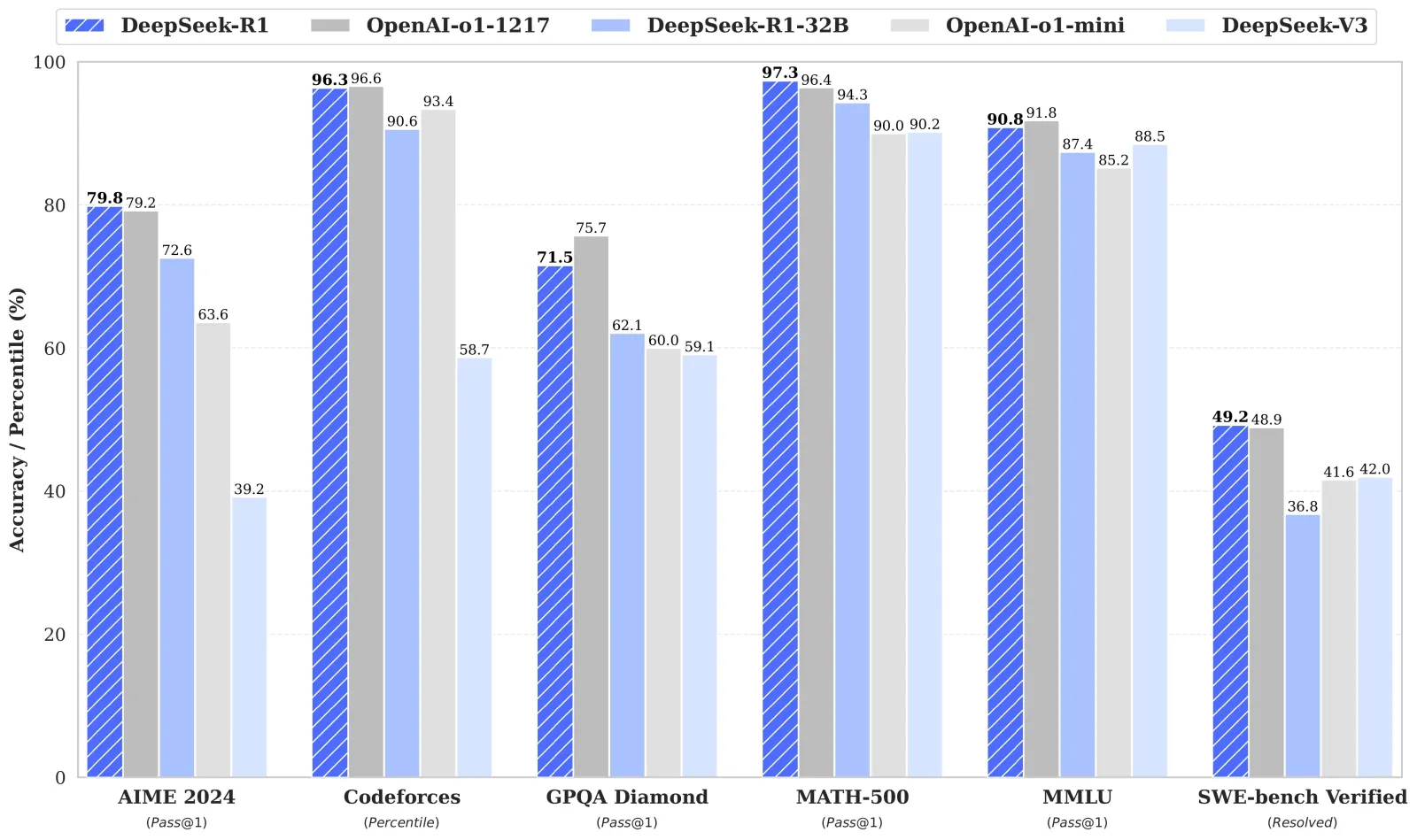
Let’s cut to the chase: How do they stack up? Here’s a snapshot of their benchmark scores and costs:
Benchmark
DeepSeek R1
OpenAI O1
Winner
AIME 2024 (Math)
79.8%
79.2%
DeepSeek R1
MATH-500 (Reasoning)
97.3%
96.4%
DeepSeek R1
Codeforces (Coding)
96.3%ile
96.6%ile
OpenAI O1
MMLU (General Knowledge)
90.8%
91.8%
OpenAI O1
Cost per 1M tokens
$0.55 (input)
$15 (input)
DeepSeek R1 (95% cheaper)
R1 shines in math and software engineering, while O1 edges ahead in coding competitions and general knowledge. But the real kicker?R1’s API costs just 5% of O1’s—a game-changer for startups and researchers8.
Why Open-Source Matters
DeepSeek R1 isn’t just a model—it’s a statement. By open-sourcing R1 under an MIT license, DeepSeek invites developers to tweak, refine, and build upon its architecture. Need a smaller, faster version? They’ve already distilled R1 into six variants (like Qwen-32B and Llama-70B) that outperform even GPT-4o in niche tasks28.
Compare this to OpenAI’s “walled garden” approach. While O1 offers polished performance, its closed nature limits customization and transparency. For example, DeepSeek R1’s training pipeline—revealed in its technical report—shows how RL can replace costly SFT data, a breakthrough for resource-strapped teams68.
The Bigger Picture: What This Means for AI
Democratizing AI Innovation: R1’s affordability and accessibility lower the barrier to entry. A solo developer can now experiment with a model rivaling O1’s capabilities—something unheard of in the billion-dollar AI race810.
Ethical Trade-Offs: Open-source models like R1 raise concerns about misuse (e.g., generating harmful content), but they also enable scrutiny. Proprietary models, while “safer,” operate in opacity510.
The Efficiency Revolution: DeepSeek trained R1 on a $6 million budget—a fraction of what OpenAI likely spent. This proves that smart resource allocation (like RL-driven training) can rival Big Tech’s brute-force spending16.
Should You Switch to DeepSeek R1?
For math/logic-heavy tasks: Yes. R1’s Chain-of-Thought reasoning excels here.
For general-purpose chatbots: OpenAI O1 still leads, but R1’s distilled models are catching up.
For budget-conscious projects: R1 is a no-brainer. At 95% lower costs, it’s ideal for prototyping18.
Personal Experience With R1: A Human Touch in AI Writing?
(Spoiler: I’m stealing this paragraph for my productivity newsletter)
I’ve been stress-testing DeepSeek R1 for the past few hours – coding Python scripts, drafting research summaries, and yes, even writing this blog section. What surprised me most wasn’t its math chops (though those are stellar), but how human its SEO copywriting felt.
When generating article drafts, most AI models make me feel like an editor battling robotic phrasing (“In conclusion, this revolutionary technology synergizes paradigm shifts!”). With R1, I simply added:
“Ensure the content is concise, flows naturally, and feels like an easy, relatable read.”
The result? Paragraphs that sounded like a colleague wrote them, not ChatGPT’s overly enthusiastic cousin. For coding tasks, it aced Python error debugging with clearer explanations than I’d get from Stack Overflow.
Why this matters: R1’s ability to grasp nuanced writing styles with minimal prompting (see their style guide tips) suggests open-source models are closing the “personality gap” that kept many businesses wary of AI content.
Final Thoughts
The DeepSeek R1 vs. OpenAI O1 rivalry isn’t just about benchmarks—it’s a clash of philosophies. Will open-source, community-driven AI overtake proprietary giants? Early signs suggest yes. As one researcher put it: “R1 proves innovation thrives when knowledge is shared, not siloed.”
No. Google does not penalize content for being written by AI. Google penalizes content that is low-quality, unhelpful, or created purely to manipulate search rankings. The method of creation (human or AI) is irrelevant. What matters is whether your content answers the searcher's question, brings something new to the table, and demonstrates real experience. That is Google's official position, and that is what we see playing out in practice every single day.
If you have been holding back from using AI to write content because you are afraid of a penalty, you are leaving traffic (and money) on the table for no reason.
What Google Actually Said
In February 2023, Google published an official blog post titled "Google Search's guidance about AI-generated content." The message was clear:
"Our focus on the quality of content, rather than how content is produced, is a useful guide that has helped us deliver reliable, high quality results to users for years."
Google's spam policies target content created "with the primary purpose of manipulating ranking in search results." That applies to human-written content just as much as AI-written content.
John Mueller reinforced this in November 2025: "Our systems don't care if content is created by AI or humans. We care if it's helpful, accurate, and created to serve users rather than just manipulate search rankings."
The Helpful Content System, now baked directly into Google's core ranking algorithm, evaluates whether content is genuinely useful. It does not run an AI detector on your blog posts.
The Real Problem: Lazy Content, Not AI Content
Here is what actually gets penalized:
Scaled content abuse: Publishing hundreds of thin, templated pages with no original insight. Google started issuing manual actions for this in June 2025.
Zero value-add: Taking raw AI output and hitting publish without adding experience, editing for accuracy, or answering the search intent better than what already exists.
Keyword stuffing disguised as AI content: Using AI to generate walls of text stuffed with keywords but saying nothing useful.
None of these are AI-specific problems. People were doing all of this with human writers and content farms long before ChatGPT existed. Google has always penalized low-quality content. AI just made it faster to produce.
Stop Wasting Time on AI Content Detectors
This is where most people get it wrong. They spend hours running their content through AI detection tools, rewriting sentences to "sound more human," and stressing over detection scores.
AI content detectors are unreliable. They produce false positives constantly, flagging human-written content as AI and missing obvious AI content. Google has never confirmed using AI detection as a ranking signal. And why would they? Their entire position is that the method of creation does not matter.
The time you spend trying to fool a detector is time you could spend making your content actually better. Add a real example from your experience. Include a data point nobody else mentions. Answer a follow-up question your competitors ignore.
That is what moves rankings. Not a detection score.
What Actually Makes AI Content Rank
After working with hundreds of business owners in our AI Ranking community, the pattern is clear. AI content ranks when it does three things:
Answers the search intent directly. Not in paragraph five. In the first sentence after the heading.
Includes real experience. A case study, a personal result, a client story. Something an AI model could not have invented on its own.
Brings something new. If your AI-written article says the same thing as the top 10 results, why would Google rank it? You need an original angle, fresh data, or a perspective the other results are missing.
It does not matter whether you write it with Claude, ChatGPT, Gemini, or any other tool. The AI is the vehicle. The value is what you bring to it.
The Simple Workflow That Works
You do not need a complicated process. You need three documents and a clear set of instructions:
1. A Tone of Voice Document
Write down how you communicate. Are you casual or formal? Do you use analogies? What words do you never use? This keeps your AI output consistent across every piece of content.
2. An Experience Document
This is the most important piece. Dump everything you know about your topic into one document: client results, personal stories, lessons learned, data you have collected, opinions you hold strongly. The more specific, the better.
3. A Set of Writing Instructions
Tell the AI to read both documents before writing. Tell it to weave in experience naturally, match your tone, and use the content capsule technique (a 40-70 word direct answer right after each heading). This gives you the highest chance of ranking in both traditional search and AI search results.
You can set this up in Claude Projects, a custom GPT, Claude Code, or any AI workspace that supports persistent context. The tool does not matter. The system does.
Bonus: Record a video first. If you film a YouTube video on the topic and then write the blog post around it (embedding the video), you get two pieces of content that reinforce each other. Blog posts with embedded YouTube videos get selected for AI Overviews 156% more often.
Proof: Community Members Ranking with AI Content
This is not theory. These are real results from people in our community using AI-written content.
Michael Hunter: Page One Rankings Overnight
Michael published an AI-written article about cleaning pearls. The next day, it was ranking on page one of Google. No manual rewriting to "remove AI traces." No running it through detectors. He focused on making the content genuinely helpful for someone searching that topic, and Google rewarded it immediately.
Tim Armstrong: Closing Deals from ChatGPT Recommendations
Tim's client is not just ranking in Google. ChatGPT is actively recommending his client's business. One retired customer walked in and said, "ChatGPT told me you might be the best option in America for this." They closed that deal.
This is the new reality. When you create genuinely helpful, experience-rich content (regardless of whether AI helped write it), you do not just rank in Google. You get cited in AI search tools like ChatGPT, Perplexity, and Gemini. That is where search is heading, and it makes the "does Google penalize AI content?" question almost quaint.
What the Data Shows
A 2025 study by Rankability analyzed 487 top Google search results and found that 83% scored as "original" (non-AI) content. Some people use this to argue Google prefers human content. But that misses the point.
Most AI content published today is low-effort, unedited output. The 17% of AI content that does rank is the content where someone added genuine value on top of the AI draft. That is the gap you should be exploiting: most of your competitors are either avoiding AI entirely (leaving speed on the table) or using AI lazily (leaving quality on the table). Do both well and you win.
The Google Quality Rater Guidelines Update
In early 2025, Google updated its Search Quality Rater Guidelines with specific instructions about AI content. Quality raters (the humans who evaluate search results to train Google's algorithms) are now told to flag AI content that adds no original value, insight, or expertise with the "lowest" rating.
But the guidelines also make clear: AI-assisted content that demonstrates E-E-A-T (Experience, Expertise, Authoritativeness, Trustworthiness) is perfectly acceptable. The first "E" (Experience) is key. That is the one thing AI cannot fake on its own. You have to bring it.
The Bottom Line
Google does not care how you write your content. Google cares whether your content deserves to rank.
Use AI to write faster. Use your experience to write better. Combine the two with a simple system (tone of voice, experience document, clear instructions) and you will outperform both the people avoiding AI and the people using it lazily.
Stop worrying about detectors. Start creating content that actually helps people. That is what ranks in 2026.
Frequently Asked Questions
Does Google penalize AI-generated content?
No. Google's official policy states they reward helpful, people-first content regardless of how it is produced. Content gets penalized for being low-quality or manipulative, not for being AI-generated.
Can Google detect AI-written content?
Google has not confirmed using AI detection in their ranking algorithms. Their focus is on content quality signals like E-E-A-T (Experience, Expertise, Authoritativeness, Trustworthiness), not on detecting the method of creation.
Should I use AI content detectors before publishing?
No. AI content detectors are unreliable and produce frequent false positives. Your time is better spent improving the content itself: adding personal experience, unique data, and genuinely answering the search intent.
What is scaled content abuse?
Scaled content abuse is when websites mass-produce low-quality content (often with AI) purely to manipulate search rankings. Google began issuing manual actions for this in June 2025. The issue is the low quality and manipulative intent, not the use of AI.
How do I make AI content rank in Google?
Focus on three things: answer the search intent directly, include real experience and original insights, and bring something new that competitors are not covering. Use a tone of voice document and an experience document to guide your AI tool.
Does AI content rank in ChatGPT and Perplexity too?
Yes. Helpful, experience-rich content gets cited across AI search tools. Community members have reported being directly recommended by ChatGPT to potential customers, leading to closed deals.
Cmux is a free, open-source terminal app that lets you run multiple Claude Code agents at the same time, each in its own workspace with notifications when they need your input. It replaces the chaos of juggling terminal windows with organized tabs, split panes, and a built-in browser. If you want to get 10x more out of your Claude Code subscription, this is the tool to install today.
30 sec readSkip to full article below
What Is Cmux and Why Should You Care?
Cmux is a free, open-source terminal application built specifically for running multiple Claude Code agents at the same time. Each agent gets its own workspace with its own notifications, so you always know which one needs your attention and which one is still working.
Here is the problem it solves. If you have been using Claude Code for a while, your desktop probably looks like a disaster zone: six terminal windows scattered across three desktops, no idea which one is waiting for permission, and you only realize 30 minutes later that an agent was blocked the whole time. Sound familiar?
Cmux fixes all of that by giving you organized workspaces, tabbed sessions, split panes, and real-time notifications in one clean interface. It genuinely makes working with Claude Code about 10x faster (and at least 10x tidier).
How Do You Install Cmux?
Installation is straightforward. Head to cmux.com, download the app, and install it. One important note: as of March 2026, Cmux is only available for Mac. Windows users will have to wait for now.
Once installed, sign in and it automatically connects to your existing Claude Code account. You are essentially opening Claude Code from within Cmux, so there is no extra configuration needed.
A few keyboard shortcuts to know right away:
Command + N: New workspace
New tab: Opens a new tab within the current workspace
Split down / Split right: Divide your workspace into multiple panes
Command palette: Quick access to all features
Rename workspace: Keep things labeled and organized
What Does a Typical Cmux Workflow Look Like?
The real power of Cmux shows up when you start running multiple agents on different tasks. Here is how a typical session works.
First, create a new workspace and point it at your project folder. Go to File > Open Folder and select your working directory. Rename the workspace to something descriptive (like "Blog & SEO" or "Client Project"). Then start Claude Code in that workspace.
Now open a second tab in the same workspace. This new tab inherits the same folder context, so you can spin up another Claude Code agent on a different task within the same project. One agent could be researching a topic while the other runs an automated SEO workflow.
Here is where the magic happens: when one agent needs your input, a blue notification icon appears on that workspace tab. You can see at a glance which agents are running, which are done, and which need your attention. No more checking every terminal window manually.
Why Is Running Multiple Claude Code Agents So Powerful?
Running multiple agents simultaneously is the single biggest productivity unlock for Claude Code users. Instead of waiting for one task to finish before starting the next, you can have several agents working in parallel.
One of our community members, Steven, built over 800 location pages using multiple Claude Code agents, generating 105 appointments per month with pages indexing in under an hour. That kind of output is only possible when you can run agents in parallel without losing track of what each one is doing.
Yes, and it is surprisingly useful. Cmux includes a built-in browser that opens right inside your workspace as a split pane. You can trigger it from the toolbar or ask Claude Code to open it directly.
Scrape and research: The browser can interact with web pages, fill out forms, and pull data
Safety: This browser instance is sandboxed and not connected to your Chrome sessions, logins, or extensions
It is not going to replace your main browser, but having a quick browsing surface right inside your coding environment saves a lot of context switching.
How Does Cmux Compare to Just Using Multiple Terminal Windows?
You could absolutely keep using multiple terminal windows. Nobody is stopping you. But here is what you are giving up:
Notifications: Regular terminals do not tell you when Claude Code needs input. Cmux does, with visual indicators on each workspace tab.
Organization: Cmux gives you named workspaces with tabs inside each one. Regular terminals give you a pile of identical-looking windows.
Folder context: Each Cmux workspace remembers its project folder. New tabs inherit that context automatically.
Split panes: Run two agents side by side (or stack them vertically) without any window management gymnastics.
Built-in browser: See your frontend renders without switching apps.
The difference is not about capability. Claude Code works the same either way. The difference is about workflow efficiency. When you are running 5, 10, or 20 agents, the organizational layer that Cmux provides becomes essential.
What Are the Best Use Cases for Cmux?
Cmux shines brightest in these scenarios:
SEO at scale: Run one agent on content creation, another on technical audits, and a third on AEO/GEO optimization
Multi-project management: Separate workspaces for each client or project, with dedicated agents in each
Research + execution: One agent researches while another implements. No waiting around.
Website development: Use the built-in browser to preview your AI-built website while Claude Code makes changes
Even if you only run two agents at a time, the notification system alone is worth the install. Knowing exactly when an agent needs you (instead of checking every few minutes) saves a surprising amount of time over a full workday.
Is Cmux Worth Installing Today?
If you use Claude Code regularly, yes. Without question. It is free, it takes two minutes to install, and it immediately makes your workflow cleaner and faster.
The biggest win is not any single feature. It is the combination of workspaces, tabs, notifications, and the built-in browser all working together to keep you in flow. You spend less time managing terminals and more time actually getting work done.
Download it from cmux.com and try running two or three Claude Code agents in parallel. Once you see those notification badges light up and realize you never have to hunt through terminal windows again, you will not go back.
And if you want to learn how to use tools like Cmux, Claude Code, and AI agents for marketing and SEO, check out our community at AI Ranking. We have got members building real businesses with these exact workflows.
The Big Story: Anthropic Named "Most Disruptive Company in the World"
TIME dropped a bombshell profile this week, naming Anthropic the most disruptive company in the world. The headline stat: Claude Code alone generates $2.5B in annualized revenue, and competing software companies have lost $300B in market value as a result.
But the real story goes deeper. The profile revealed a dramatic standoff with the Pentagon. CEO Dario Amodei refused to allow Claude in fully autonomous weapons systems or mass domestic surveillance. Secretary of Defense Pete Hegseth rejected those constraints, and the Trump administration designated Anthropic a "supply-chain risk to national security" on Feb 27. That is the first such designation against a U.S. company.
Meanwhile, Claude Opus 4.6 independently solved an open graph theory conjecture that legendary computer scientist Donald Knuth had been working on for weeks. Knuth published a paper titled "Claude's Cycles" and wrote: "It seems I'll have to revise my opinions about generative AI one of these days."
Let that sink in. An AI model solved a problem that one of the greatest computer scientists alive couldn't crack.
Anthropic: 10 Claude Code Releases in 12 Days
Anthropic shipped at a breakneck pace this week. Here are the highlights:
One more thing: Anthropic publicly accused DeepSeek, Moonshot AI, and MiniMax of creating 24,000+ fraudulent accounts and running 16M+ interactions to extract Claude's capabilities. The distillation war is heating up.
OpenAI: GPT-5.4 Brings Computer-Use to the Masses
GPT-5.4 launched March 5 in three variants: standard, Thinking (reasoning), and Pro (max performance). The standout features:
OpenAI also retired GPT-5.1, auto-migrating all conversations to GPT-5.3/5.4. And ChatGPT for Excel entered beta, letting you build, update, and analyze spreadsheets directly inside Excel.
For SEO professionals and content creators, the computer-use feature is the one to watch. Imagine ChatGPT handling your CRM updates, posting to platforms, or managing spreadsheets from email data, all without custom integrations.
Google Gemini: Workspace Takeover and Apple Partnership
Google made several significant moves this week:
The Apple and Samsung deals are massive for AI search. When Siri runs on Gemini and 800M Samsung devices have it built in, AI-mediated discovery becomes the default for billions of users. If you are not optimizing for AI comprehension yet, the window is closing.
Google also introduced Groundsource, a new methodology that uses Gemini to transform unstructured global news into actionable historical data. And DeepMind's Genesis Mission is now supporting the White House national AI initiative to accelerate scientific discovery across DOE's 17 National Laboratories.
Meta: Llama 4 Goes Open-Source Multimodal
Meta released Llama 4 Scout and Maverick, their first open-weight natively multimodal models using mixture-of-experts (MoE) architecture. Both are available on Hugging Face.
Llama 4 now powers Meta AI across WhatsApp, Messenger, Instagram Direct, and meta.ai. Meta also awarded $1.5M in Llama Impact Grants to 10 international projects.
The key takeaway for creators: a free, open-source model now legitimately competes with paid options. That changes the economics of AI-assisted content creation.
A March 9 website update showed expanded context handling, with the community calling it "V4 Lite," though nothing is confirmed. DeepSeek is also developing the model in collaboration with Huawei and Cambricon chipmakers.
Their recently released Kimi K2.5 features an "agent swarm mode" that directs up to 100 sub-agents in parallel, with coding benchmarks comparable to GPT-5 and Gemini. Notably, their overseas revenue now exceeds domestic, signaling real global traction.
What This Means for SEO Professionals and Creators
AI crossed a capability threshold this week
Claude solving an open math conjecture and GPT-5.4 shipping native computer-use are not incremental updates. They represent AI moving from "tool that helps you write" to "collaborator that thinks and acts." For content creators, AI-assisted research and production are getting dramatically better at depth and originality. If you are competing on content quality, the bar just rose significantly.
Computer-use is the next automation frontier
GPT-5.4 can now operate your browser and desktop apps, not just generate text. Combined with its Excel integration, ChatGPT can handle tasks like updating spreadsheets from emails, posting to platforms, or managing CRM entries without custom integrations. Claude in PowerPoint means AI-generated presentations with real charts and diagrams. For SEO professionals specifically, Claude's 1M context window means feeding entire websites into a single conversation for comprehensive audits, eliminating the old workflow of breaking content into chunks.
The AI search landscape is fragmenting fast
Google Gemini integrating into Workspace, powering Apple's Siri, and targeting 800M Samsung devices means AI-mediated discovery is going mainstream at massive scale. Meta pushing Llama 4 into WhatsApp, Messenger, and Instagram creates yet another AI search surface. SEO strategies must now account for AI comprehension channels, not just traditional search results. Businesses that optimize for structured data, clear entity relationships, and authoritative sourcing will have a significant advantage as these AI interfaces become primary discovery channels.
Video Opportunity Ideas
Looking for your next content idea? Here are four timely topics with strong potential:
1. "ChatGPT Can Now Control Your Computer (I Tested It)"
GPT-5.4's native computer-use is a first for a general-purpose model. Demo it live: have ChatGPT navigate websites, fill forms, manage spreadsheets. Show practical use cases for business owners. Just launched Mar 5, so there is major first-mover advantage on YouTube.
2. "The AI Distillation War: Anthropic Caught DeepSeek Stealing Claude's Brain"
24,000 fake accounts, 16M interactions, three Chinese AI labs caught red-handed. Explain what distillation means, why it matters, and what it means for the AI tools people use daily. The Pentagon standoff adds a geopolitical layer. Drama + geopolitics + AI = algorithm gold.
3. "Claude's 1M Context Window Changes Everything for SEO"
Directly relevant to the AI Ranking audience. Demo feeding an entire website into Claude and getting a comprehensive SEO audit in one shot. Compare to the old workflow of breaking content into chunks. Practical, tutorial-style content that your audience needs to know about.
4. "FREE AI That Beats ChatGPT? I Tested Llama 4 Maverick"
Meta's Llama 4 Maverick is free, open-source, and claims to beat GPT-4o. Run a head-to-head comparison on real tasks (blog writing, SEO analysis, code generation). The "free vs paid" angle always performs well, and "free AI" keywords have strong search intent.