
Explore Our Latest Insights
Stay updated with our expert SEO and AI tips.
Featured blog posts
72% of all content cited by AI search engines has one thing in common.
It's not backlinks. It's not domain authority. It's a simple way to structure your content that takes about five minutes to implement.
And this isn't just theory from some research paper. Our community members are getting real results with this. They're getting cited by Google AI Overviews in Ireland. They're seeing more impressions and clicks. One member even had ChatGPT recommend them as "the best option in America" for a mortgage - and they closed that client the next day.
So how the hell does this work?
Traffic Is Down. But That's Not Necessarily Bad News.
Let's be honest - traffic is down for everyone.
HubSpot was one of the most trafficked websites in the world. Their blog traffic dropped by 80% in 10 months. They went from 24.4 million organic visits in March 2023 to just 6.1 million by January 2025.
If that can happen to HubSpot, it can happen to anyone.
But here's the thing - this isn't necessarily a death sentence if you understand what's happening.
We've entered what I call the citation economy. Clicks aren't as valuable as they used to be, but citations are extremely valuable. If you're not cited by the AI search engines, you're essentially invisible.
And whilst overall traffic is down, the traffic you CAN get from AI search engines - if you understand this strategy - converts significantly better:
- Ahrefs found that AI search visitors convert 23 times better than traditional search visitors
- Semrush's research shows AI search visitors are 4.4x more valuable on average
- Seer Interactive's case study found ChatGPT traffic converted at 15.9% compared to Google organic at 1.76%
Less traffic, but way better quality. I can work with that.
Before We Go Further: You Still Need Valuable Content
I want to make one thing very clear before we get into the technique.
This strategy by itself isn't enough. You need good content along with it.
Google gives you very blase examples of what "good content" means. So let me give you some structured fundamentals:
What makes content valuable:
- Updated data - Original statistics, research, or synthesized information that's easier to understand
- Clear opinions backed by data - Don't just state facts, have a perspective
- Practical explanations - Show people how to actually do something
- Original workflows - Maybe you've built automations or found tools that help you work better
- Personal experience - Case studies, things you've learned throughout your career
That last one tends to work the best. Real experience is something AI can't easily replicate.
Once those fundamentals are done, we can move into the technique.
The Capsule Content Method
Fancy name, but very easy execution.
The technique can be encapsulated in three main things:
1. Write Short Answers (Around 150 Characters)
Under every heading that asks a question, write a brief answer - about 30-50 words or roughly 150 characters.
According to Search Engine Land's study of 8,000 AI citations, 72% of pages cited by ChatGPT had an answer capsule present. It's the single most consistent predictor of AI citation.
2. Zero Links in That First Answer
Keep that initial answer clean. No links, no references - just a direct, confident answer.
This makes it a lot easier for the AI to extract and cite that paragraph.
3. Answer First, Explain Later
Essentially, you want to answer the question right away, then provide more context and depth afterward.
Really, to make it simple, keep one question in mind when you're writing:
"Can someone understand this paragraph without reading anything else on the page?"
Is this paragraph encapsulated by itself? Can the AI just grab it and use it as a source?
Bad Example vs Good Example
Let's say you're writing a blog post about SEO and you have an H2 asking "What is Technical SEO?"
Bad Example (The Way Most People Write)
"In today's digital landscape, businesses are increasingly looking for ways to improve their online presence. SEO has evolved significantly over the years, and in this comprehensive guide we'll explore..."
Way too long. No direct answer. AI is going to skip right over this.
Good Example (The Capsule Method)
"Technical SEO is the process of optimizing your website's infrastructure so that search engines can crawl, index, and rank your pages effectively."
Done. That's the answer right there in the first sentence. Now you can elaborate with more detail below it.
Real-World Proof This Works
You've probably read content structured this way - you just didn't notice it.
When I Googled in AI mode "what is the best way to write content that will get cited by AI search engines?", the most cited source was this article from Semrush.
Looking at that content through the lens of the capsule content technique:
The first H2 asks: "What is AI search and why should I care?"
And right below that: "AI search engines use large language models to generate complex answers using trusted content from the web. Instead of showing a list of links like traditional search engines, AI search engines deliver a single synthesized response."
They answered that right away, then gave more information.
This makes it extremely easy for AI to cite that as a source.
The Statistics Back This Up
The research supports this approach:
- Content structure matters: Pages using 120-180 words between headings receive 70% more ChatGPT citations than pages with sections under 50 words
- Self-contained answers win: AI prioritizes passages that fully answer queries in 134-167 word self-contained units
- Question-based headings boost citations: Using question-format headings and FAQ sections significantly increases your chances of being cited
- Original insights matter: Content containing information not easily found elsewhere is the second-strongest differentiator for cited pages
- Fresh content gets more citations: Content updated in the past three months averages 6 citations versus 3.6 for outdated pages
How to Rewrite Your Existing Content (Without Taking Ages)
Here's the process I use:
Step 1: Use the Prompt
I've created a prompt that analyzes your content for "capsule readiness." You can use it with ChatGPT, Perplexity, or any LLM with internet access.
The prompt will:
- Give you a citation readiness score
- Analyze each section of your content
- Show you which headings should be reformatted as questions
- Provide suggested rewrites for your answer capsules
Step 2: Check the Criteria
The prompt will tell you things like:
- Does this content have answer capsules present?
- Are headings formatted as questions?
- Are there clear structured lists?
- Is there original data or insights?
Step 3: Rewrite Your H2s as Questions
This is where the magic happens.
Current H2: "Retirement Investment Vehicle Overview"
Suggested Rewrite: "What Are the Main Retirement Investment Vehicles?"
Simple change. Drastic positive consequences.
Step 4: Add the Answer Capsule
Current opening: "When it comes to stacking cash for those golden years, you've got solid options on the table."
Capsule rewrite: "IRAs, 401k plans, and annuities are the primary retirement investment vehicles that help you grow and protect your savings."
Gets right to the point. Now you can add the conversational tone and additional detail below it.
This isn't about changing your tone of voice or completely rewriting everything. Just keep that one question in mind: can this be understood and cited as a standalone answer?
Where to Start: Find Your Second-Page Content
If you've got a bunch of content on your website, you might be wondering where to begin.
Here's the strategy: find all the pages or blog posts ranking on the second page of Google.
How to Find These Pages:
- Go to Google Search Console
- Navigate to Performance
- Make sure Average Position is selected
- Filter to show pages ranking between positions 8-20
These are your golden opportunities. This content is already in Google's database - it's just not ranking well enough.
The reason I target second-page content:
- It's already indexed
- Google already sees it as relevant to the query
- A small improvement can push it to page one
- Page one content has a much higher chance of being cited by AI
According to research, 76.1% of URLs cited in AI Overviews also rank in the top 10 of Google search results. Get to page one first, then watch the AI citations follow.
Community Results
This stuff actually works. Our community members are seeing real results:
Tim Armstrong had a client closing a mortgage deal directly from a ChatGPT recommendation. The customer came in saying "ChatGPT told me you might be the best option in America for this." That wasn't even a click - it was GPT practically handing the client a lead because good on-site SEO was done.
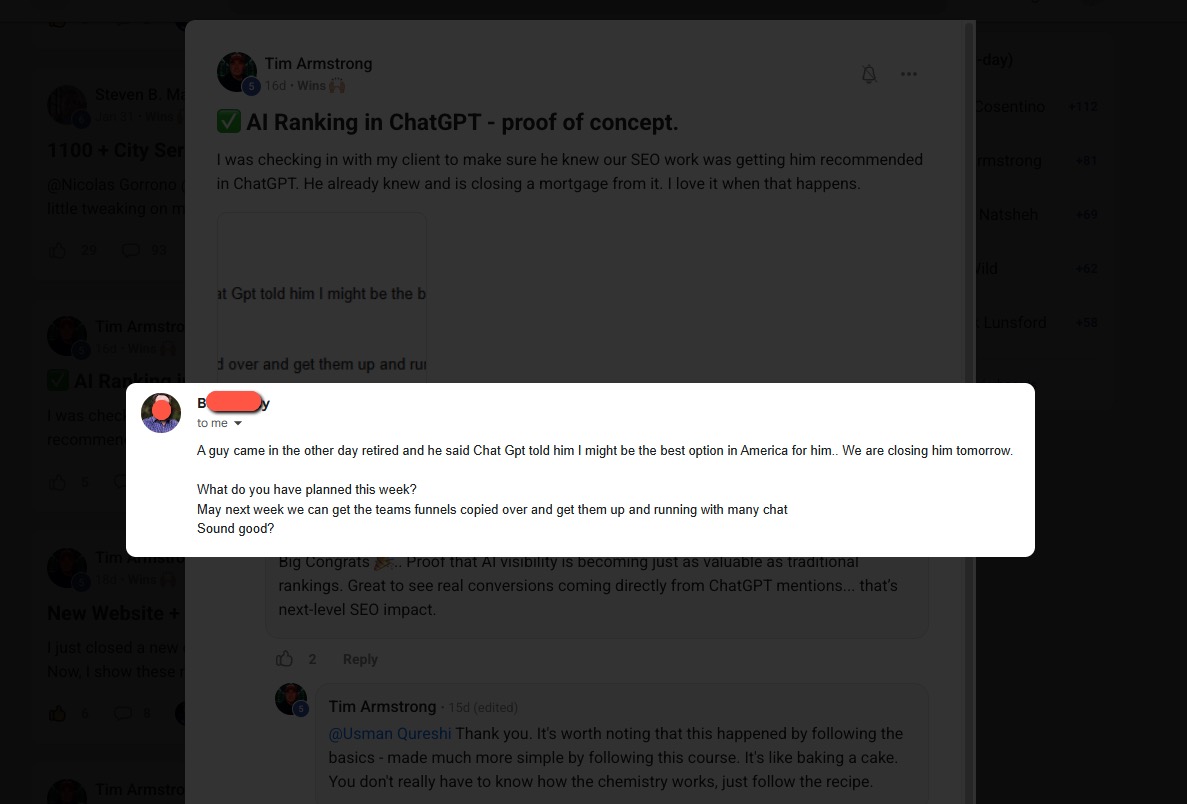
Members in Ireland are getting cited in Google AI Overviews after implementing just a fraction of this strategy.
William Moon, a financial advisor in Arizona, went from nearly zero clicks despite ranking #1, to closing a $165,000 retirement planning client after optimizing his content structure. His CTR went from 0.3% to 2.3% - a 7x increase.
The Bottom Line
The citation economy is here. Traffic is down across the board, but the brands getting cited in AI Overviews are seeing 35% higher organic CTR and 91% higher paid CTR compared to non-cited brands.
The Capsule Content Method is straightforward:
- Format your H2s as questions
- Answer in the first 150 characters (30-50 words)
- Keep that answer clean - no links
- Then elaborate with more detail, examples, and context
It takes about five minutes to implement per section. The results can be dramatic.
Remember: This doesn't replace good SEO fundamentals. You still need valuable content, proper on-site optimization, and everything else that makes a website trustworthy.
GEO without SEO is like trying to swim butterfly without learning to swim first. Get the fundamentals right, then structure your content so AI can actually cite you.
Next Steps
Want to dive deeper into AI search optimization? Here are some resources:
- How to Do SEO for SearchGPT - A complete guide to optimizing for AI search engines
- SEO in the Age of AI: Why Your Clicks Are Disappearing - Understanding the shift to zero-click searches
- Turn Claude 4 Into Your Own Personal SEO Assistant - How to build AI-powered SEO workflows
And if you want more hands-on support with live Q&A calls where I can look at your website and give you specific advice, consider joining the AI Ranking Skool community.
.webp)
The Capsule Content Method: How to Get Cited by ChatGPT, Perplexity, and Google AI Overviews

AI Content Writing Checklist for SEO
Follow these 5 essential principles to create AI-assisted content that ranks and resonates
It's Okay to Use AI for Content
Google has been crystal clear: it's not about how you create content, but whether you're answering user search intent. The focus is on quality, helpfulness, and relevance (not the tools you use). AI can be a powerful ally in your content creation, as long as you follow these proven principles.
1. Inject Your Experience
AI can generate information, but it can't live your life. This is where you gain an unbeatable advantage. Your personal experience, client stories, real-world lessons, and unique insights add the "Experience" in E-E-A-T that AI simply cannot replicate.
"When I helped a SaaS client restructure their pricing page in 2023, we saw a 34% increase in conversions within 60 days. The key wasn't adding more features, it was simplifying the decision-making process by reducing options from five tiers to three."
"Pricing pages are an important part of any website. To optimize your pricing page, consider simplifying your options and making it easier for customers to make decisions. This can lead to increased conversions."
2. Be Precise, Cut the Fluff
Don't chase arbitrary word counts. More words don't equal better content (depth beats length every time). Structure your content to answer questions precisely, especially in your H2s and H3s.
H2: How Long Does It Take to Rank on Google?
Most new websites take 3-6 months to rank for competitive keywords, though low-competition terms can rank within weeks.
Factors include domain authority, content quality, and backlink profile.
H2: Google Ranking Timeline
When you're thinking about SEO, there are many factors to consider. First, we need to understand search engines.
Google is the most popular search engine in the world and has a complex algorithm...
3. Write at an 8th-Grade Reading Level
This isn't about dumbing down your content (it's about accessibility). The majority of online readers prefer clear, straightforward language. Avoid unnecessary jargon and complex phrasing that creates barriers.
"Email marketing helps you build relationships with customers by sending them valuable content directly to their inbox."
"Email marketing facilitates the cultivation of symbiotic customer relationships through the strategic dissemination of value-added digital correspondence to individual electronic mailboxes."
4. Back Up Statements with Data
Numbers and statistics aren't optional (they're essential for credibility). Every claim needs supporting data, and every stat needs a link to the high-quality source where you found it. This builds trust with both Google and your readers.
"According to a 2024 HubSpot study, companies that blog consistently generate 67% more leads per month than those that don't."
"Blogging is one of the most effective ways to generate leads for your business. Many successful companies use blogging as their primary marketing strategy."
5. Add Supporting Visuals
Remember, you're writing for humans, not just search engines. Break up text walls with images, screenshots, diagrams, charts, and illustrations. Visuals should add value and enhance your points (not just serve as decoration).

AI Content Writing Checklist
Background
Steven B. Marks, a member of our premium community, came to the group in November 2024 with a simple but powerful question: Should I create city pages for my client’s local SEO strategy? His client had four physical locations but wanted to target an entire state for one key service. The challenge was clear: without Google Business Profiles (GBPs) for every city, how could they capture that traffic?

The advice given was to build city-specific service pages: highly targeted pages optimized for transactional keywords like “plumbing services in Houston” or “24-hour emergency plumbing services in Houston.” This approach sparked a journey that completely transformed his client’s business.
Strategy Breakdown
1. Transactional Keyword Focus
Rather than chasing broad informational queries (which are increasingly answered by AI Overviews and GPT search), the strategy honed in on transactional intent keywords. These are the searches people make when they’re ready to buy or book, making them far more valuable.
2. Service + City Page Mapping
- Create a hub page for each city: e.g. “Plumbing Services in Houston.”
- Under that hub, build individual service pages: e.g. “24-hour emergency plumbing in Houston,” “pipe repair in Houston,” etc.
- Every service has its own page. No dumping everything onto one catch-all page.
3. Handling Duplicate Content Concerns
Many hesitate to create city/service combinations out of fear of duplication. Steven’s approach avoided issues by:
- Customizing title tags and HTML headers
- Using schema markup to signal exactly what each page covered
- Ensuring each page had unique value signals for Google
4. Indexing Best Practices
Don’t try to index everything at once. Roll pages out gradually, about 10 per week, so you don’t throw up red flags to Google. This slower pace also gives you time to check whether new pages are actually getting indexed. If you see the dreaded “crawled but not indexed” message (Google’s polite way of saying, “I read your page, I just don’t like it”), fix those issues before pushing hundreds more pages live.
5. Scaling with Automation
Creating thousands of service + city pages doesn’t have to mean thousands of hours of manual work. The process can (and should) be automated.
Why Segmenting Matters
When building at scale, resist the temptation to generate full pages in a single GPT or Claude prompt. Doing it in one shot leads to problems:
- Inconsistent word counts
- Variations in tone and style
- Higher risk of hallucinations
Instead, segment each page into structured sections and generate them individually. For example:
- context section
- Why hire us in {location}
- benefits of {service}
- FAQ section
- {on page schema}
- Meta Description
Each section is handled by a different automation node, ensuring consistent structure across all pages.
Example Build
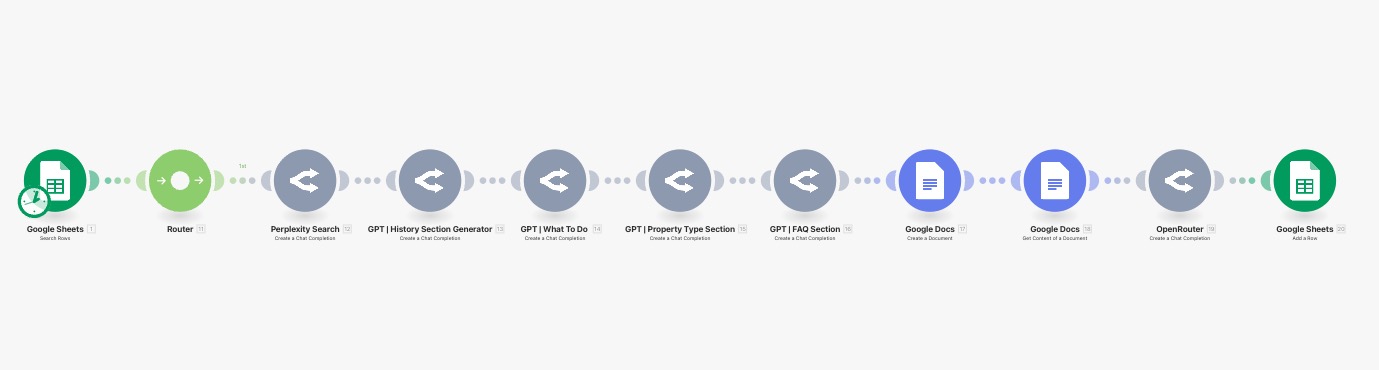
The screenshot provided shows a real automation flow:
- Google Sheets provides the data inputs.
- Router distributes the tasks.
- Each GPT node creates one section of the page.
- Google Docs assembles the final draft.
- The output is pushed back to Sheets for tracking.
Benefits of This Approach
- Scalability: You can generate 1,000+ pages with the same structure, adjusting only the local service and city.
- Consistency: Pages look uniform while still being tailored to each location.
- Efficiency: The process is fast and cost-effective—limited only by your API budget.
With this method, producing hundreds or even millions of pages is possible without sacrificing quality or spending endless hours writing.
Results
- November 2024: Started with just 127 indexed pages.
- April/May 2025: Over 1,122 pages indexed. Phones and calendars flooded with leads.
- January 2025: Client hit 99 booked appointments in one month (not counting phone bookings). Best month ever.
- August 2025: Google Search Console shows 1,200 clicks in 28 days, up from just 600 in April 2023.
- Business Impact: Client had to hire additional attorneys and paralegals to handle demand. Filing totals for 2025 are already surpassing previous years, with months left to go.
- Zero Ad Spend: All growth came from organic traffic.

Why This Worked
- Scalability: Hundreds of city + service combinations covered all the transactional keywords competitors ignored.
- High Intent: Focused traffic meant higher conversions, not just vanity metrics.
- Community Collaboration: The original idea came from sharing openly in the community, which gave Steven the confidence to execute.
Key Lessons
- Don’t lump all services into one generic “Our Services” page.
- Map out every service you want to rank for, then replicate it across every city you want visibility in.
- Transactional keywords are where the money is. Informational queries are often swallowed by AI Overviews.
- Organic traffic can outperform paid ads when structured correctly.
Final Word
What started as a question about whether to create city pages turned into a textbook example of local SEO domination. With no ad spend, Steven’s client now enjoys record-breaking growth, proving that the right content structure can scale a business faster than most people imagine.
If you want to learn how to do this and get support from an active community, consider joining us at AI Ranking Premium.

Local SEO at Scale: A Case Study in City Page Domination
With GPT‑5, OpenAI has basically simplified the whole “which model do I pick?” dilemma down to three core modes. Auto. Fast. Thinking. That’s it. But there’s nuance in how and when you should use each one. And trust me, if you get this right, you’ll save yourself time, frustration, and possibly a few grey hairs.
1. GPT5 Model Selection
Auto
Auto is like the GPS of GPT‑5. You tell it where you want to go, and it decides the best route. If your request is simple, it’ll quietly send it through Fast. If it senses complexity, it’ll switch to Thinking without you lifting a finger. It’s smart. But sometimes it’ll overthink a “what’s the capital of Chile?” type of question and route you to Thinking. Slightly annoying, but that’s just how OpenAI optimised GPT‑5 to balance compute efficiency.
OpenAI has been pretty upfront about this: one of the big pushes with GPT‑5 was to cut down on server strain while giving us better reasoning capacity at scale.
Fast
This is your go‑to for 99% of tasks. Quick answers, brainstorming, simple copy. If you’re drafting an email subject line or asking it to summarise a short text, Fast is perfect. It’s built to be responsive – you’ll actually feel the difference. In many ways, this is a little bit what GPT‑4o felt like: snappy, fast responses that made everyday tasks flow smoother... except now its smarter.
Thinking
Thinking mode is where GPT‑5 flexes. It’s slower, yes, but with a massive 196k token context window (about 4x GPT‑4o’s). Use it when you’re doing deep strategy work, coding problems, or anything with multiple moving parts. The trade‑off is speed, but the payoff is accuracy and depth.
Legacy Models
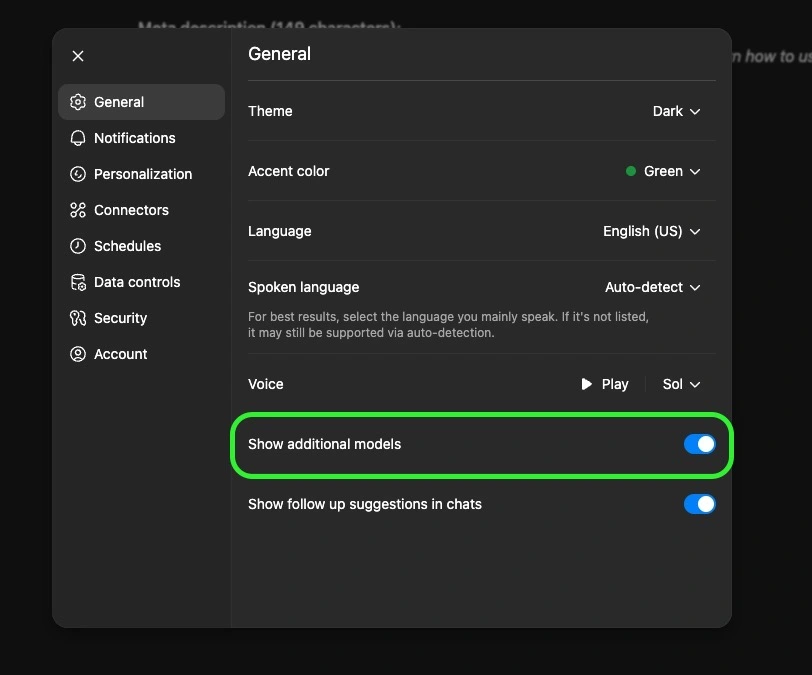
Missing your old friends GPT‑4o, 4.1, o3? They’re still tucked away. Go into Settings → General → Show additional models. Flip that toggle, and you’ll see them under the “Legacy Models” dropdown. Not essential for most people, but nice to have in case you want to compare outputs.
2. Tools You Actually Need to Know
Here’s where GPT‑5 goes from “chatbot” to “Swiss army knife.” These tools are what make the Plus plan worth it.
Add Photos & Files
Upload up to ~20 files at once. Docs, spreadsheets, PDFs, even images. This turns GPT into a multi‑modal assistant, it can read your PDFs, analyse your data, or even look at a photo and give insights. Super useful for research and SEO workflows (think uploading a CSV of keywords or a competitor’s brochure).
Search
Search gives GPT real‑time internet access. Officially, it’s powered by Bing. Unofficially, some SEOs testing the responses claim it’s pulling Google results more often than not. Either way, the point is: this is your way to cut hallucinations and get fresh data.
*Important side note* more and more sites are blocking AI crawlers (Cloudflare being the biggest culprit). So don’t assume GPT can access every corner of the internet. But when it works, it’s gold.
Deep Research
This is not just “search but slower.” It’s a Plus‑exclusive mode that basically turns GPT into your AI research assistant. Instead of a quick lookup, it actually performs multi‑step searches, not just scanning the top answers, but digging deeper into related areas, following interesting leads, and going further down the rabbit hole until it collects all the useful information. It’ll then spend 2–30 minutes combing sources, asking you clarifying questions, and producing a fully cited report.
Limits: ~25 deep research sessions/month on Plus. But that’s plenty if you save it for the big stuff – competitor analysis, market research, or building the foundation for a new content campaign.
Agent Mode
Think of Agent Mode as hiring an AI intern who also knows how to use a computer. It can:
- Browse sites like a human (click links, fill out forms).
- Run code in a terminal.
- Pull data into spreadsheets.
- Generate slide decks with charts.
- Even generate leads.
The key difference: unlike normal GPT where you guide every step, an Agent executes multi‑step workflows autonomously. You stay in control (it’ll ask permission before big actions), but this is the closest thing to an AI employee. And just to be clear, OpenAI isn’t the only one with this kind of autonomous agent tools like Manus or GenSpark offer similar functionality. Personally, I like having everything under one subscription, but it could be worth testing those out too since they bundle in other useful tools.
Canvas
Canvas is my personal favourite. It’s basically a Google Docs‑meets‑GPT editor where you and the AI can write side‑by‑side. Instead of GPT spitting out text in chat for you to copy, it edits inline, with suggestions, highlights, and even “track changes” style edits.
It’s a game‑changer for:
- Blog drafts
- SEO content refinement
- Code debugging
- Client deliverables
- Creating simple but useful HTML apps you can embed in your site
You can even throw a meeting transcript in there and have it convert it into a structured, sharable HTML report.
Create an Image
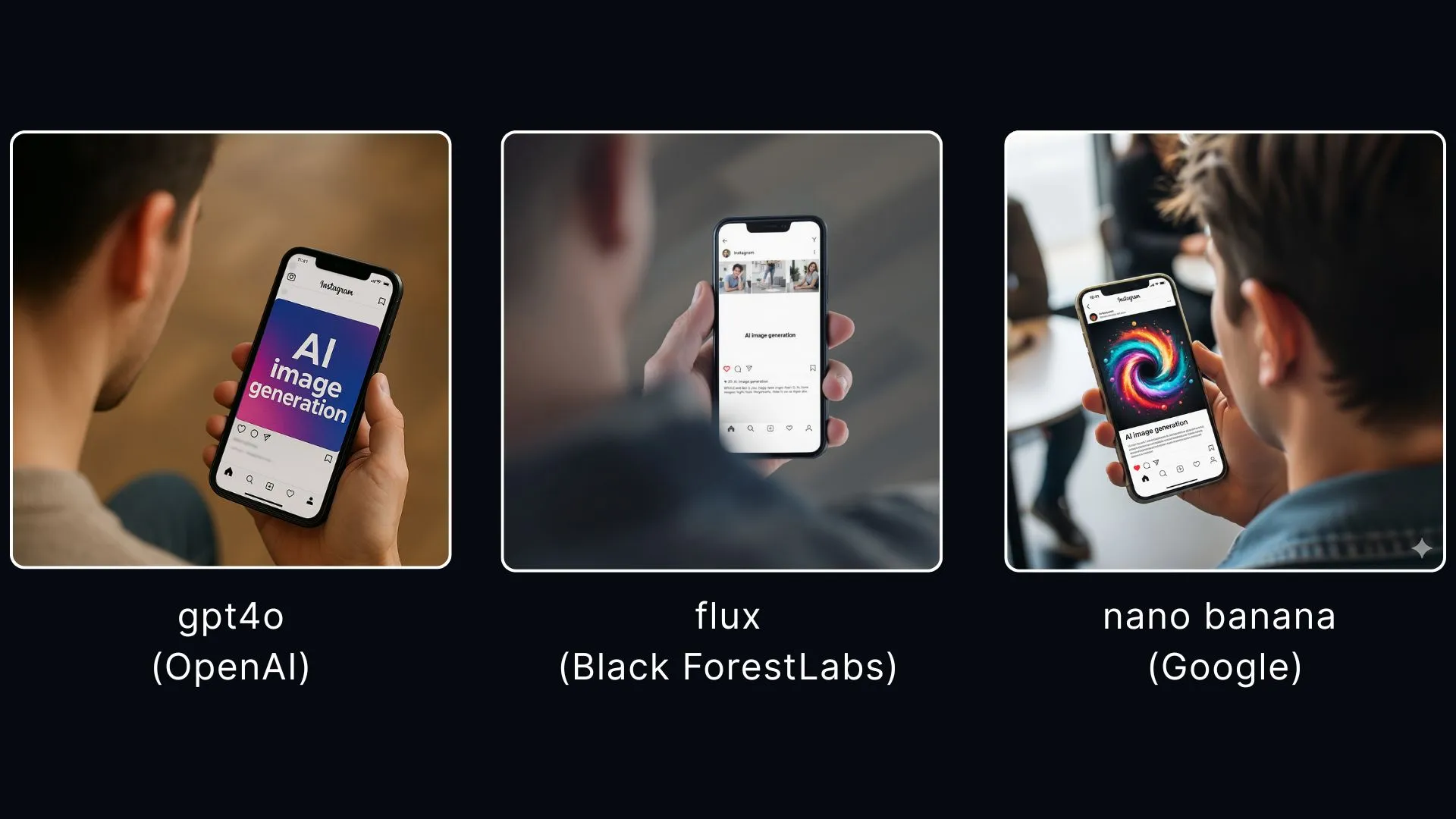
Built on OpenAI’s GPT‑4 image model (a huge upgrade from DALL·E). It handles text in images very well which used to be the Achilles heel of AI art tools. Great for social graphics, blog headers, or quick visuals when you don’t want to fire up Photoshop. That said, whilst this is an incredible AI image tool, in my opinion it’s by far not the best. If you want images that are almost indistinguishable from real photos, you should check out Flux from Black Forest Labs or Google’s new Nano Banana generator. At the end of this section, I’ll drop three images below from three different image generators with the same prompt: GPT‑4o, Flux, and Nano Banana. This way, you can make up your mind about which one you like better.
Prompt: High-angle over-the-shoulder photo of a person, showing the back of their head and shoulder. Their smartphone is in focus, displaying an Instagram post on the screen with the words "AI image generation." The background is softly blurred to emphasize the phone.
Study & Learn
This is more niche. Essentially GPT builds custom study programs. Perfect if you want to learn a new skill (SEO, coding, algebra homework for your kid). If your kid asks for help with algebra or quadratic equations, stuff you’ve totally forgotten, you can definitely use this tool to get you out of the pickle. Not something every business owner will use daily, but it’s there...
3. Customisation & Settings You Shouldn’t Skip
Here’s where you turn GPT from “a tool” into your tool.
- Custom GPT profile: Add your name, role, and tone. More importantly, use the “traits” field to set shortcuts. Example: prefix with
Cfor concise one‑liners,Lfor long‑form detailed answers. Total time‑saver. - Memory: Toggle this on. GPT will remember how you like things done, your writing style, even recurring workflows. You can edit or delete memories anytime. I think this is really the kind of unsung hero of all the GPT settings. The more memory and things that GPT remembers about you, the more personalised your ChatGPT experience will be. Yes, it can feel a little scary having an AI remember so much, but the deeper you go the better it gets. Think of it like Apple’s ecosystem effect: once your iPhone, AirPods and MacBook all work seamlessly together, it’s tough to leave. Same here, the more GPT remembers, the harder it is to imagine switching to another app.
- Connectors: Gmail, Google Drive, Calendar, Notion, Canva. Once hooked up, GPT can fetch info and act directly in those apps.
- Personality features: GPT‑5 also lets you set a personality style. You can make it more formal, friendly, cynical, or even playful depending on what suits you best. This goes beyond shortcuts – it actively changes how the model frames responses, almost like giving it a new voice. For example, a ‘cynic’ personality will give you blunt, witty replies, while a ‘coach’ might be more encouraging and structured. This is brand new in GPT‑5 and worth experimenting with. If you want to go deeper into this, we've created a detailed guide on GPT-5's new personality, which you can check out here.
- Data control: Disable “Improve the model for everyone.” Otherwise, you’re giving OpenAI consent to train on your data. Especially critical if you’re in law, healthcare, or finance.
- Voices & Themes: More cosmetic, but advanced voice mode is actually fun if you like talking to your assistant instead of typing.
4. Best Practices (a.k.a. Don’t Do Dumb Stuff)
- Use Fast by default. Only switch to Thinking when you’re tackling strategy or complex analysis.
- Don’t waste Deep Research. Save it for competitive research or market deep dives, not “what’s the best pizza topping.”
- Lean on Canvas. If you’re drafting or editing, don’t settle for chat bubbles – put it in Canvas and collaborate properly.
- Treat Agent Mode like a junior hire. Give it clear tasks, review the outputs, and never let it run wild with sensitive stuff.
- Stay organised with Projects. For ongoing campaigns, group your chats, files, and settings in one place. Keeps you sane.
FAQ
1. What’s the difference between Fast and Thinking modes in GPT-5?
Fast gives you quick, snappy answers (like GPT-4o), while Thinking takes its time with deeper reasoning and a much larger context window.
2. Can I still use older GPT models like GPT-4?
Yes. Toggle Show additional models in Settings and you’ll see legacy models like GPT-4o, 4.1, and mini versions in the dropdown.
3. How is Deep Research different from normal Search?
Search pulls quick results from the web. Deep Research runs multi-step queries, follows leads, and produces a fully cited report — perfect for competitor or market analysis.
4. What can Agent Mode actually do for my business?
It can browse websites, fill out forms, run code, generate reports, or even schedule meetings — essentially acting like a junior AI employee under your supervision.
5. Is Canvas just for writing?
Not at all. It’s for writing and coding. You can refine SEO drafts, debug scripts, or even build simple HTML apps you can embed on your site.

Unlocking GPT‑5 for Business: Models, Tools & Settings You Should Actually Care About
All Blog Posts
Discover insights and strategies for AI-powered SEO.
Background
Steven B. Marks, a member of our premium community, came to the group in November 2024 with a simple but powerful question: Should I create city pages for my client’s local SEO strategy? His client had four physical locations but wanted to target an entire state for one key service. The challenge was clear: without Google Business Profiles (GBPs) for every city, how could they capture that traffic?
The advice given was to build city-specific service pages: highly targeted pages optimized for transactional keywords like “plumbing services in Houston” or “24-hour emergency plumbing services in Houston.” This approach sparked a journey that completely transformed his client’s business.
Strategy Breakdown
1. Transactional Keyword Focus
Rather than chasing broad informational queries (which are increasingly answered by AI Overviews and GPT search), the strategy honed in on transactional intent keywords. These are the searches people make when they’re ready to buy or book, making them far more valuable.
2. Service + City Page Mapping
- Create a hub page for each city: e.g. “Plumbing Services in Houston.”
- Under that hub, build individual service pages: e.g. “24-hour emergency plumbing in Houston,” “pipe repair in Houston,” etc.
- Every service has its own page. No dumping everything onto one catch-all page.
3. Handling Duplicate Content Concerns
Many hesitate to create city/service combinations out of fear of duplication. Steven’s approach avoided issues by:
- Customizing title tags and HTML headers
- Using schema markup to signal exactly what each page covered
- Ensuring each page had unique value signals for Google
4. Indexing Best Practices
Don’t try to index everything at once. Roll pages out gradually, about 10 per week, so you don’t throw up red flags to Google. This slower pace also gives you time to check whether new pages are actually getting indexed. If you see the dreaded “crawled but not indexed” message (Google’s polite way of saying, “I read your page, I just don’t like it”), fix those issues before pushing hundreds more pages live.
5. Scaling with Automation
Creating thousands of service + city pages doesn’t have to mean thousands of hours of manual work. The process can (and should) be automated.
Why Segmenting Matters
When building at scale, resist the temptation to generate full pages in a single GPT or Claude prompt. Doing it in one shot leads to problems:
- Inconsistent word counts
- Variations in tone and style
- Higher risk of hallucinations
Instead, segment each page into structured sections and generate them individually. For example:
- context section
- Why hire us in {location}
- benefits of {service}
- FAQ section
- {on page schema}
- Meta Description
Each section is handled by a different automation node, ensuring consistent structure across all pages.
Example Build
The screenshot provided shows a real automation flow:
- Google Sheets provides the data inputs.
- Router distributes the tasks.
- Each GPT node creates one section of the page.
- Google Docs assembles the final draft.
- The output is pushed back to Sheets for tracking.
Benefits of This Approach
- Scalability: You can generate 1,000+ pages with the same structure, adjusting only the local service and city.
- Consistency: Pages look uniform while still being tailored to each location.
- Efficiency: The process is fast and cost-effective—limited only by your API budget.
With this method, producing hundreds or even millions of pages is possible without sacrificing quality or spending endless hours writing.
Results
- November 2024: Started with just 127 indexed pages.
- April/May 2025: Over 1,122 pages indexed. Phones and calendars flooded with leads.
- January 2025: Client hit 99 booked appointments in one month (not counting phone bookings). Best month ever.
- August 2025: Google Search Console shows 1,200 clicks in 28 days, up from just 600 in April 2023.
- Business Impact: Client had to hire additional attorneys and paralegals to handle demand. Filing totals for 2025 are already surpassing previous years, with months left to go.
- Zero Ad Spend: All growth came from organic traffic.
Why This Worked
- Scalability: Hundreds of city + service combinations covered all the transactional keywords competitors ignored.
- High Intent: Focused traffic meant higher conversions, not just vanity metrics.
- Community Collaboration: The original idea came from sharing openly in the community, which gave Steven the confidence to execute.
Key Lessons
- Don’t lump all services into one generic “Our Services” page.
- Map out every service you want to rank for, then replicate it across every city you want visibility in.
- Transactional keywords are where the money is. Informational queries are often swallowed by AI Overviews.
- Organic traffic can outperform paid ads when structured correctly.
Final Word
What started as a question about whether to create city pages turned into a textbook example of local SEO domination. With no ad spend, Steven’s client now enjoys record-breaking growth, proving that the right content structure can scale a business faster than most people imagine.
If you want to learn how to do this and get support from an active community, consider joining us at AI Ranking Premium.
Local SEO at Scale: A Case Study in City Page Domination
With GPT‑5, OpenAI has basically simplified the whole “which model do I pick?” dilemma down to three core modes. Auto. Fast. Thinking. That’s it. But there’s nuance in how and when you should use each one. And trust me, if you get this right, you’ll save yourself time, frustration, and possibly a few grey hairs.
1. GPT5 Model Selection
Auto
Auto is like the GPS of GPT‑5. You tell it where you want to go, and it decides the best route. If your request is simple, it’ll quietly send it through Fast. If it senses complexity, it’ll switch to Thinking without you lifting a finger. It’s smart. But sometimes it’ll overthink a “what’s the capital of Chile?” type of question and route you to Thinking. Slightly annoying, but that’s just how OpenAI optimised GPT‑5 to balance compute efficiency.
OpenAI has been pretty upfront about this: one of the big pushes with GPT‑5 was to cut down on server strain while giving us better reasoning capacity at scale.
Fast
This is your go‑to for 99% of tasks. Quick answers, brainstorming, simple copy. If you’re drafting an email subject line or asking it to summarise a short text, Fast is perfect. It’s built to be responsive – you’ll actually feel the difference. In many ways, this is a little bit what GPT‑4o felt like: snappy, fast responses that made everyday tasks flow smoother... except now its smarter.
Thinking
Thinking mode is where GPT‑5 flexes. It’s slower, yes, but with a massive 196k token context window (about 4x GPT‑4o’s). Use it when you’re doing deep strategy work, coding problems, or anything with multiple moving parts. The trade‑off is speed, but the payoff is accuracy and depth.
Legacy Models
Missing your old friends GPT‑4o, 4.1, o3? They’re still tucked away. Go into Settings → General → Show additional models. Flip that toggle, and you’ll see them under the “Legacy Models” dropdown. Not essential for most people, but nice to have in case you want to compare outputs.
2. Tools You Actually Need to Know
Here’s where GPT‑5 goes from “chatbot” to “Swiss army knife.” These tools are what make the Plus plan worth it.
Add Photos & Files
Upload up to ~20 files at once. Docs, spreadsheets, PDFs, even images. This turns GPT into a multi‑modal assistant, it can read your PDFs, analyse your data, or even look at a photo and give insights. Super useful for research and SEO workflows (think uploading a CSV of keywords or a competitor’s brochure).
Search
Search gives GPT real‑time internet access. Officially, it’s powered by Bing. Unofficially, some SEOs testing the responses claim it’s pulling Google results more often than not. Either way, the point is: this is your way to cut hallucinations and get fresh data.
*Important side note* more and more sites are blocking AI crawlers (Cloudflare being the biggest culprit). So don’t assume GPT can access every corner of the internet. But when it works, it’s gold.
Deep Research
This is not just “search but slower.” It’s a Plus‑exclusive mode that basically turns GPT into your AI research assistant. Instead of a quick lookup, it actually performs multi‑step searches, not just scanning the top answers, but digging deeper into related areas, following interesting leads, and going further down the rabbit hole until it collects all the useful information. It’ll then spend 2–30 minutes combing sources, asking you clarifying questions, and producing a fully cited report.
Limits: ~25 deep research sessions/month on Plus. But that’s plenty if you save it for the big stuff – competitor analysis, market research, or building the foundation for a new content campaign.
Agent Mode
Think of Agent Mode as hiring an AI intern who also knows how to use a computer. It can:
- Browse sites like a human (click links, fill out forms).
- Run code in a terminal.
- Pull data into spreadsheets.
- Generate slide decks with charts.
- Even generate leads.
The key difference: unlike normal GPT where you guide every step, an Agent executes multi‑step workflows autonomously. You stay in control (it’ll ask permission before big actions), but this is the closest thing to an AI employee. And just to be clear, OpenAI isn’t the only one with this kind of autonomous agent tools like Manus or GenSpark offer similar functionality. Personally, I like having everything under one subscription, but it could be worth testing those out too since they bundle in other useful tools.
Canvas
Canvas is my personal favourite. It’s basically a Google Docs‑meets‑GPT editor where you and the AI can write side‑by‑side. Instead of GPT spitting out text in chat for you to copy, it edits inline, with suggestions, highlights, and even “track changes” style edits.
It’s a game‑changer for:
- Blog drafts
- SEO content refinement
- Code debugging
- Client deliverables
- Creating simple but useful HTML apps you can embed in your site
You can even throw a meeting transcript in there and have it convert it into a structured, sharable HTML report.
Create an Image
Built on OpenAI’s GPT‑4 image model (a huge upgrade from DALL·E). It handles text in images very well which used to be the Achilles heel of AI art tools. Great for social graphics, blog headers, or quick visuals when you don’t want to fire up Photoshop. That said, whilst this is an incredible AI image tool, in my opinion it’s by far not the best. If you want images that are almost indistinguishable from real photos, you should check out Flux from Black Forest Labs or Google’s new Nano Banana generator. At the end of this section, I’ll drop three images below from three different image generators with the same prompt: GPT‑4o, Flux, and Nano Banana. This way, you can make up your mind about which one you like better.
Prompt: High-angle over-the-shoulder photo of a person, showing the back of their head and shoulder. Their smartphone is in focus, displaying an Instagram post on the screen with the words "AI image generation." The background is softly blurred to emphasize the phone.
Study & Learn
This is more niche. Essentially GPT builds custom study programs. Perfect if you want to learn a new skill (SEO, coding, algebra homework for your kid). If your kid asks for help with algebra or quadratic equations, stuff you’ve totally forgotten, you can definitely use this tool to get you out of the pickle. Not something every business owner will use daily, but it’s there...
3. Customisation & Settings You Shouldn’t Skip
Here’s where you turn GPT from “a tool” into your tool.
- Custom GPT profile: Add your name, role, and tone. More importantly, use the “traits” field to set shortcuts. Example: prefix with
Cfor concise one‑liners,Lfor long‑form detailed answers. Total time‑saver. - Memory: Toggle this on. GPT will remember how you like things done, your writing style, even recurring workflows. You can edit or delete memories anytime. I think this is really the kind of unsung hero of all the GPT settings. The more memory and things that GPT remembers about you, the more personalised your ChatGPT experience will be. Yes, it can feel a little scary having an AI remember so much, but the deeper you go the better it gets. Think of it like Apple’s ecosystem effect: once your iPhone, AirPods and MacBook all work seamlessly together, it’s tough to leave. Same here, the more GPT remembers, the harder it is to imagine switching to another app.
- Connectors: Gmail, Google Drive, Calendar, Notion, Canva. Once hooked up, GPT can fetch info and act directly in those apps.
- Personality features: GPT‑5 also lets you set a personality style. You can make it more formal, friendly, cynical, or even playful depending on what suits you best. This goes beyond shortcuts – it actively changes how the model frames responses, almost like giving it a new voice. For example, a ‘cynic’ personality will give you blunt, witty replies, while a ‘coach’ might be more encouraging and structured. This is brand new in GPT‑5 and worth experimenting with. If you want to go deeper into this, we've created a detailed guide on GPT-5's new personality, which you can check out here.
- Data control: Disable “Improve the model for everyone.” Otherwise, you’re giving OpenAI consent to train on your data. Especially critical if you’re in law, healthcare, or finance.
- Voices & Themes: More cosmetic, but advanced voice mode is actually fun if you like talking to your assistant instead of typing.
4. Best Practices (a.k.a. Don’t Do Dumb Stuff)
- Use Fast by default. Only switch to Thinking when you’re tackling strategy or complex analysis.
- Don’t waste Deep Research. Save it for competitive research or market deep dives, not “what’s the best pizza topping.”
- Lean on Canvas. If you’re drafting or editing, don’t settle for chat bubbles – put it in Canvas and collaborate properly.
- Treat Agent Mode like a junior hire. Give it clear tasks, review the outputs, and never let it run wild with sensitive stuff.
- Stay organised with Projects. For ongoing campaigns, group your chats, files, and settings in one place. Keeps you sane.
FAQ
1. What’s the difference between Fast and Thinking modes in GPT-5?
Fast gives you quick, snappy answers (like GPT-4o), while Thinking takes its time with deeper reasoning and a much larger context window.
2. Can I still use older GPT models like GPT-4?
Yes. Toggle Show additional models in Settings and you’ll see legacy models like GPT-4o, 4.1, and mini versions in the dropdown.
3. How is Deep Research different from normal Search?
Search pulls quick results from the web. Deep Research runs multi-step queries, follows leads, and produces a fully cited report — perfect for competitor or market analysis.
4. What can Agent Mode actually do for my business?
It can browse websites, fill out forms, run code, generate reports, or even schedule meetings — essentially acting like a junior AI employee under your supervision.
5. Is Canvas just for writing?
Not at all. It’s for writing and coding. You can refine SEO drafts, debug scripts, or even build simple HTML apps you can embed on your site.
Unlocking GPT‑5 for Business: Models, Tools & Settings You Should Actually Care About
GPT‑5 arrived in August 2025, and while everyone was busy drooling over bigger context windows and slicker multimodal reasoning, a quieter but far more human feature slipped in: personalities. Yes, your chatbot can now choose a mood. Or, more accurately, you can pick which mood you want it to wear.
This update isn’t a gimmick. Personalities change the way GPT‑5 speaks, reasons, and interacts. No more copy‑paste politeness or “always‑sunny” tone. Instead, you can pick something that matches your task, or your tolerance for small talk. In my own experience, Cynic has quickly become my favorite. It’s blunt, sarcastic, and will tell you what you need to hear without buttering you up. That small twist makes using GPT far less sterile and much more productive.
What Are GPT‑5 Personalities?
GPT‑5 offers four presets, Cynic, Robot, Listener, and Nerd. Each is more than a coat of paint. They shape how the AI chooses words, structures replies, and balances empathy with precision.
- Cynic: Dry humor, snarky edges, practical over polite.
- Robot: Stripped of emotion, factual and to the point.
- Listener: Empathic, reflective, almost therapeutic.
- Nerd: Obsessed with detail, loves examples, enthusiastic.
They’re part of a broader personalization push that also includes memory, user bios, and even custom UI themes. This isn’t just cosmetic. It’s OpenAI acknowledging that style matters as much as accuracy.
How to Set GPT‑5 Personalities
Switching personalities is thankfully easy. On desktop or mobile:
- Open ChatGPT and click your profile icon.
- Select Customize ChatGPT.
- Choose your Personality from the dropdown (Cynic, Robot, Listener, Nerd).
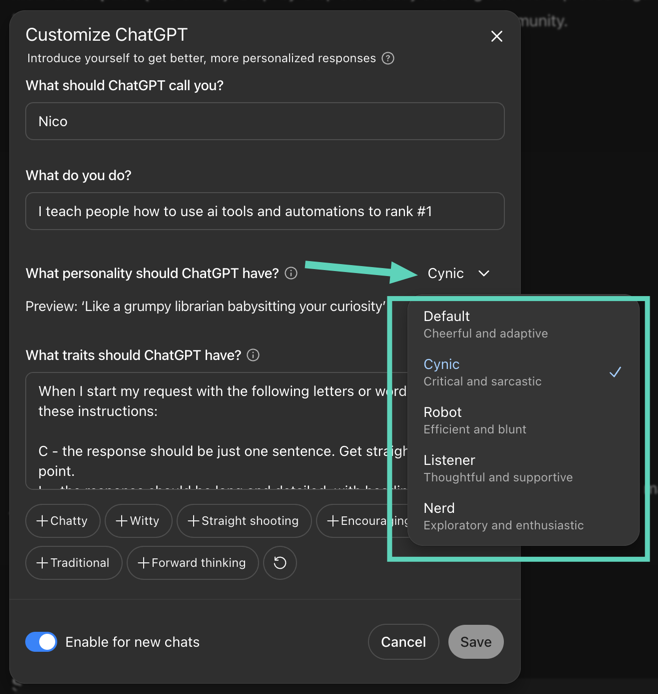
Alternatively, you can pick one at the start of a conversation by clicking the sparkle icon next to the model name. Keep in mind that personalities apply only to new chats. If you start with Cynic, that chat will stay Cynic forever unless you reset it. You can always revert to the Default personality.
Which Personality Should You Use?
Different personalities shine in different scenarios:
PersonalityBest ForCynicCutting through fluff, reality checks, quick decisions. Think strategy sessions or when you’re sick of AI pleasantries.RobotTechnical work, debugging code, analyzing spreadsheets, data crunching. Anything where tone is a distraction.ListenerDrafting sensitive emails, brainstorming during stressful moments, or tackling anything emotional. It reflects and affirms instead of lecturing.NerdDeep dives, research, learning, planning. Ideal for exploring complex topics or asking for structured, example‑rich output.
In my workflow, Cynic wins hands down. It’s refreshing to get advice without sugarcoating. The snark is a bonus, it feels like a colleague who can be both helpful and slightly amused at my mistakes.
Pro Tips & Best Practices
Personalities don’t override GPT‑5’s core abilities. The reasoning, multimodal input, and massive context window still matter more for heavy tasks. But the way the model communicates changes dramatically.
- Match the tone to the task. Use Robot for crunching numbers, Listener for writing HR emails, Nerd for research, Cynic for strategy.
- Expect updates. OpenAI has already promised to make GPT‑5 “warmer” without losing its professional edge. Translation: Cynic may get even sharper, Listener may get even softer.
- Combine with UI personalization. Memory, user bios, and custom colors make personalities feel more integrated. The AI stops being a generic box and becomes a tool that fits you.
- For developers. If you’re using the API, you can mimic personalities by adjusting parameters like
verbosityandreasoning_effortto steer tone and depth.
My Experience With Cynic
I’ll admit it: Cynic hooked me fast. The first time it told me, flat out, that my idea was garbage, I almost laughed. Not because it was wrong, it wasn’t, but because finally, an AI wasn’t scared to tell me the truth. No hedging, no over‑apologizing. Just honesty with a hint of bite.
Cynic is particularly good for brainstorming and critical review. When you’re too close to your own work, it feels like having a brutally honest colleague. It doesn’t care about your feelings, which, ironically, makes it far more useful than an overly polite assistant. The snark makes it memorable, too. That unexpected change in tone can jolt you into looking at your work differently.
Conclusion
GPT‑5 isn’t just another “faster, smarter” upgrade. With personalities, it finally gives users control over style, not just content. Choosing the right personality can sharpen tasks, soften conversations, or simply make the AI more enjoyable to use. And if you’re like me, you’ll quickly find that Cynic, sharp, honest, and a little cheeky, becomes your daily driver.
Personalization isn’t optional anymore. You can ignore it and stick with Default, but then you’ll miss out on what makes GPT‑5 actually feel different: an assistant that works not only with your tasks, but also with your temperament.
Frequently Asked Questions About GPT‑5 Personalities
1. Can I switch personalities in the middle of a chat?
No. Personalities are set when you start a new conversation. If you want to change, you’ll need to start a fresh chat with the new personality.
2. Do personalities affect the accuracy of GPT‑5’s answers?
Not really. The underlying reasoning and multimodal capabilities stay the same. What changes is tone, style, and the way responses are structured.
3. Are personalities available for free users?
At launch, they’re mainly available for paid tiers like Plus, Pro, and Team. Free users may see limited or delayed access depending on OpenAI’s rollout.
4. Can I create my own personality beyond the four presets?
Yes. You can type in a custom style description like “casual and witty” or “formal and concise,” and GPT‑5 will adapt its voice accordingly.
5. Which personality is best for professional settings?
It depends on the context. Robot is safest for technical work and reports, Listener is strong for team communication and HR‑related writing, Nerd is perfect for research, and Cynic—if your coworkers can handle blunt honesty—can be great for strategy and critique.

Best ChatGPT 5 Personality Settings: Which One Fits Your Work Style?

So GPT-5 is here, and as usual, the internet has split into two camps: people who love it, and people who think it’s the worst thing to happen since autocorrect decided to “fix” your texts. Honestly, I think a lot of the hate comes from people not using it correctly. I’ve just spent seven days reading, watching, and pushing GPT-5 to its limits, so here’s the straight-to-the-point guide you actually need.
1. Unlock All the Hidden Models
When you open the model selector, you’ll probably only see:
- Auto
- Fast
- Thinking
- Pro (if you’re on the $200/month plan)
If you scroll down to "Legacy models," you might spot GPT-4o. But here’s the thing: there’s way more available.
Here’s how to unlock them:
- Go to Settings
- Open the General tab
- Toggle Show additional models
Now, under GPT-5, you’ll see Thinking Mini, which is fantastic for copywriting and lighter creative work.
Which one should you use?
- Auto: GPT will pick based on complexity. Simple = Fast, complex = Thinking.
- Thinking: Better for complex, multi-step reasoning.
- Fast: Cheap, efficient, and surprisingly good. Great default.
- Thinking Mini: Like Thinking, but lighter and faster.
OpenAI’s routing system tends to pick the cheaper (Fast) option if possible. You can always start a chat with Thinking for context, then switch to Fast to save time and credits.
And yes, if you’re still emotionally attached to old favorites like GPT-4.1 or GPT-3.5, they live in the Legacy models section. OpenAI brought them back after a very vocal backlash.
2. Play With the New Personalities
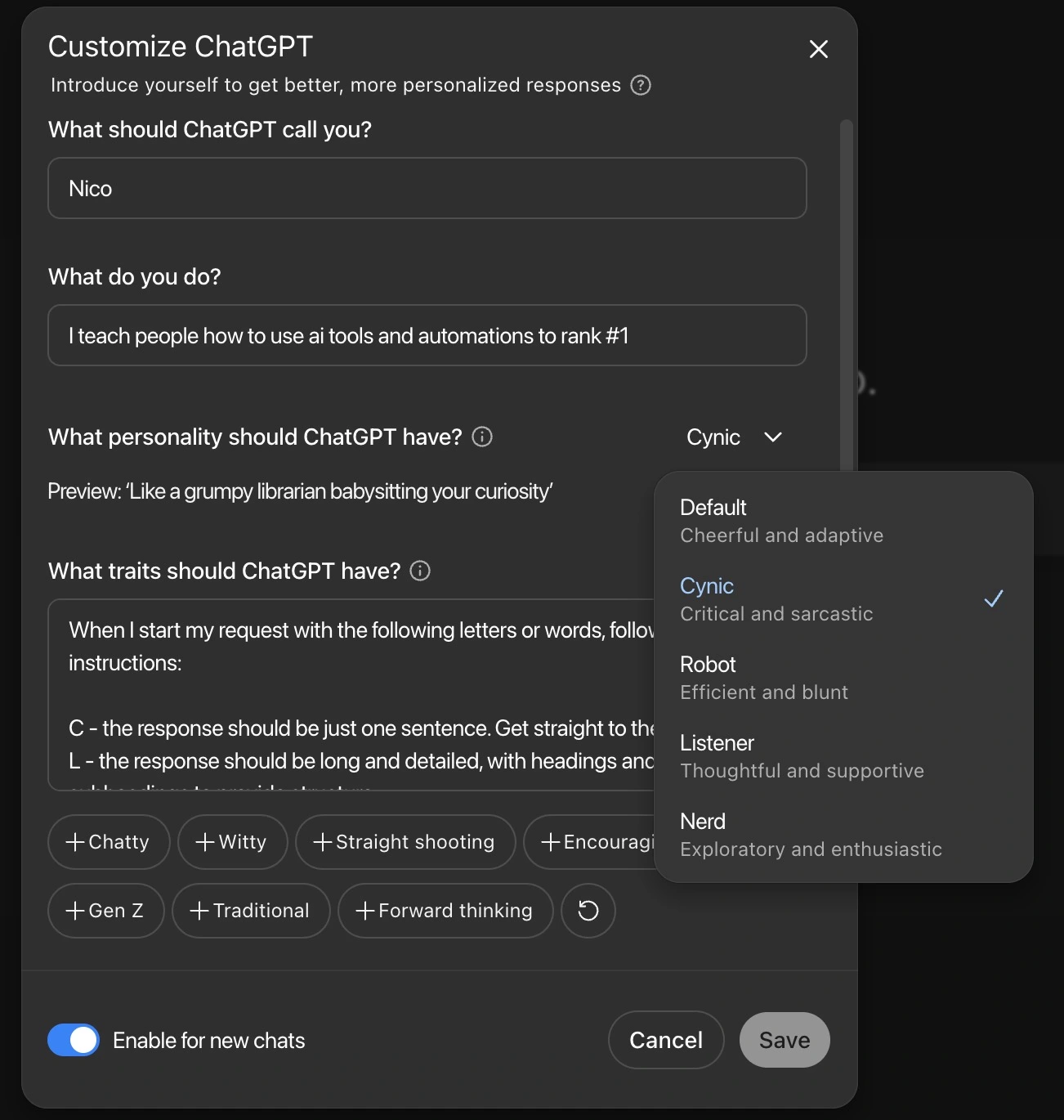
GPT-5 now lets you pick a built-in personality. At first, I thought these were a bit of a gimmick, but the more I use them, the more I realize they’re surprisingly useful:
- Cynic: Snarky, blunt, and great for no-nonsense feedback. My personal favorite.
- Robot: Zero small talk. Just gets to the point. Perfect for coding or rapid drafting.
- Listener: Supportive and empathetic. Weird to say about an AI, but some people genuinely use it for emotional support.
- Nerd: Excited, thorough, and detail-obsessed. Perfect for learning something in depth.
Switch them up and see which fits your workflow. I’ve found Cynic is great for constructive criticism, and Robot is a huge time saver.
You can access all these personalities by going to the Customize ChatGPT.
3. Use the Canvas Feature for Apps and Dashboards
Canvas is GPT-5’s built-in interactive workspace. You can:
- Build games
- Create data dashboards
- Make interactive reports
You can share these with anyone, even if they don’t have a ChatGPT account. This makes it a goldmine for lead generation, imagine sending an interactive report that doubles as a pitch.
4. (Gimmick Alert) Change Your Highlight Colour
It’s cosmetic, not functional, but you can change your GPT interface accent colour to blue, green, yellow, pink, orange, or purple. It’s the kind of feature Apple would hype up as a major release, even though it won’t make GPT-5 any smarter. Still, it does make the workspace feel less sterile.
5. Use the Prompt Enhancer to Fix Bad Prompts
If GPT-5 isn’t giving you what you want, stop blaming the model. Prompting is just communication, and bad prompts = bad results. OpenAI’s Prompt Enhancer (available in the Playground) takes your vague or poorly written prompt and turns it into something far more specific.
Poorly defined prompts are one of the biggest reasons people fail to get good AI outputs. In fact, research shows that improving prompt clarity can boost task accuracy by up to 30% (Stanford HAI). Use the enhancer and you’ll instantly see better results.
Bottom line: GPT-5 is incredibly capable, but only if you unlock all the tools and actually use them. Stop treating it like a magic trick and start treating it like the power tool it is.

GPT-5: The Real Guide to Getting the Most Out of It
The Contradiction at the Heart of SEO
I think the main problem with SEO is that everyone is right and wrong at the same time. Just roll with me for a sec.
If you've been dabbling in SEO for a few weeks or over a decade, you’ve probably noticed something weird: for every 'rule' or strategy, there’s always someone online saying the opposite. SEO is full of contradiction. It’s like an ongoing oxymoron factory.
- “Backlinks always work”... except when they don’t.
- “Google penalizes AI content”... but not always. (They give out one of the best LLMs for free, but you’re not supposed to use it on your own site? Sure, makes sense.)
- “Wix websites are bad for SEO”... except the ones ranking #1.
Why Both Sides Are Telling the Truth (Kind Of)
It's not that one person is right and another is wrong. It's that someone found a strategy, like PBNs, and it worked for them. Then someone else gives it a go and nothing happens.
Why? Because the variables are endless.
Person A might be in a niche outside YMYL, in an area that’s easy to rank for. Person B might try the same approach in a saturated niche, selling health supplements, already dominated by major players. Naturally, it flops.
Google Isn’t Always Honest Either
To make it worse, Google doesn’t exactly tell the full truth. What they say you should do to rank isn’t always what actually works, a fact made obvious by the 2024 leaks. So while they publish guides and courses, I wouldn’t call them hard rules. They're more like loose suggestions. Soft recommendations at best (if that).
Staying Relevant in the Mess
So how the hell do you stay relevant as a business now?
I've boiled it down to a few things that have actually worked for me, strategies that are keeping me cited in Google AI Overviews, GPT search, and Perplexity.
1. Be Open-Minded, Just Bring a Sack of Salt
You’re going to see people sharing “game-changing” strategies that 10x’ed their traffic. First instinct is to dismiss it. That’s fair. Most are too good to be true.
But be open enough to dig deeper. That mindset alone helped me discover strategies still pulling in traffic today. Like building basic HTML web apps: ring size calculators, tax quizzes, stuff I initially thought was ridiculous. But if you hit the right use case, it’s free traffic for life.
That said, take every SEO tip with a massive grain of salt. Even this one. Test what you can. Trust your own data.
2. The Fundamentals Still Work
People ask me if we teach "GEO" or "LLMSEO" in the community. My answer? We teach the fundamentals, and then show you what’s working right now. The reply I sometimes get: “Oh... I’m not really into SEO, I just want to do GEO.”
That’s like saying, “I want to learn butterfly stroke but not how to swim.”
You need solid fundamentals to get traffic from AI search. These engines pull their sources from page one. Not page five. Not even page two. Remember the old joke?
"Where do you hide a dead body? Page two of Google."
Basic SEO Fundamentals That Still Matter
On-site SEO:
- Clear website structure
- Solid internal linking
- Minimal errors
- Well-placed, focused keywords
- Fast loading times
Off-site SEO:
- Active social media profiles
- Backlinks and local citations
- Google Search Console + Bing Webmaster Tools
Content:
- Meet search intent (focus on transactional + informational)
- Every service/product should have its own page.
Please, for the love of any deity you respect (or fear), do not cram all your services into one page. You’re setting yourself up to rank for nothing.
3. What’s Working in AI Search Right Now?
First: Believe Me... or Don’t
This next bit comes from real testing, not theory. We’ve shared it with over 500 agency owners and businesses in our AI Ranking community, that helps, supports and teaches how to rank in the ai search enginges. It works... for those who actually do the work.
a. Strong SEO Fundamentals
Already covered that one above.
b. SEO Alone Isn’t Enough Anymore
To quote the legend Neil Patel: SEO is turning into Search Everywhere Optimisation.
You can’t just optimise for Google. You need to be the trusted entity across Instagram, TikTok, YouTube, Pinterest. Not just because they’re indexing posts now, but because authority is built on presence.
We had one guy in the community with a serious YouTube presence, 120k subs, in a brutally competitive niche (calisthenics). We helped him build a 200+ page site fast using AI and smart structure. Within 3 months? Traffic exploded. Why?
Because Google already knew him. His online reputation transferred to his website.
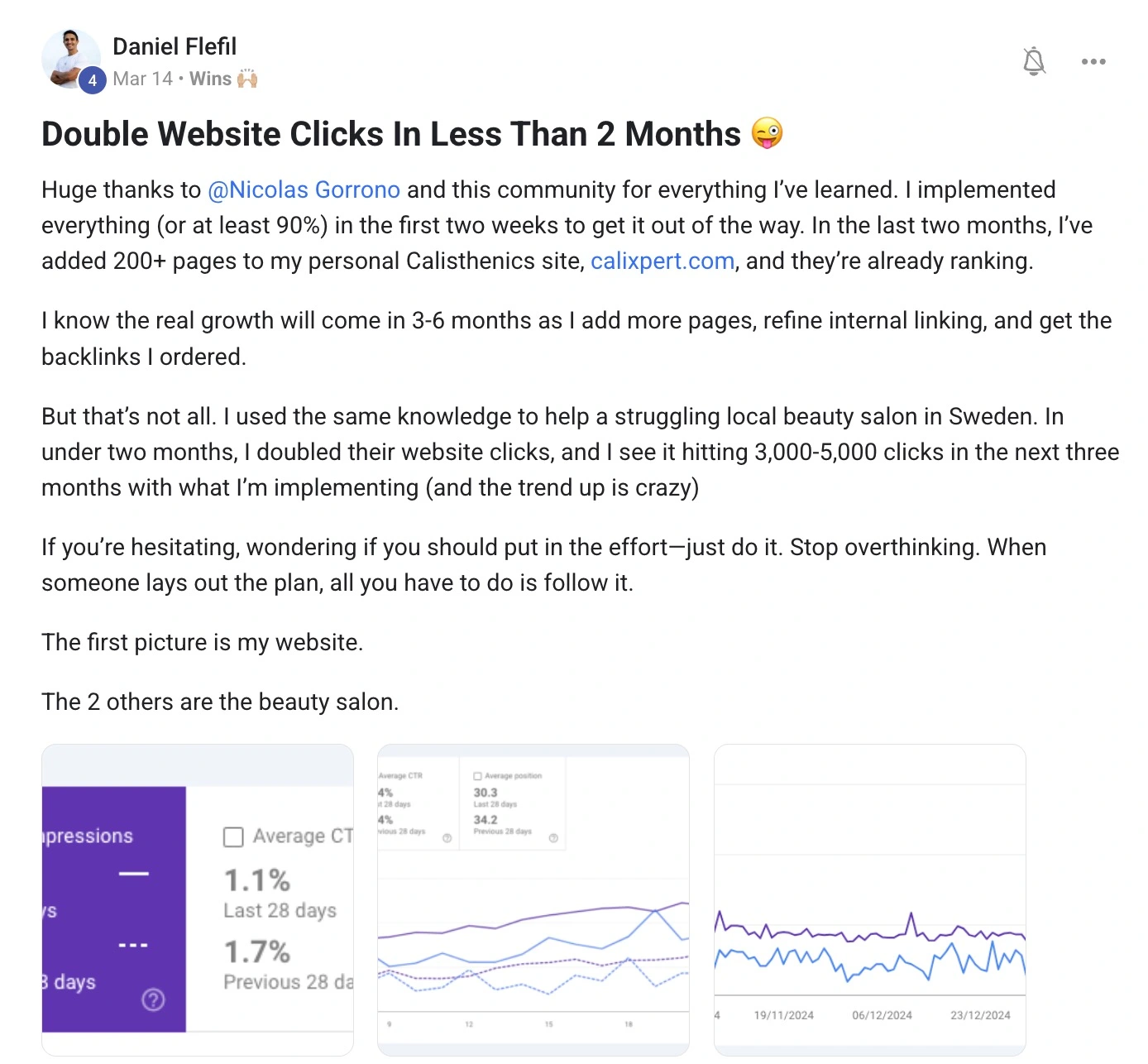
I’m not saying this is easy, but I’m saying it matters.
c. Tactics That Might Help in AI Search
- Add an
llm.txtfile to your site’s root folder. Is it proven? Not yet. But if it might help, and it takes one click in Yoast... why not? - Get on Bing Webmaster Tools. GPT Search is powered by Bing. Submit your sitemap and stay in the game.
- Use proper Schema (Structured Data). Speak the language LLMs understand. Don’t rely 100% on plugins, test your pages manually using Google’s schema tester.
I have a few more strateiges in the youtube video below you can take a look at.
d. Write for Citations, Not Just Rankings
You don’t just want to be the top blue link. You want to be the source AI pulls from.
How to Write for Citations:
- Answer the question right under the heading.
- Use bullet points.
- Offer a unique angle backed by experience or data.
- Create a YouTube video on the same topic (LLMs love multimedia).
e. Change How You Think About Data
Clicks are down. That’s reality. But don’t panic.
Focus on appearances and conversion rate instead. Those two metrics will tell you whether your brand is becoming a trusted source.
As for tracking AI search traffic, it’s still messy. Most tools (even new ones like Ahrefs' AI reports) kinda suck. For now, filter platform-specific traffic in Google Analytics to see where it’s coming from and what it’s doing.
Final Thoughts
There are tons of little tweaks that can give you an extra 2–5% edge, and we share those inside AI Ranking.
But here’s the real TL;DR:
- Master the basics.
- Stay curious.
- Be everywhere.
- And always test things for yourself.
SEO’s a weird game. But if you play it right, it still works.

Everyone's Right, Everyone's Wrong: The Uncomfortable Truth About SEO
Your website isn’t just a digital business card. It’s your SEO engine. And if you build it with the wrong structure? Good luck getting anywhere.
The truth is, most small business sites fail not because they lack backlinks or content. They fail because no one planned the site structure. No roadmap. No scalable strategy. Just a homepage, a few vague service pages, and a contact form. Sound familiar?
Let’s change that.
In this guide, we’ll break down how to build an SEO-friendly website structure that actually ranks, scales, and converts. Plus, you’ll see how one AI Ranking member used this strategy to generate over 1,100 location pages and 99+ organic leads, per month. All without paid ads.
Why Website Structure Matters for SEO
Website structure impacts everything from crawlability to conversions. It determines how easily search engines can crawl and index your content, how logically your pages are grouped, and how well your site flows for both users and bots. A poor structure confuses search engines and frustrates users, while a great one increases visibility, rankings, and engagement.
- Google ranks pages, not websites, and those pages need to clearly answer search intent.
- A well-structured website improves crawl efficiency and internal link flow.
- Good structure enhances user experience and helps reduce bounce rates.
- It allows you to scale content easily and build topical authority.
How to Plan Website Structure for Better SEO
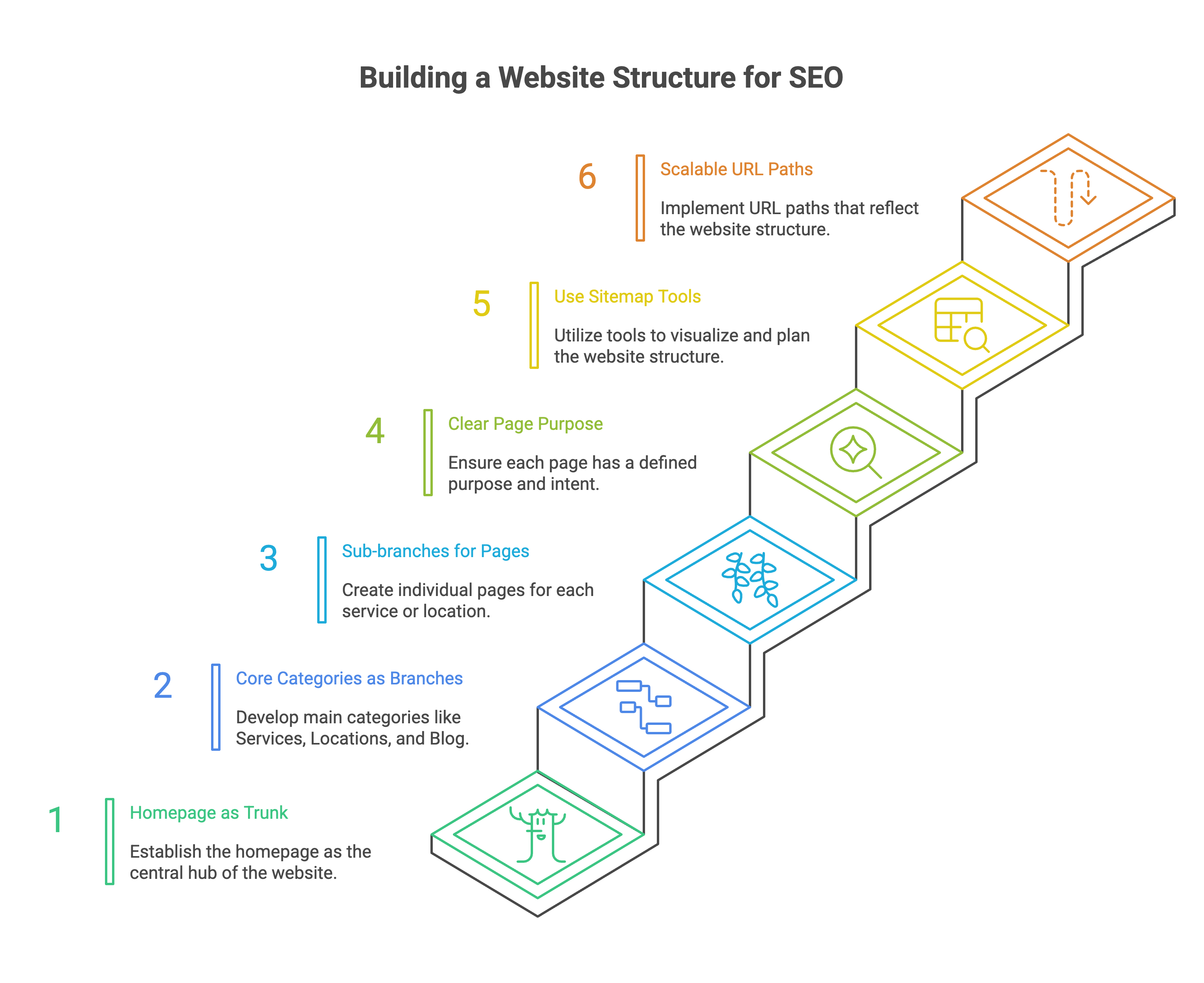
Start by thinking of your website like a tree, one trunk, multiple branches.
- The trunk is your homepage.
- Main branches are your core categories (Services, Locations, Blog).
- Sub-branches are individual service or location pages.
- Every page should have a clear purpose and intent.
- Use tools or a sitemap generator to sketch this out in advance.
- Create scalable URL paths that reflect this structure.
Does Website Structure Affect SEO?
Yes. The structure of your website plays a foundational role in how search engines understand, prioritize, and rank your content. A smart structure not only boosts your indexation and keyword visibility, but also sets the stage for strong internal linking and better user experience.
- Poor structure creates competition between your own pages.
- Crawlers struggle to find or prioritize your important content.
- Clean structure allows better internal linking and content flow.
- Helps distribute page authority more strategically.
The Two Proven Approaches for Local Business Websites
There are two reliable ways to structure local business websites, and your choice depends on your business model.
1. The Hyper-Localized Approach
Create a structure where each location has its own page with dedicated services underneath.
- Location hub ("Areas We Serve")
- Subpages for each location
- Individual pages for each service within that location
2. The Services-First Approach
Start with your services, then add location content as needed.
- Core services page with dedicated subpages
- Optional location content linked from each service page
Key rule: Create one page per service per location.
If you want a birds eye view of an example of both types of structures you can take a look at this preview of a hyper-localised and hyper efficient approach to website structure.
SEO Friendly URL Structure for a Website
Keep URLs clear, consistent, and keyword-rich. A well-planned URL structure makes it easier for search engines to understand your site architecture, match pages with specific search queries, and surface the right content to the right audience. It also improves click-through rates by making links more readable and relevant.
- Use short, descriptive slugs.
- Include both the service and location when needed.
- Avoid parameters or meaningless numbers.
Examples:
- Bad:
/services - Better:
/services/pool-construction - Best:
/long-island/pool-construction
Pick a format and stick to it sitewide:
/location/service-name
/service-name/location
What Is SEO Hierarchy Structure?
SEO hierarchy is how your pages are logically grouped, prioritized, and interlinked to show both users and search engines what matters most. It creates a blueprint for relevance, flow, and discoverability across your site.
- Homepage is at the top.
- Then come category pages like Services or Locations.
- Under those are specific service/location pages.
- Reinforce this structure with internal linking.
Example hierarchy:
- Homepage
- Services
- Pool Construction
- Spa Renovation
- Locations
- Long Island
- Pool Construction in Long Island
- Spa Maintenance in Long Island
- Long Island
- Services
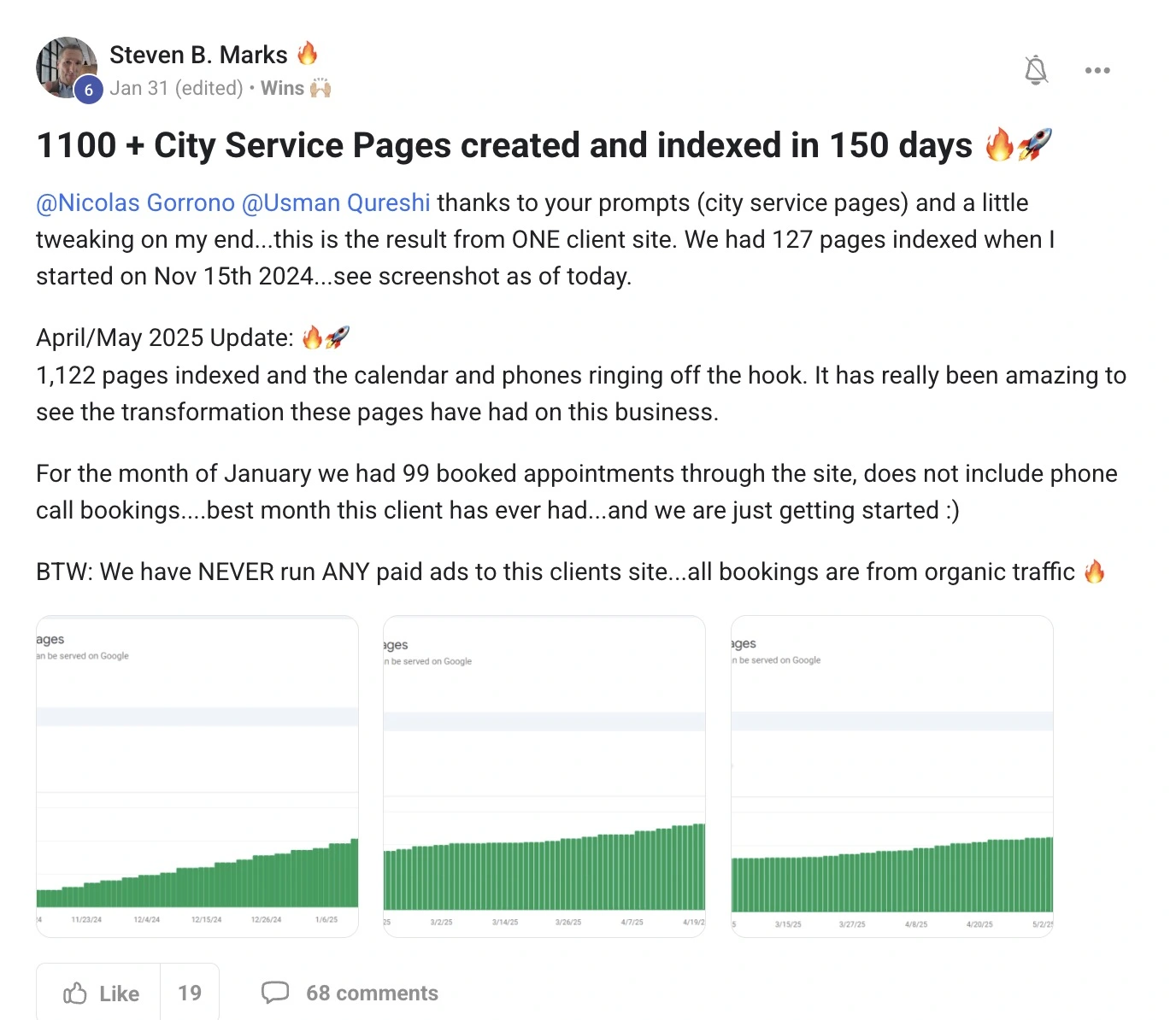
Real Example: 1,100+ Local Pages and 99+ Leads per Month
One of our AI Ranking community members, Steven B. Marks, used this strategy to generate over 1,100 service-location pages. Because he had the correct structure from the beginning, with clear, scalable URL paths and dedicated pages for every service in every city, he avoided issues like content overlap, cannibalization, or crawl confusion. This allowed him to scale quickly and effectively without triggering penalties from Google or needing to rework the foundation later on.
- Used AI to build and index city-specific service pages.
- Followed a repeatable, structured layout across the site.
- Booked 99+ appointments in January alone without running ads.
Learn from his method: How to Generate Location Pages at Scale with AI
Tools That Make This Easy
You don’t need to do it manually. Here are tools to help.
1. ChatGPT + Mermaid
Use ChatGPT to create visual sitemaps with Mermaid diagrams.
- Paste a prompt describing your business type, services, and areas served.
- Insert the Mermaid code into app.diagram.net > Insert > Advanced > Mermaid.
2. AI Ranking Location Page Generator
Use AI prompts to generate hundreds of local pages quickly.
- Follow this process: Generate Location Pages at Scale
3. Free SEO Keyword Tool
Need keyword ideas for each service-location combo?
Final Checklist Before You Build
Before launching or restructuring, review this:
In Summary: Build Smart, Scale Fast
Your website structure is the foundation of your SEO strategy.
- Start with a scalable, logical plan.
- Use tools and prompts to speed up the process.
- Focus on building authority around services and locations.
If you're looking for ongoing support and a community of like-minded small business owners who are trying to rank their websites number one in AI overviews, GPTsearch, and perplexity, you should consider joining our community AI Ranking. We help, support, and teach you the easiest way to rank your website in this day and age of AI overviews.

Website Structure for SEO: How to Build It Right from the Start
Don't get me wrong, ChatGPT is incredible at brainstorming. It can generate endless keyword ideas, cluster them, rephrase long-tails, and even help you structure content.
But here’s the problem: ChatGPT (or any AI model, really) doesn’t have built-in access to search volume, keyword difficulty, trends, or real-time competition data. Which means all those keyword suggestions it gives you? They’re educated guesses at best.
Great for ideation. Not so great for strategy.
That’s where most SEO beginners fall into the trap—assuming GPT has the data when it’s really just freeballing it.
What You Really Need for Keyword Research
To make smart SEO decisions, you need three things:
- Search Volume – How many people are actually searching for the keyword?
- Keyword Difficulty – How competitive is it to rank?
- Search Intent & SERP Data – What’s already ranking and why?
So what’s the fix? We connect ChatGPT to a real SEO database. Specifically: DataForSEO.
Tools You’ll Need
This method uses three things:
- ✅ A paid ChatGPT account (so you can build custom GPTs)
- ✅ A free GitHub JSON schema (to add real SEO actions)
- ✅ A DataForSEO API account (with free credit!)
We’ll also show you how to encode your login using a Base64 encoder to safely pass your credentials.
Once connected, ChatGPT can:
- Pull keyword ideas with search volume and difficulty
- Check rankings and URLs in the SERP
- Track keyword trends over time
No more guessing. Just pure, data-backed keyword research—inside GPT.
Step-by-Step: Turn ChatGPT into a Real-Time SEO Tool
Step 1: Set Up Your DataForSEO Account
- Go to dataforseo.com
- Sign up for a free account (you get a few dollars in credit to start)
- Save your login email and API password
This is the data GPT will need to make real-time SEO requests.
Step 2: Create a Custom GPT
- Head to chat.openai.com/gpts
- Click “Create” in the top right
- Fill in your GPT’s name and description (e.g. “Keyword Research Pro”)
- Scroll down and enable:
- Code Interpreter
- Web Browsing
- File Uploads
- Actions ✅
Now it’s time to power this GPT up.

Step 3: Add the JSON Schema
- Go to this GitHub Repo (I’ll drop the link in the community)
- Find the file called:
dataforseo_researcher_toolkit.json - Copy the entire schema
Back in GPT setup:
- Go to Actions > Create Action
- Paste the schema in the "Schema" box
You’ll now see a full list of available actions—everything from keyword suggestions to SERP analysis.

Step 4: Add Your API Credentials (Securely)
GPTs require secure authentication. Here’s how:
- Go to a free Base64 encoder (e.g. base64encode.org)
- Paste your credentials in this format:
your@email.com:your_api_password- Click Encode → Copy the encoded string
Now back in the GPT editor:
- Scroll to Authentication
- Choose API Key (hidden from user)
- Paste the encoded Base64 string
Done! Your GPT is now securely connected to DataForSEO.
(Optional) Step 5: Improve the System Prompt
The better your system prompt, the better your results.
Want ChatGPT to act like a full-service SEO analyst? Use Prompt Cowboy to write a pro-level system prompt for your custom GPT.
Here’s a basic example:
"You are an expert keyword researcher with access to real-time SEO data via DataForSEO. Your goal is to generate keyword clusters, identify low-competition opportunities, and suggest content strategies based on user search intent. You can perform SERP analysis, calculate keyword difficulty, and recommend internal linking strategies."
How to Use Your New Keyword Research GPT
Let’s say you run a local landscaping business in Austin, Texas. You could now ask:
"Find 20 low-difficulty, high-volume keywords related to lawn care or landscaping in Austin. Prioritize local intent."
Your custom GPT will:
- Search live SEO data
- Filter keywords based on volume and difficulty
- Return a formatted list ready for your blog, services, or FAQ pages
Want to go deeper?
- Ask for a SERP comparison of 2 keywords
- Run a gap analysis between your site and competitors
- Cluster keywords into topic silos for future blog posts
Bonus: Validate Ideas with AI Ranking’s Free Keyword Tool
Even if you’re not ready to build your own GPT, you can use the Free SEO Keyword Research Tool to validate keyword ideas and volume.
It’s a lightweight, zero-code way to dip your toes into smarter keyword strategy.
Final Thoughts: This Changes the Game
If you’re serious about ranking with SEO but don’t want to burn cash on multiple tools, this setup is a total game-changer.
You now have:
- Real-time data inside ChatGPT
- Instant access to keyword metrics
- A reusable, repeatable SEO workflow
The best part? It’s built your way—with your audience, your industry, and your goals in mind.
👉 Want more?
Get access to more custom GPTs with real-time access to real SEO data inside our community.
We’re building and sharing powerful GPT tools like this every week, plus walkthroughs, prompts, and automations you can copy/paste into your business.

How to Do Keyword Research with ChatGPT (the Right Way)
How to Connect Claude to SEO Data: Your Complete Guide to AI-Powered SEO Analysis
Let me tell you something that's about to change how you approach SEO forever.
You know that familiar mix of excitement and frustration when you're trying to analyze your website's performance? One minute you're diving into Google Search Console, the next you're wrestling with keyword research tools, then bouncing between backlink analyzers and rank trackers. It's exhausting, expensive, and honestly... there's got to be a better way.
Well, the truth is, there finally is.
Claude, yes, that AI assistant you've probably been chatting with, can now connect directly to DataForSEO's massive database through something called the Model Context Protocol (MCP).
What does this mean for you?
It means you can now ask Claude questions like "What are my top ranking keywords?" or "Show me my competitor's backlink strategy" and get real, actionable SEO data in seconds.
No more jumping between fifteen different tools. No more trying to piece together insights from scattered data sources. Just you, Claude, and every piece of SEO data you could ever need, all wrapped up in a conversation that actually makes sense.
What Exactly is DataForSEO MCP and Why Should You Care?
The Model Context Protocol is basically the bridge that connects Claude to external data sources, think of it as giving Claude superpowers to access real-time SEO information. DataForSEO, for those who haven't heard of them, is one of the most comprehensive SEO data providers on the planet. They're the folks behind the APIs that power many of the SEO tools you're already using.
But here's the thing that gets me excited: instead of learning yet another complicated SEO platform interface, you can now just... talk to your data. Want to know how your website's performing for local searches? Ask Claude. Curious about what keywords your competitors are ranking for? Claude's got you covered. Need a quick backlink analysis? You know the drill.
The beauty of this setup is that it democratizes SEO analysis. You don't need to be a data scientist or spend hours learning complex software interfaces. You just need to know how to ask good questions, and let's be honest, if you're running a small business, you probably already know what questions you want answered.
Setting Up Claude for SEO: The Step-by-Step Guide
Alright, let's get into the nitty-gritty. Setting up this connection is surprisingly straightforward, but I'll walk you through each step so you don't get stuck anywhere.
Step 1: Get Your DataForSEO API Credentials
First things first, you'll need a DataForSEO account. Head over to their website and sign up. They offer pay-as-you-go pricing, which is perfect for small businesses because you're only paying for the data you actually use. No monthly subscriptions for features you'll never touch.
Once you're signed up, grab your API login and password from your dashboard. Keep these handy, you'll need them in a minute.

Step 2: Install the Prerequisites
You'll need Node.js installed on your computer. Don't worry, it's not as technical as it sounds. Just go to nodejs.org, download the installer for your operating system, and run it. This gives Claude the ability to connect to external services.
To check if you have Node installed, open your command line (Terminal on Mac, Command Prompt on Windows) and type:
node --version
If you see a version number, you're good to go.
Step 3: Connect Claude Desktop to DataForSEO
Here's where the magic happens. You need to configure Claude Desktop to recognize the DataForSEO MCP server. Open Claude Desktop, go to Settings, then click on "Developer" and select "Edit Config."
In the configuration file, paste this setup:
{
  "mcpServers": {
    "dataforseo": {
      "command": "npx",
      "args": [
        "-y",
        "@dataforseo/mcp-server-typescript"
      ],
      "env": {
        "DATAFORSEO_USERNAME": "your_username_here",
        "DATAFORSEO_PASSWORD": "your_password_here"
      }
    }
  }
}
Replace "your_username_here" and "your_password_here" with your actual DataForSEO credentials. Save the file and restart Claude Desktop.
Step 4: Test the Connection
Once Claude restarts, you should see a small icon in the bottom left of your chat input box. This indicates that MCP servers are connected and ready to go. Try asking Claude something like:
"Can you check what keywords my website ranks for?"
If everything's set up correctly, Claude will use the DataForSEO connection to fetch real data about your site's performance.
Practical SEO Tasks You Can Now Handle with Claude
Now that you're connected, let's talk about what you can actually do with this setup. The truth is, the possibilities are pretty much endless, but here are some of the most useful tasks for small business owners:
Keyword Research Made Conversational
Instead of staring at spreadsheets full of keyword data, you can now have actual conversations about your keyword strategy. Ask Claude things like:
- "What are some high-volume, low-competition keywords related to my business?"
- "How does my keyword performance compare to last month?"
- "Show me long-tail keywords that I should be targeting"
Claude will pull real search volume data, competition metrics, and trend information, then present it in a way that actually makes sense for your business goals.
Competitor Analysis Without the Headache
Competitor research used to mean bouncing between multiple tools and trying to piece together a coherent picture. Now you can simply ask:
- "What keywords is [competitor domain] ranking for that I'm not?"
- "Show me the backlink profile of my main competitor"
- "Which of my competitors has the strongest local SEO presence?"
Claude will gather the data and present insights that you can actually act on, not just overwhelming spreadsheets of information.
Site Health and Technical SEO Monitoring
For small business owners, technical SEO can feel like speaking a foreign language. But now you can ask Claude to explain complex issues in plain English:
- "What technical SEO issues should I prioritize on my website?"
- "How is my site performing in terms of page speed and user experience?"
- "Are there any crawling or indexing issues I should know about?"
The best part? Claude doesn't just identify problems, it explains what they mean for your business and suggests practical solutions.
Local SEO Intelligence
If you're running a local business, this integration is particularly powerful for local SEO tasks:
- "How am I ranking for local keywords in my area?"
- "What local directories should I be listed in?"
- "Show me local competitors who are outranking me and why"
The Economics of AI-Powered SEO
Let me break down why this matters from a cost perspective, because I know that's probably on your mind.
Traditional SEO setups often require multiple tool subscriptions. You might be paying for Ahrefs ($99/month), SEMrush ($119/month), Screaming Frog ($185/year), and maybe a local SEO tool on top of that. Before you know it, you're spending $300+ per month just on SEO tools.
With the Claude + DataForSEO setup, you're looking at:
- Claude subscription (if you don't already have one)
- DataForSEO API usage (pay-as-you-go, typically $20-50/ ever 3 month for small businesses)
That's it. One interface, one conversation, access to the same data that powers those expensive enterprise tools.
Don't get me wrong, dedicated SEO platforms have their place, especially for large agencies managing hundreds of clients. But for small business owners who just want to understand and improve their SEO performance? This approach is both more affordable and more intuitive.
Advanced Capabilities That'll Blow Your Mind
Once you get comfortable with basic queries, you can start exploring some of the more advanced capabilities that make this integration truly powerful.
Automated Reporting and Analysis
You can ask Claude to generate comprehensive SEO reports by combining data from multiple sources:
"Create a monthly SEO performance report for my website, including keyword rankings, backlink growth, and competitor comparison."
Claude will pull all the relevant data, analyze trends, and present everything in a format that's actually useful for making business decisions.
Predictive SEO Insights
By analyzing historical data patterns, Claude can help you identify opportunities and potential issues before they become problems:
"Based on my current keyword trends, what should I focus on for the next quarter?"
Content Strategy Development
Perhaps most importantly for small business owners, you can use this setup to inform your content strategy:
"What topics should I be writing about based on keyword opportunities in my industry?"
Claude can analyze search trends, competition levels, and your current content gaps to suggest specific topics that could drive traffic to your site.
Integration with Your Existing SEO Workflow
The beauty of this approach is that it doesn't replace your existing tools, it makes them more powerful. You can still use Google Search Console, Google Analytics, and other free tools for day-to-day monitoring. But when you need deeper insights or want to understand the bigger picture, Claude becomes your research assistant.
Think of it as having a conversation with an SEO expert who has access to enterprise-level data. You can explore ideas, test hypotheses, and get explanations that help you understand not just what's happening, but why it's happening and what you should do about it.
This integration also works beautifully alongside the strategies for turning Claude into your personal SEO assistant that we've discussed before. Now, instead of just getting general SEO advice, you're getting advice based on real data about your specific situation.
Troubleshooting Common Setup Issues
Even with straightforward instructions, sometimes things don't work perfectly on the first try. Here are the most common issues and their solutions:
Connection Failed: If Claude can't connect to DataForSEO, double-check your API credentials and make sure you've saved the configuration file properly. Also verify that your DataForSEO account has sufficient credits.
Slow Responses: If queries are taking a long time, it might be due to API rate limits. DataForSEO has built-in rate limiting to ensure fair usage. Just wait a moment and try again.
Missing Data: If Claude says it can't find information about your website, make sure you're using the correct domain format (usually without "www" or "https://").
The Future of SEO is Conversational
What we're seeing here is just the beginning of a fundamental shift in how we interact with data. The days of logging into multiple dashboards, exporting CSV files, and manually creating reports are numbered.
The truth is, most small business owners don't need to become SEO experts, they just need to understand their performance and know what actions to take. This conversational approach to SEO data makes that possible in a way that traditional tools never could.
Instead of spending hours learning how to navigate complex interfaces, you can spend that time actually improving your website and growing your business. Instead of paying for multiple tool subscriptions, you can access the same underlying data through a single, intuitive interface.
Ready to Transform Your SEO Workflow?
Setting up Claude with DataForSEO access literally takes about 10 minutes, but it can save you hours every week and potentially hundreds of dollars every month in tool subscriptions. More importantly, it gives you the insights you need to make informed decisions about your SEO strategy without requiring a PhD in digital marketing.
The integration we've walked through today represents a major leap forward in making professional-grade SEO analysis accessible to everyone. You no longer need to choose between expensive enterprise tools and flying blind, there's finally a middle ground that gives you the data you need in a format you can actually use.
If you're ready to try this out, go ahead and set up the connection using the steps above. And if you prefer video instructions or want to see this integration in action, I've put together a detailed tutorial that walks through the entire process step-by-step.

How to Connect Claude to Your SEO Data
Traditional SEO tools are falling behind. Google is evolving faster than ever, and if your tools aren’t keeping up, your rankings will slide. But what if you could build your own SEO assistant? One that knows your site, your competitors, and gives you crystal-clear, data-driven answers?
Yep. I’m talking about Claude 4 + Data For SEO + a lightweight MCP integration that turns Claude into an SEO strategist with live data access.
Here's how to set it all up from scratch. No dev skills needed.
What You’ll Need
Before you start, get these tools ready:
- Claude for Desktop – Mac or Windows: Download Claude
- Node.js – Runtime for installing dependencies: Download Node.js
- Data For SEO account – Use this link to get $1 credit (goes a long way): Sign Up
- VS Code – Free code editor to tweak one config file: Download VS Code
Step-by-Step Setup
1. Install Claude + Node.js
Start by installing Claude and Node.js on your computer. Simple next-next-finish installs.
2. Sign Up for DataForSEO
Create an account, grab your login email and wait for your API password (it’ll come via email). You’ll need both soon.

3. Launch Claude Desktop
Open Claude on your Desktop, log in, and go to:
Settings → Developer → Edit Config

This opens a config file in your editor. You'll paste this 👇 snippet of code here that connects Claude to Data For SEO via the MCP (multi-call plugin).
{
  "mcpServers": {
    "dataforseo": {
      "command": "npx",
      "args": [
        "-y",
        "dataforseo-mcp-server"
      ],
      "env": {
        "DATAFORSEO_USERNAME": "your_user_name",
        "DATAFORSEO_PASSWORD": "your_password"
      }
    }
  }
}
Paste the code, then replace the placeholder email and password with your actual API credentials from Data For SEO.
CTRL + S to save. Close the editor.
4. Restart Claude
Quick-restart Claude. Now under the Search and Tools tab, you’ll see a new integration: Data For SEO.
Click it. Welcome to your new SEO command center.
Time to Test It
Ask Claude something like:
“How many keywords is [yourcompetitor.com] ranking for? Give me the top 20, and their backlink summary.”
You’ll need to allow API access the first time, but then it remembers. In seconds, you’ll get real search volume, estimated traffic, backlink counts, domain authority, and more.
Not AI guesses. Real, live data.
Video Installation Guide

Turn Claude 4 Into Your Own Personal SEO Assistant
If you're searching for SEO tools for financial advisors but feel lost in the sea of options, you're not alone. The truth is, navigating the online marketing world can be tricky—especially when you need to stay compliant, build trust, and still get noticed by potential clients.
After 10 years working in SEO and helping financial advisors like Will in Arizona go from page 3 to ranking #1 in just weeks, I've narrowed down the tools that actually move the needle. Below are the essential tools you need in your arsenal, organized by what they do and why they matter for financial services specifically.
The Tools That Actually Matter (From Someone Who Uses Them Daily)
Here's my honest take: you don't need 20 different SEO tools. You need the right ones, used consistently. I'm going to walk you through exactly what I use for my own clients and in my SEO work.
1. Google Business Profile (Non-Negotiable)
Staking your claim on Google Business Profile (GBP) is essential for local visibility. Financial services rely on trust, and showing up in local search results helps instill confidence in prospects. According to research, 72% of people who search locally will visit a business within five miles (complete guide to SEO for financial advisors).
What most advisors get wrong: They set up GBP once and forget about it. The advisors seeing real results are posting weekly updates, responding to every review, and adding new photos regularly. Google rewards active profiles.
Pro tip from experience: When we optimized Will's Google Business Profile in Arizona, we didn't just fill out the basics. We:
- Added weekly posts about financial planning topics
- Uploaded photos of his office and team
- Responded to every single review (good and bad)
- Used the Q&A feature to preemptively answer common questions
- Added all relevant service categories
Result? He started appearing in the Map Pack alongside his organic rankings.
2. Google Reviews Management
Positive Google reviews serve as social proof, especially important in a trust-based industry like finance. Beyond that, having a solid review profile can push you higher in local search rankings.
The system that works: Create a simple process for asking happy clients for reviews. I recommend:
- Ask immediately after a successful meeting or plan delivery
- Send a direct link to your Google review page (make it easy)
- Follow up once if they don't respond
- Never offer incentives (that violates Google's terms)
Tools like Birdeye or Podium can automate review requests, but honestly, a simple email works just as well for most advisors.
3. LinkedIn for Authority Building
LinkedIn isn't just a professional networking site—it's also an excellent tool for establishing your Experience, Expertise, Authoritativeness, and Trustworthiness (E-E-A-T). Posting articles, engaging with industry groups, and refining your profile can all strengthen your reputation as a knowledgeable financial advisor.
Why this matters for SEO: Google increasingly looks at your overall online presence, not just your website. A strong LinkedIn profile with regular content signals to Google that you're a real expert, not just someone claiming to be one.
What to post:
- Your take on market news (show your expertise)
- Client success stories (anonymized)
- Educational content about retirement, taxes, estate planning
- Behind-the-scenes of your practice
4. Answer Socrates (Free Keyword Research)
If you're wondering exactly what your potential clients are asking about finances or planning, Answer Socrates can be a great ally. This free tool compiles the most common queries people type into search engines, revealing content gaps you can fill.
Type in "retirement planning Arizona" and you'll get hundreds of questions real people are asking. Each question is a potential blog post or FAQ answer.
5. Google Search Console (Your SEO Dashboard)
This free tool from Google is absolutely essential. It shows you:
- Which keywords you're ranking for
- Which pages are getting impressions and clicks
- Any technical issues Google finds on your site
- Which pages aren't getting indexed (critical to fix)
How I use it: Every week, I check Search Console for my clients to find "quick win" opportunities—pages ranking on page 2 that just need a little optimization to break into page 1.
Real example: For Will's Arizona financial advisor site, Search Console showed us several pages were getting impressions but not clicks. We rewrote the meta descriptions to be more compelling, and CTR increased significantly within weeks.
6. Screaming Frog (Technical SEO Audit)
The free version of Screaming Frog lets you crawl up to 500 URLs—plenty for most financial advisor websites. It finds:
- Broken links
- Missing meta descriptions
- Duplicate content issues
- Missing alt tags on images
- Pages with thin content
Run this quarterly and fix whatever it finds. These technical issues are often why sites don't get indexed.
7. DataForSEO API (Advanced, But Worth It)
Here's what I personally use and recommend to serious practitioners: DataForSEO provides the same data as expensive tools like Ahrefs and SEMrush, but at a fraction of the cost through their API.
Why I switched: I was paying $99/month for Ahrefs. Now I get the same keyword data, backlink analysis, and SERP tracking through DataForSEO for about $20-30/month depending on usage.
The learning curve is steeper because you're working with an API, but if you're comfortable with tools like ChatGPT or Claude, you can actually have AI help you query the data. I've built custom SEO dashboards for clients using DataForSEO + AI that give them exactly the metrics they need.
8. Ahrefs or SEMrush (The All-in-One Options)
If you want everything in one place and don't mind paying $99-199/month, these are the industry standards. They offer:
- Keyword research
- Competitor analysis
- Backlink tracking
- Rank tracking
- Site audits
My honest take: These are great tools, but expensive for what most financial advisors need. If you're just getting started, the free tools above will get you 80% of the way there.
9. Machined.ai (For Content at Scale)
This is what we used to help Will create hyper-local service pages for every location he wanted to target in Arizona. Machined.ai lets you create SEO-optimized content at scale while maintaining quality.
The key: Don't just publish AI content raw. We always add personal experience, local details, and unique insights before publishing. The AI gives you a solid foundation; you add the human touch that Google (and clients) want to see.
10. Make.com (Automation)
This is my secret weapon for scaling SEO tasks. Make.com (formerly Integromat) lets you automate repetitive tasks like:
- Creating location pages at scale
- Distributing content across social media
- Monitoring ranking changes
- Generating reports
For Will, we used Make.com to automate the creation of his hyper-local service pages, ensuring each one had the right schema markup and was submitted to Google Search Console immediately after publishing.
The Tool Stack I Actually Recommend
If you're just starting out, here's my recommended setup:
Free Tools (Start Here):
- Google Business Profile (essential)
- Google Search Console (essential)
- Answer Socrates (keyword research)
- Screaming Frog free version (technical audits)
Paid Tools (When You're Ready to Scale):
- DataForSEO API (~$30/month) OR Ahrefs/SEMrush (~$99/month)
- Machined.ai (for content at scale)
- Make.com (for automation)
Common Mistakes I See Financial Advisors Make
Mistake #1: Tool hopping. Advisors sign up for every tool they hear about, use each for a week, then move on. Pick your tools and stick with them long enough to see results.
Mistake #2: Ignoring the free tools. Google Search Console alone can transform your SEO if you actually use it. Most advisors have it set up but never log in.
Mistake #3: Focusing on tools over fundamentals. No tool will fix bad content or a confusing website structure. Get the basics right first.
Ready to Put These Tools to Work?
The tools I've shared here are the same ones we use to help financial advisors dominate their local markets. But tools are just one piece of the puzzle—you also need the right strategy.
If you want step-by-step guidance on implementing these tools with a proven SEO strategy for financial advisors, check out our AI Ranking community. You'll see exactly how advisors like Will in Arizona used these tools to go from invisible to ranking #1.
For more on the complete strategy, read our Complete Guide to SEO for Financial Advisors in 2025.

Effective SEO Tools for Financial Advisors You Can't Ignore
Grasp local SEO basics
If you are an independent financial advisor looking to stand out in your city or region, the truth is, local SEO for financial advisors can be your secret weapon. Think of it this way: 75% of searchers never make it to the second page of Google (Bill Good Marketing). So if you are not appearing in the first page results, you may as well be invisible to your future clients.
Local SEO simply means optimizing your online presence so that potential clients in your vicinity can find you quickly when they search for services such as “financial advisor near me.” And let me just say, if you skip it, good luck getting anywhere in an increasingly competitive market.
Optimize your Google Business profile
Google Business Profile, once known as Google My Business, can drastically boost your local visibility. Nearly 46% of all Google searches have local intent (INSIDEA), so an optimized profile positions you front and center when prospects are looking for advice in their area.
Complete every section
Be sure to include your business name, address, phone number, website URL, and service areas. Inconsistent details can harm your credibility, so make sure your information matches what is on your website.Encourage reviews
Businesses that respond to reviews on Google are considered 1.7 times more trustworthy (Nitrogen Wealth). Give your clients a friendly nudge to share their experiences. Don’t get me wrong, directly asking for positive reviews can feel awkward, but it is worth it to build local trust.Use Google’s post feature
Share updates, events, or articles. It is cool and all… but not that useful if you never post anything. Regular posts keep you active and let potential clients see why you are the advisor who knows exactly how to help them.
Use location-driven keywords
Regular keyword research is an essential part of any SEO plan, but local keywords take that a step further. When people search for a “financial advisor in Kansas City” or “fee-only financial advisor in Orlando,” you need to appear. Targeting these phrases helps you connect with prospects who are ready to take the next step.
Spot opportunities
Tools like SEMrush, Moz, or Ahrefs reveal search volume, keyword variations, and competition levels. Keep an eye on real-world usage too. If your community is known for something specific (e.g., retirees in Scottsdale), leverage that in your content.Insert keywords naturally
Make them part of your site’s copy, headings, and meta descriptions. If your local references feel forced, readers will notice. For a structured approach, you might run an seo audit for financial advisors, then refine how you place these geo-specific keywords.
Earn local backlinks
The reality is, local backlinks can seriously boost your credibility with Google. Search engines look at who is linking to you as a measure of your trustworthiness. Sure, you can rely on broad industry links, but local endorsements provide a direct signal that you are relevant to your community.
Partner with local organizations
Sponsoring a community event or sharing specialized insights with local media often results in quality backlinks. Check with chambers of commerce, local charities, or real estate agencies—they may be open to collaborating.Contribute expertise
If you are keen to secure more links, try sites that connect experts with publishers. Once you have earned some brand awareness, it also helps to keep building authority on your own site. You can find more ideas on how to improve your link-building strategy at backlinks for financial advisors.
Create relevant local content
A blog or resource center on your site is a perfect spot to address topics pertinent to your area. Think “financial planning for military families near Fort Bragg” or “retirement strategies in Florida for snowbirds.” By marrying your expertise with local interests, you attract just the right people at the right time.
Emphasize local issues
Whether it is city tax considerations or regional investment trends, local content sets you apart from generic market updates. This sort of local detail can net you a consistent stream of well-targeted traffic.Leverage internal linking
Connect your locally focused articles to the rest of your site. This helps visitors navigate easily and signals to search engines that your content is comprehensively covering a topic. For more advice on structured content, you might check out search engine optimization tips for financial advisors.
Track your progress effectively
Measuring local SEO performance is just as vital as the actual optimization. You want to see where your traffic is coming from, how many clicks you get, and which pages convert best.
Use analytics tools
Google Analytics provides data on user behavior, popular pages, and bounce rates. Platforms like SEMrush or Ahrefs let you compare keywords, monitor rankings, and analyze competitor performance.Refine, then repeat
Tweak your strategies as you discover what works best—trimming any tactics that fail to yield results. SEO is an ongoing process, so expect to repeat and refine your methods. For a broader optimization plan, take a look at financial advisor seo best practices.
Local SEO might feel like a puzzle, but it is simply about becoming the most visible expert in your corner of the map. By optimizing your Google Business profile, crafting location-focused content, and earning reputable backlinks, you create a strong digital footprint that helps prospective clients find you first. Don’t get me wrong, there is no one-size-fits-all solution—every region and audience is different. But if you consistently refine your approach, you will see more local leads coming your way. And that—if you ask me—is worth the effort.
Case Study: Will's Arizona Local SEO Domination
Let me walk you through exactly how we helped Will, a financial advisor in Arizona, dominate his local market.
The Starting Point
When Will joined our community, he faced two major problems:
- His pages weren't getting indexed by Google
- The pages that were indexed were stuck around page 3 for his target keywords
For a financial advisor, being on page 3 is essentially being invisible. 75% of searchers never go past page 1.
The Strategy: Hyper-Local Service Pages
Instead of trying to rank for "financial advisor Arizona" (extremely competitive), we built hyper-local service pages targeting specific combinations:
- Retirement Planning in Scottsdale
- 401(k) Rollover Services in Mesa
- Financial Planning in Gilbert
- IRA Rollover in Chandler
Each location got its own dedicated page for each service Will offered. This meant creating dozens of pages, but each one targeted a specific, less competitive search term.
The Tools We Used
Machined.ai: We used this to create quality content at scale. It let us generate the initial content for each location-service page while maintaining uniqueness and value.
Make.com: We automated the creation and optimization of these pages. Each page was automatically set up with proper schema markup and submitted to Google Search Console for indexing.
The key: Even though we used AI tools for efficiency, Will added his personal experience and local knowledge to each page. Generic AI content alone wouldn't have worked—the human touch made it valuable.
Schema Markup for Every Page
Every service page included:
- LocalBusiness schema
- Service schema
- FAQ schema (addressing common questions for that specific service)
- Person schema (establishing Will as the expert)
This told Google exactly what each page was about and who was behind the content.
Google Business Profile Optimization
We didn't just fill out Will's GBP—we optimized it aggressively:
- Weekly posts about financial planning topics
- Photos of his office and team
- Response to every single review
- Q&A section pre-filled with common questions
- All service categories properly selected
The Results
Within weeks (not months), Will saw:
- #1 rankings for his target local keywords
- Map Pack presence alongside organic rankings
- AI search visibility in ChatGPT and Perplexity for Arizona financial advisor queries
- Discovery calls booked from organic traffic
Will described the transformation: "Before coming into this community, I thought page speed was kind of a myth and it didn't matter. But my site load time was like 6.5 seconds and now it's a little under 3 seconds. The pages have been ranking well, but now with a faster server it's starting to make a big impact."
The Unexpected Bonus: GEO Results
Here's what we didn't plan for: Will started getting recommended by AI search tools. When someone in Arizona asked ChatGPT or Perplexity for a financial advisor recommendation, Will started appearing.
We didn't do anything specific for "GEO optimization." We just did local SEO correctly. The same signals that convince Google you're the local authority—quality content, proper schema, credible sources, strong GBP—also convince AI systems.
This is the biggest lesson from Will's success: do the fundamentals of local SEO well, and AI visibility often follows naturally.

Transform Your Reach with Local SEO for Financial Advisors
Backlinks for financial advisors may sound like some elusive SEO trick, but the truth is they're still vital if you want to build credibility and draw potential clients to your site. You can have a polished website, robust services, and a well-crafted brand story, but if you're not ranking on page one of Google, good luck getting anywhere. After all, 75% of searchers never go beyond that first page (LinkDoctor). The good news? Building quality backlinks is surprisingly doable once you understand the basics.
Real Results: How We Built Authority for a Financial Advisor in Arizona
Before diving into tactics, let me share a real case study that shows exactly how backlink building fits into a complete SEO strategy for financial advisors.
When Will, a financial advisor in Arizona, came to our community, his website was stuck on page 3 of Google for his main keywords. He was getting zero organic leads, despite having years of experience and genuine expertise in retirement planning and 401(k) rollovers.
Here's what we discovered: Will's website had almost no backlinks from relevant sources. He had great content, but no external validation of his expertise. In Google's eyes, he was just another financial advisor making claims without third-party proof.
The Backlink Strategy That Changed Everything
We implemented a multi-pronged approach specifically designed for Arizona's financial services market:
Local Arizona Citations: We built out his presence on every relevant local directory - the Arizona Better Business Bureau, local Chamber of Commerce listings, Arizona-specific business directories, and financial advisor directories that allowed geographic targeting. These weren't just random directories; we focused on sources that Arizona residents would actually trust.
State-Specific Resource Links: We reached out to Arizona retirement resources, state government financial literacy pages, and local news outlets that cover financial topics. One guest post on an Arizona business publication about "Retirement Planning for Arizona State Employees" generated both a quality backlink and direct client inquiries.
Professional Association Links: Will was already a member of several professional organizations, but his listings weren't optimized. We ensured his profiles on the Financial Planning Association, NAPFA, and CFP Board all linked back to his website with consistent information.
The Results: Within weeks, Will went from page 3 to ranking #1 for his target keywords. But here's what surprised us - he also started appearing in the Google Map Pack AND getting recommended by AI search tools like ChatGPT and Perplexity when people searched for financial advisors in Arizona. The backlinks we built didn't just help traditional SEO; they established the kind of authority that AI systems also recognize.
Understand Backlinks for Financial Advisors
Basically, a backlink is another website's way of saying, "Hey, you can trust these folks." When financially savvy publications or even local business directories link to your site, it tells search engines and visitors that your expertise is validated. That's crucial in an industry where trust is everything.
In finance, you're dealing with material that falls under Google's "Your Money or Your Life" (YMYL) category. This means Google applies extra scrutiny to your site. High-quality backlinks help prove you know what you're talking about, which can nudge your rankings higher. If you're new to the concept of search engine optimization, you might also explore SEO for financial advisors for broader guidance that aligns backlinks with your overall strategy.
Why Backlinks Matter More for Financial Advisors Than Other Industries
Here's something I've learned after 10 years in the SEO trenches: backlinks aren't created equal across industries. For financial advisors, they carry extra weight because of how Google evaluates YMYL content.
Think about it from Google's perspective. They don't want to rank a financial advisor who might give bad advice that ruins someone's retirement. So they look for external signals that validate your expertise. Those signals come primarily from backlinks.
When a respected financial publication links to your article on 401(k) rollovers, that tells Google: "This person knows their stuff." When your local CPA's website recommends you, that's another vote of confidence. When your CFP board profile links to your practice, that's institutional validation.
For financial advisors specifically, Google is looking at:
- Source relevance: Links from financial publications, professional associations, and business directories carry more weight than random blogs
- Geographic relevance: For local SEO, links from local sources (chambers of commerce, local news, regional business directories) signal you're established in your area
- Professional credibility: Links from CFP Board, FPA, NAPFA, and similar organizations validate your credentials
- Topical authority: Links from content related to your specialties (retirement planning, estate planning, etc.) build your reputation in specific areas
Build Your Credibility Through Strategic Link Building
Backlinks and authority go hand in hand. Think of them as votes of confidence that extend beyond just SEO. When your site is referenced by reputable outlets or industry influencers, you're indirectly telling potential clients, "I know this stuff." And in finance, your prospective clients need to feel you're going to guide them responsibly before they even pick up the phone.
As search engines see these trustworthy references, you start building a reputation as the go-to resource. You'll eventually notice your organic traffic ticking up, thanks in part to the extra boost from earned backlinks.
Proven Outreach Methods That Work for Financial Advisors
It's cool and all to wait for inbound links to magically appear, but you'll likely be waiting a while. Sometimes you have to go out there and make the magic happen yourself. Here are the tactics that consistently work:
Focus on Local Citations First
Local listings are your bread and butter, especially if you serve a specific geographic area. Here's my priority list for financial advisors:
Tier 1 (Do These First):
- Google Business Profile (foundation of everything)
- Yelp Business listing
- Better Business Bureau
- Local Chamber of Commerce
- State-specific business directories
Tier 2 (Financial-Specific):
- CFP Board's "Find a CFP Professional" directory
- NAPFA advisor search
- FPA PlannerSearch
- Wealthminder
- SmartAsset's SmartAdvisor
- Paladin Registry
Tier 3 (Local Boosters):
- Local newspaper business directories
- Regional business journals
- Community foundation websites
- Local university alumni directories (if applicable)
The key is consistency. Your Name, Address, and Phone number (NAP) must be identical across all listings. One inconsistency can hurt your local SEO efforts.
Contribute Through Featured.com
A platform like Featured.com connects experts (you) with publishers seeking insights. You find questions related to your niche, provide thoughtful answers, and score backlinks for your trouble. It's a win for publishers craving fresh content and a win for you in terms of brand exposure. The best part? The free tier can still get you a backlink or two, which might be all you need to start boosting your domain authority.
I go through this whole process in a step-by-step tutorial guide in the video below. So if you want to get some links with featured.com without paying much, watch the whole thing.
Build Relationships with Complementary Professionals
This is the strategy most financial advisors overlook, and it's goldmine territory. Think about the professionals your clients also work with:
- CPAs and Tax Accountants: They often have websites with resource pages. Offer to write a guest post on retirement tax planning, and they'll likely link back to you.
- Estate Planning Attorneys: Similar opportunity. Content about "How Financial Planning and Estate Planning Work Together" benefits both parties.
- Insurance Agents: Especially those specializing in life insurance or long-term care. Your expertise complements theirs.
- Real Estate Agents: First-time homebuyers often need financial planning advice. A partnership here can generate referrals AND backlinks.
- HR Consultants: They work with businesses that need 401(k) advice for employees.
The approach is simple: reach out, offer value, and suggest a mutual linking arrangement. This isn't a link scheme - it's professional networking that happens to have SEO benefits.
Consider Professional Link Building Help
Sometimes you just don't have the hours or the headspace to chase down backlinks on your own. Don't get me wrong, it's not that you're incapable, it's just that your time is better spent actually advising clients.
When to Partner with a Service
If you need a more direct approach, platforms like GetMeLinks can streamline the entire process. They'll locate relevant sites, secure link placements, and handle the not-so-glamorous negotiations.
When done right, link-building services aren't shady. They're simply a more efficient way to amplify your presence. As a financial advisor, compliance should always be top-of-mind, so just make sure whoever you partner with:
- Uses only white-hat techniques (no PBNs or link farms)
- Focuses on relevant, financial industry publications
- Provides transparency about where your links are placed
- Builds links gradually (sudden spikes look unnatural to Google)
- Respects industry regulations and compliance requirements
The YouTube Strategy for Building Authority (and Backlinks)
Here's something I've seen work incredibly well for financial advisors: YouTube.
When Will in Arizona started creating YouTube videos about retirement planning topics specific to his area, something interesting happened. Not only did his YouTube channel start ranking, but it created a flywheel effect for his backlinks.
Local news outlets started embedding his videos when covering retirement topics. Other financial bloggers started linking to his content as a resource. His YouTube channel became a backlink generation machine.
Plus, YouTube videos build trust in a way that written content can't. Potential clients see your face, hear your voice, and get a sense of your personality before they ever contact you. This makes conversion much easier when they do reach out.
For financial advisors, video topics that work well include:
- State-specific retirement planning tips
- Explanations of complex topics (Roth conversions, Social Security optimization)
- Market commentary with your professional perspective
- Client success stories (with permission and proper anonymization)
- Answers to common questions you hear in consultations
Put It All Together: Your Backlink Action Plan
You're in a highly regulated field where trust is paramount. Backlinks might seem like a small technical aspect of SEO, but they carry a lot of weight in proving that trust to both Google and your prospective clients.
Week 1-2: Audit your current backlink profile using a tool like Ahrefs or SEMrush. Identify gaps in your local citations and professional directory listings.
Week 3-4: Build out all Tier 1 and Tier 2 citations. Ensure NAP consistency across all listings.
Week 5-8: Start your Featured.com outreach. Aim for 2-3 quality contributions per week.
Month 3+: Develop relationships with complementary professionals. Propose guest post exchanges or resource page additions.
Ongoing: Consider starting a YouTube channel to build authority and generate organic backlink opportunities.
The truth is, backlinks for financial advisors are not just about gaming an algorithm. They're about highlighting your authority in a landscape where expertise is everything. When you pair a solid backlink strategy with strong on-page optimizations and local SEO tactics, you're giving both search engines and clients exactly what they need to see.
Ready to Build Your Backlink Strategy?
If you want to learn more about implementing these strategies with step-by-step guidance, check out our AI Ranking community where financial advisors are getting results just like Will did in Arizona. We cover not just backlinks, but the complete SEO picture that helps you dominate local search and start appearing in AI-powered search results too.

Unlock Success with Backlinks for Financial Advisors
Stay Updated with Our Insights
Subscribe to our newsletter for the latest tips and trends in AI-powered SEO.